• Welcome to ASR. There are many reviews of audio hardware and expert members to help answer your questions. Click here to have your audio equipment measured for free!

Mathaudio Room EQ users (tips & tricks)

If you have it you use it unless you know is accurate without it anyway.
Well, my UMIK-1 calibration file is actually a 616-lines text document, obviously full of correction figures. Hard to imagine that it might have no effect on the measurement results.
 
Well, my UMIK-1 calibration file is actually a 616-lines text document, obviously full of correction figures. Hard to imagine that it might have no effect on the measurement results.
Of course it's useful and you keep on using it.
I do the same.
 
Well, my UMIK-1 calibration file is actually a 616-lines text document, obviously full of correction figures. Hard to imagine that it might have no effect on the measurement results no

Well, my UMIK-1 calibration file is actually a 616-lines text document, obviously full of correction figures. Hard to imagine that it might have no effect on the measurement results.
Yes a calibration file is the icing on the cake. But if i compare them i realy hear any difference probably because of the minute differences from only 1or 2db in a limited frequency range. An if you strive to perfection around a couple of years you need a new calibration file.
 
Last edited:
Could you explain how to step through a procedure like that?
First you go to the REW generator and under "sweeps" you choose 20-20.000 and the length you want (512 is ok)
It's handy to add "timing ref" (tick the box) so REW recognize it better.

You press "save to file" and you choose the channel,sample rate and bit-depth you want and you save it somewhere.
Same with the other channel.

Now,when you are about to measure,in the measure tab you choose "from file".
You put you're saved file in the box (whatever channel you want to measure)
You press "start" and you playback the same file from foobar.

Ready!
 
Maybe some misunderstanding is involved here ...

My idea/wish is as follows:

When you do a measurement with MathAudio, the object of that measurement is your »un-eq’ed« system. Then, as the next step, you normally activate Room EQ, using the measurement’s results, alright.

Now, what I would want then is an opportunity to repeat the measurement, but now based on the »Room-EQ’ed« system.
 
Wait...
The idea is to see your previous systems response vs system response with Mathaudio,right?
That's the only thing that makes sencse.
The only way is to use REW as described above.
First with REW normal settings as always and then "from file" while you playback through Foobar.
You can superimpose the results and see.
 
The idea is to see your previous systems response vs system response with Mathaudio,right?
Yes. I would expect to see (not only hear:)) some kind of improvement.

Maybe it could be done by activating MathAudio’s Room correction as »system wide« first. Will try that later.
 
Yes. I would expect to see (not only hear:)) some kind of improvement.

Maybe it could be done by activating MathAudio’s Room correction as »system wide« first. Will try that later.
Look at an example

Raw vs Math.PNG


Red is the raw response,blue is with Mathaudio.
Isn't that what you want?

Edit:color
 
Last edited:
OK – this is what I want:

When MathAudio measures my un-EQed system, it comes up with this:

1663087972902.png


I then modified the shape and position of the »reference frequency line« to meet my taste for perfect sound, which looks like this:

1663088303821.png


I then established this EQ-setting to be »system wide« and repeated the first measurement, which now measured an EQ-ed system. See this result:

1663088506335.png


This is pretty nice, I’d say! :)
 
OK – this is what I want:

When MathAudio measures my un-EQed system, it comes up with this:

View attachment 230685


I then modified the shape and position of the »reference frequency line« to meet my taste for perfect sound, which looks like this:

View attachment 230686


I then established this EQ-setting to be »system wide« and repeated the first measurement, which now measured an EQ-ed system. See this result:

View attachment 230687


This is pretty nice, I’d say! :)
An how does it sounds
 
Since I saw the results of the last measurement I feel that the sound is pretty linear, clear and well balanced :D
I got the impression that we get used to the untreated room acoustics me included. It take some time to get used to the new corrected sound. That will not say that room correction is perfect but it correct a lot which can not be achieved with new gear makes it worthwill an that for free using foobar2000 remarkable.
 
Last edited:
OK – this is what I want:

When MathAudio measures my un-EQed system, it comes up with this:

View attachment 230685


I then modified the shape and position of the »reference frequency line« to meet my taste for perfect sound, which looks like this:

View attachment 230686


I then established this EQ-setting to be »system wide« and repeated the first measurement, which now measured an EQ-ed system. See this result:

View attachment 230687


This is pretty nice, I’d say! :)
That's very heavy correction.
If I was you I would try put the slider at the 10-12db position (of the first graph) and leave the rest as is.
Generally,the less you mess with >400Hz,the better.
 
Yes, have flagged this up over on Hydrogenaudio...
 
So this is my latest setting ...
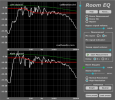
I also use MathAudio Room EQ. The quality of the correction is not inferior to other methods, such as DSP convolver and others.
An important condition is not to exceed the level of correction and remove only certain resonances of the room and no more. Not exceeding 1Khz.
In your particular case, I would do it this way.

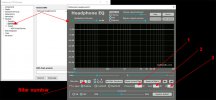
PS. There is also another way to correct the room - MathAudio Headphone EQ. Based on measurements and filters calculated in REW. The latest version of MathAudio Headphone EQ allows you to create a series of filters with input parameters and works like a full parametric equalizer.
 

Attachments

  • 166d50217.png
    166d50217.png
    121 KB · Views: 226
Last edited:
I also use MathAudio Room EQ. The quality of the correction is not inferior to other methods, such as DSP convolver and others.
An important condition is not to exceed the level of correction and remove only certain resonances of the room and no more. Not exceeding 1Khz.
In your particular case, I would do it this way.

PS. There is also another way to correct the room - MathAudio Headphone EQ. Based on measurements and filters calculated in REW. The latest version of MathAudio Headphone EQ allows you to create a series of filters with input parameters and works like a full parametric equalizer.
I am curious as to how to use Headphone EQ in this way. Have done a quick search but can't find any info. Could you possibly post any links to info on how to do this?

Thanks in advance!
 
1/ It is necessary to make measurements of the room in REW. 2/ in REW in the "equalizer" tab, calculate the necessary correction filters. How to do this can be found in the corresponding topic. 3/ in MathAudio Headphone EQ enter these filters (3 parameters)
To correct low frequencies, it is desirable not to exceed 300-400Hz and remove only certain resonances of the room above that.

ps Tests of MathAudio Headphone EQ as a parametric equalizer in relation to a "convolver" showed the advantage of MathAudio Headphone EQ in sound transparency.
 

Attachments

  • MA.jpg
    MA.jpg
    75.5 KB · Views: 182
Last edited:
Back
Top Bottom