
-
WANTED: Happy members who like to discuss audio and other topics related to our interest. Desire to learn and share knowledge of science required. There are many reviews of audio hardware and expert members to help answer your questions. Click here to have your audio equipment measured for free!
You are using an out of date browser. It may not display this or other websites correctly.
You should upgrade or use an alternative browser.
You should upgrade or use an alternative browser.
Mathaudio Room EQ users (tips & tricks)
- Thread starter Snarfie
- Start date
OP

- Thread Starter
- #22
Let me give you an example why it's position is important to me (subjectively)
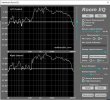
Have a look at my measurement. Around 200hz up to around 11.000hz you see compared with my white line (target curve) a difference till 14 db. Thats a hugh difference causes a hiss between voices instruments etc worse my bass is in bypass mode almost killed an imaging is absent. Compare this 14db setoff with a trebel knob on your amplifier (if it has a trebel knob) The range is mabey 6 db in a limited frequency range. For me my target curve which is not a curve creates a level playing field for all frequencies an let me rediscover almost every aspect if my music. Problem in the begining was that i was hooked on this high freqencies it took met 10 minutes to get used to the corrected sound ( room correction). I hear details after 50 years i never heard before.
Have a look at my measurement. Around 200hz up to around 11.000hz you see compared with my white line (target curve) a difference till 14 db. Thats a hugh difference causes a hiss between voices instruments etc worse my bass is in bypass mode almost killed
an imaging is absent. Compare this 14db setoff with a trebel knob on your amplifier (if it has a trebel knob) The range is mabey 6 db in a limited frequency range. For me my target curve which is not a curve creates a level playing field for all frequencies an let me rediscover almost every aspect if my music. Problem in the begining was that i was hooked on this high freqencies it took met 10 minutes to get used to the corrected sound ( room correction). I hear details after 50 years i never heard before.Attachments
Last edited:
OP
- Thread Starter
- #23
Thats the correct way (vertical) specific for Mathaudio to do a measurement.Regarding measurement: It’s quite a while since I did them, and I believe the mic was vertical. But I have to redo them anyway, since I replaced my amplifier recently.

Golf
Senior Member
- Joined
- Sep 4, 2022
- Messages
- 416
- Likes
- 289
By the way: Your screenshots make me wonder, whether my MathAudio version is the latest one (as I don’t have that »In/Out« button). I won’t even know how to verify
Besides: My left channel window names the calibration file I was using for my measurements.
Besides: My left channel window names the calibration file I was using for my measurements.
OP
- Thread Starter
- #25
By the way: Your screenshots make me wonder, whether my MathAudio version is the latest one (as I don’t have that »In/Out« button). I won’t even know how to verify
Besides: My left channel window names the calibration file I was using for my measurements.
View attachment 229316ts an old version i th
latest version is 2.7.9 you can verify top right under About in the your mathaudio screen.
Golf
Senior Member
- Joined
- Sep 4, 2022
- Messages
- 416
- Likes
- 289
Let me give you an example why it's position is important to me (subjectively)
So your chosen reference frequency line is a straight one. I understand that.
But I still don’t fully understand why you placed it at -15 dB (and not at -10 dB or even -5 dB). Except that your decision was based on that good old »I simply let my ears do the judgement« ...
OP
- Thread Starter
- #28
Yes for me the strait white line is maximum transparency if i put it on -10 db bass lacks an mid high frequency are starting to dominate.So your chosen reference frequency line is a straight one. I understand that.
But I still don’t fully understand why you placed it at -15 dB (and not at -10 dB or even -5 dB). Except that your decision was based on that good old »I simply let my ears do the judgement« ...

Sokel
Master Contributor
- Joined
- Sep 8, 2021
- Messages
- 6,133
- Likes
- 6,216
The position shows the amount of attenuation that's applied in frequencies.OK, I understand that. But then why is also its position that important?
See my example,cuts -10db at 30Hz,the same you can do in any area that's exceeds the ideal "neutral" line.
Try to do it gently thought,try,listen and again until you reach your target line.
Sokel
Master Contributor
- Joined
- Sep 8, 2021
- Messages
- 6,133
- Likes
- 6,216
You can use REW for that,using the "from file" measurement which you can play through foobar.I sure would just love a MathAudio feature that allows redoing the measurement of a given system that is actually corrected by MathAudio Room EQ.

The higher you keep the target line, the less MathAudio RoomEQ will actually do. It does not EQ anything below the target line. It only EQs what's above the line.So your chosen reference frequency line is a straight one. I understand that.
But I still don’t fully understand why you placed it at -15 dB (and not at -10 dB or even -5 dB). Except that your decision was based on that good old »I simply let my ears do the judgement« ...
Golf
Senior Member
- Joined
- Sep 4, 2022
- Messages
- 416
- Likes
- 289
Easy as opening a beer can, I’d guessYou can use REW for that,using the "from file" measurement which you can play through foobar.
 ... Will give it a try later.
Golf
Senior Member
- Joined
- Sep 4, 2022
- Messages
- 416
- Likes
- 289
Thanks a big lot! That seems to be the same than what Sokel posted some hours ago, but now I start to get the picture ...The higher you keep the target line, the less MathAudio RoomEQ will actually do. It does not EQ anything below the target line. It only EQs what's above the line.
Last edited:
I'm using the new Adam A7v monitors that came out recently. Correction is possible within the monitors via dsp, however there are some delays on the software being released so I haven't been able to try it yet. I'm currently using REW and using a parametric EQ in the mean time. I'm trying to limit myself to 6 eq bands, as that's what the Adam software will have once available. I figure I can then use the same settings. I've been having some mixed results with REW's suggested eq adjustments and have found that I'm getting some pretty good results by doing it manually and watching how the predicted curve responds to changes. I'm just making cuts and only up to 400hz.Wondering what type/brand speakers are you using and how many filters (measurements) did you made.
Golf
Senior Member
- Joined
- Sep 4, 2022
- Messages
- 416
- Likes
- 289
Redid the measurements today. Found no way to do it via Audirvana, which is way I was using foobar for it.
Which is why I’m not fully trusting the results by now Quite surprisingly I have to apply a 16% left balance correction to center the »sound stage« for the listener.
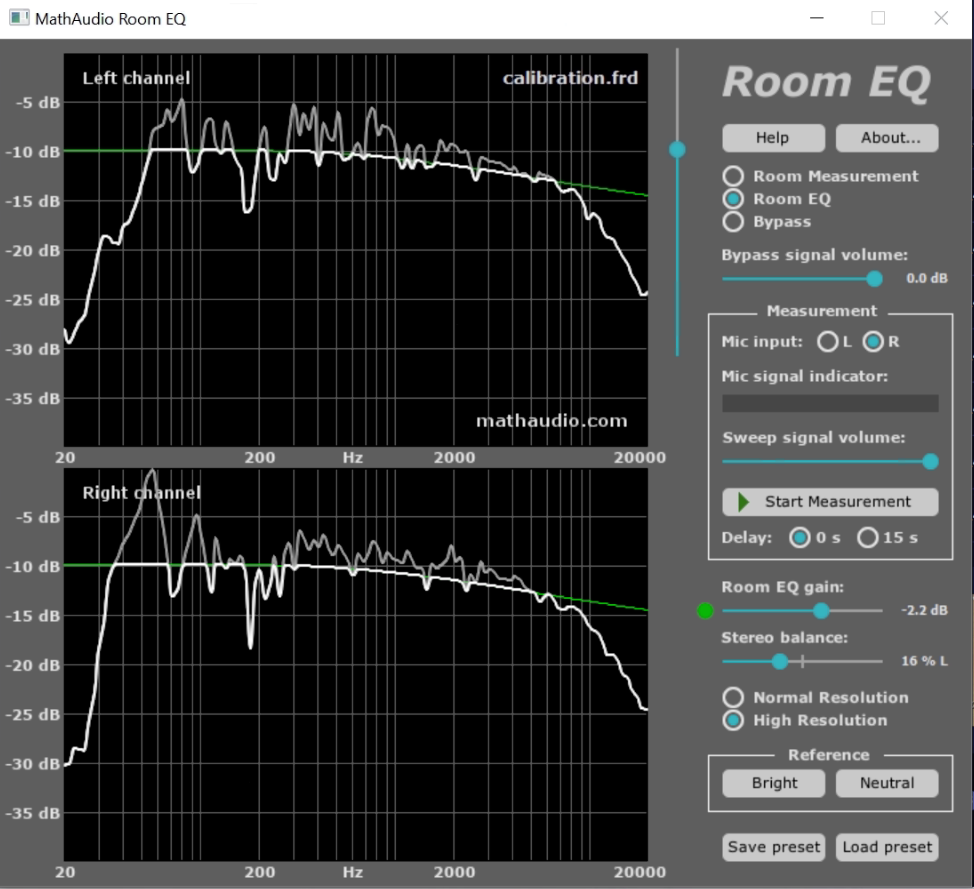
Which is why I’m not fully trusting the results by now
Quite surprisingly I have to apply a 16% left balance correction to center the »sound stage« for the listener.The sharp drop off in frequency response starting at around 8 kHz looks strange. What mic are you using and do you have a calibration file for it?
Trying to figure out if it's your mic that can't capture higher frequencies or if it's truly your speakers that can't reproduce them. What speakers do you have?
Trying to figure out if it's your mic that can't capture higher frequencies or if it's truly your speakers that can't reproduce them. What speakers do you have?
Sokel
Master Contributor
- Joined
- Sep 8, 2021
- Messages
- 6,133
- Likes
- 6,216
At least that looks a like a right measurement.Redid the measurements today. Found no way to do it via Audirvana, which is way I was using foobar for it.
Which is why I’m not fully trusting the results by now
View attachment 229551
How many did you do around your listening spot?
You have to do at least 9-11 depending on the area,in a rectangular fashion with the mic on your ear height.
Golf
Senior Member
- Joined
- Sep 4, 2022
- Messages
- 416
- Likes
- 289
Maybe only 7 or 8. Out of respect for my neighbors, and for my wifeHow many did you do around your listening spot?
Sokel
Master Contributor
- Joined
- Sep 8, 2021
- Messages
- 6,133
- Likes
- 6,216
They don't have to be loud,75db is the usual level but that's up to you.Maybe only 7 or 8. Out of respect for my neighbors, and for my wife
Similar threads
- Replies
- 11
- Views
- 1K
- Replies
- 113
- Views
- 11K


- Replies
- 68
- Views
- 8K

