
-
WANTED: Happy members who like to discuss audio and other topics related to our interest. Desire to learn and share knowledge of science required. There are many reviews of audio hardware and expert members to help answer your questions. Click here to have your audio equipment measured for free!
- Forums
- Audio, Audio, Audio!
- DACs, Streamers, Servers, Players, Audio Interface
- Audio Interfaces (ADC & DAC)
You are using an out of date browser. It may not display this or other websites correctly.
You should upgrade or use an alternative browser.
You should upgrade or use an alternative browser.
Topping D10s + E1DA Cosmos ADC as a measuring system
- Thread starter pma
- Start date
Dumdum
Senior Member
Thanks for that, doing that install now, I had a newer version installed, but for trouble shooting I will install that versionThe one from the Cosmos ADC's product page: https://e1dashz.wixsite.com/index/cosmos-adc
That's normal. The iAP interface is some kind of workaround from Comtrue for Huawei devices and has nothing to do with the Cosmos ADC's operation.
It can safely be ignored.
Dumdum
Senior Member
Done and installled, just tested and still getting ‘bouncing’
I have also increased the buffers in rew to max to see if that helped any, it didn't
I am just running tests on the same Dsp with the focusrite 8i6 I have as that’s a hair cleaner than the 2i2 and you can just about see the harmonics down to 5th or 6th over the noise and get a SINAD of just over 90db which may be down a little due to noise in the interface I suspect
I have also increased the buffers in rew to max to see if that helped any, it didn't
I am just running tests on the same Dsp with the focusrite 8i6 I have as that’s a hair cleaner than the 2i2 and you can just about see the harmonics down to 5th or 6th over the noise and get a SINAD of just over 90db which may be down a little due to noise in the interface I suspect
Dumdum
Senior Member
Sorry I was replying as you typed your initial post and hadn’t refreshed the pageAgain: everyone will see an iAP interface with a yellow exclamation mark in their Device Manager, regardless of which driver is used for the Cosmos ADC.
It is fully expected.

staticV3
Master Contributor
- Joined
- Aug 29, 2019
- Messages
- 8,017
- Likes
- 12,861
Bouncing is basically guaranteed using the Rectangular window and still likely using Flat top (depends on motherboard and USB cable quality IME).Done and installled, just tested and still getting ‘bouncing’
All other windows should be stable.
Dumdum
Senior Member
So not expected or good with Blackman Harris 4 or 7 then… any other ideas welcomeBouncing is basically guaranteed using the Rectangular window and still likely using Flat top (depends on motherboard and USB cable quality IME).
All other windows should be stable.
It does this with two completely different pcs
Lenovo yoga core i5
Hp which is a intel slow thing that’s 8yrs old
Regardless of pc I can’t take a stepped sine measurement without it jumping up before it gets to 250hz
It’s not so bad when you’re taking 1khz sine measurements for harmonics as you can let it run with 32 averages and hit save when it settles
staticV3
Master Contributor
- Joined
- Aug 29, 2019
- Messages
- 8,017
- Likes
- 12,861
Yeah I've had that happen once using a Ryzen Thinkpad, though annoyingly it just sorted itself out at some point.So not expected or good with Blackman Harris 4 or 7 then… any other ideas welcome
It does this with two completely different pcs
Lenovo yoga core i5
Hp which is a intel slow thing that’s 8yrs old
Regardless of pc I can’t take a stepped sine measurement without it jumping up before it gets to 250hz
It’s not so bad when you’re taking 1khz sine measurements for harmonics as you can let it run with 32 averages and hit save when it settles
At the time, my sweeps came out looking like this:
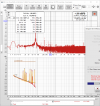
Could you try running LatencyMon on both of your systems?
That might tell us something about the potential culprit behind this instability.
Dumdum
Senior Member
Yeah I've had that happen once using a Ryzen Thinkpad, though annoyingly it just sorted itself out at some point.
At the time, my sweeps came out looking like this:
View attachment 346356
Could you try running LatencyMon on both of your systems?
That might tell us something about the potential culprit behind this instability.
staticV3
Master Contributor
- Joined
- Aug 29, 2019
- Messages
- 8,017
- Likes
- 12,861
Googling wdf01000.sys brings up lots of forum posts describing latency and audio dropouts.
Some of these may have a solution that works for you.
Does running latencymon on your other PC give a similar result?
Dumdum
Senior Member
I don’t have the other pc handy at the minute, will carry on with experimentation tomorrow
Thank you for your time
Thank you for your time
Dumdum
Senior Member
I think the easiest course of action is to flatten the other laptop as it’s not the fastest and use that purely for measurements with a fresh install of windows 10, so that is my next plan
Dumdum
Senior Member
Reset the windows ten second pc with the intention of having it purely for testing… and removed all data bar the operating system and still bouncing… frustrating me this!
Dumdum
Senior Member
So I have got my issue a lot better, by chance I read of someone turning off some network drivers… so by chance I set the rta reading and turned off a bt device, and also the next device under that
I also have changed the power scheme to high performance, and changed the screen saver to 15 minutes on battery and 1hr on mains, this has also helped, I will try and introduce the correct Lenovo drivers for the two items I shut off and see what they do when reactivated with the Lenovo driver and not the windows driver
A positive night after all!
Got the noise floor measurement down to -123db also, and depending on the input sensitivity, had up to -111.6db for SINAD which isn’t far off the AP
I also have changed the power scheme to high performance, and changed the screen saver to 15 minutes on battery and 1hr on mains, this has also helped, I will try and introduce the correct Lenovo drivers for the two items I shut off and see what they do when reactivated with the Lenovo driver and not the windows driver
A positive night after all!
Got the noise floor measurement down to -123db also, and depending on the input sensitivity, had up to -111.6db for SINAD which isn’t far off the AP

staticV3
Master Contributor
- Joined
- Aug 29, 2019
- Messages
- 8,017
- Likes
- 12,861
What Autoranger are you referring to?Is the Cosmos Scaler an equivalent (+$$$) replacement for the Autoranger?
somebodyelse
Major Contributor
- Joined
- Dec 5, 2018
- Messages
- 3,760
- Likes
- 3,067
Dumdum
Senior Member
No problem, I use usual resistor dividers, both SE and balanced configuration, at low impedance (not to add resistor noise), like 1k / 100R and appropriate switch setting on E1DA.
View attachment 211407
The SE divider + 2.7V EDA setting adds 13x attenuation, so the max. input is 35.1V. Simple math, you can make it as you like.
SE divider looks like this
View attachment 211408
The Dispre 2 - JFET preamp was measured directly, without a divider, in a setup as below:
View attachment 211409
So if I want to make a se divider like yours what values of resistors should be used to get roughly 5x the attenuation? So on the 10v setting I can use 50v input which is plenty for what I want to be measuring
I presume it has some reference in the equation to current and also voltage drop through the circuit

lemmy_collins
Member
R1/R2 should be 5 so 1k and 200 ohm should be OK but beware it will change by downing the setting because of the COSMOS input impedance, for 1.7Vrms the divider will be 6.6 because R2 will be in // with 640ohm input impedance.So if I want to make a se divider like yours what values of resistors should be used to get roughly 5x the attenuation? So on the 10v setting I can use 50v input which is plenty for what I want to be measuring
I presume it has some reference in the equation to current and also voltage drop through the circuit
Similar threads

- Replies
- 114
- Views
- 7K

- Replies
- 26
- Views
- 2K

- Poll
- Replies
- 150
- Views
- 18K

- Poll
- Replies
- 24
- Views
- 8K
