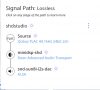
What does your signal path show when you are playing music via Roon? Just curious.
edit: whatever that "ALSA" DAC thing is, that's the SHD Studio. That is not a standalone DAC that I have.

What does your signal path show when you are playing music via Roon? Just curious.

So you are going straight from from your sever via Ethernet to the SHD?
As I already have SHD on a Bill-Of-Materials for a new 2.2 system, I shouldn't even care about this, but hey, I will certainly read the review
The only drawbacks in SHD series for me are the lack of HDMI ARC port and perhaps 12V trigger (I need to cut power to Subs and Monitors when SHD is sleeping). But these are annoyances that I can tolerate as long as there is no good alternative.
Note that the new revisions have a remote that allows to quickly switch 4 presets and Dirac Live on and off. I think this is brilliant if it works well.

Question for the SHD owners... or those that might be in the know.
Is there a remote function to mute one of the analog outputs? For example... if I use OUT1 and OUT2 for front left+right speakers and OUT3 for subwoofer and wanted to mute OUT3.... can a preset be setup and saved for this scenario?

 I'll wait.
I think this is what I am looking for here, and I should be able to create a preset with output 3 muted via the Outputs tab. So this should make it fairly easy to setup and use as an HT Bypass with my HTP-1 processor. I'd create the a preset to turn off all processing and mute the sub channel and use fixed volume output.No, the mute button just mutes all of it.
I think this is what I am looking for here, and I should be able to create a preset with output 3 muted via the Outputs tab. So this should make it fairly easy to setup and use as an HT Bypass with my HTP-1 processor. I'd create the a preset to turn off all processing and mute the sub channel and use fixed volume output.
View attachment 98045

That will work. I don't know of any fixed output option though. You will just have to remember to set the volume to the same level everytime.I think this is what I am looking for here, and I should be able to create a preset with output 3 muted via the Outputs tab. So this should make it fairly easy to setup and use as an HT Bypass with my HTP-1 processor. I'd create the a preset to turn off all processing and mute the sub channel and use fixed volume output.
View attachment 98045
If you get the miniDSP WI-DG you can connect to the dashboard on a computer through wifi and flip the mute on and off within a preset. That way you wouldn't have to use up a whole present. Unfortunately the WI-DG doesn't work with the Dirac software, so you can't use it to connect for the microphone measurements.I think this is what I am looking for here, and I should be able to create a preset with output 3 muted via the Outputs tab. So this should make it fairly easy to setup and use as an HT Bypass with my HTP-1 processor. I'd create the a preset to turn off all processing and mute the sub channel and use fixed volume output.
View attachment 98045
Yes, on my unit the master volume stays the same if I shift between presets.So the use of the preset isn't really a big deal for me. I probably won't use more than two presets anyway. The question would be if the Master Volume will stick at 0 dB (or whatever volume it needs to be) for the preset, provided I don't adjust the volume for that preset. If I can set the Master Volume to 0 dB, mute Out3, turn off the Xover, and it stick on that preset, I should be good. I won't be using Dirac since I will use Convolution/Audiolense in Roon.
View attachment 98082
Awesome... so that should work out well unless I'm totally missing something.Yes, on my unit the master volume stays the same if I shift between presets.
It would be. It's a digital value so I think it's theoretically possible. It's just kind of dangerous to have a preset that could break your speakers if you aren't careful.It would be nice if miniDSP offered a fixed output switch on each preset.