Dynamic Eq which I started using is a couple of weeks ago is off again and stays off. Was playing Resident evil 4 remake during the rainy parts of the game and was wondering why my surrounds sounded tonally a bit different. The rain was coming from all the speakers. Turned Dynamic Eq off and every speaker sounded tonally the same again. There was also, don't know how to say it in another way, more rain noticeable, and extra layer, more transparent so to speak, with dynamic eq off. I used a - 3,5 dB setting for dynamic eq to get the surround levels equal to the front stage. What a mess. So off for me.

-
WANTED: Happy members who like to discuss audio and other topics related to our interest. Desire to learn and share knowledge of science required. There are many reviews of audio hardware and expert members to help answer your questions. Click here to have your audio equipment measured for free!
You are using an out of date browser. It may not display this or other websites correctly.
You should upgrade or use an alternative browser.
You should upgrade or use an alternative browser.
The problem with Audyssey Dynamic EQ
- Thread starter -Matt-
- Start date
SenseOfScience
New Member
- Joined
- Apr 3, 2023
- Messages
- 4
- Likes
- 1
I guess this never came to pass? It seems like it would be trivial to allow using DEQ without mucking with the surround levels. It's way over the top with the surround boost and is legitimately uncomfortable when gaming.Getting back to the subject of this thread, the word is that in an upcoming update to MQX, it will give you the option to use DEQ without changing the levels of the surrounds. Finally!

It's possible to tame Dynamic EQ boosts with just the Multeq Editor app at least for the level you generally listen to your system:I guess this never came to pass? It seems like it would be trivial to allow using DEQ without mucking with the surround levels. It's way over the top with the surround boost and is legitimately uncomfortable when gaming.
SenseOfScience
New Member
- Joined
- Apr 3, 2023
- Messages
- 4
- Likes
- 1
Thanks for the link. I actually just bought the app yesterday in hopes of taming so will definitely give it a watch.It's possible to tame Dynamic EQ boosts with just the Multeq Editor app at least for the level you generally listen to your system:
Quick and dirty Home Assistant script to adjust rear channels levels to compensate DynEQ volume boost.
Script
UI Buttons
This solution helps to adjust the channels levels for all rear speakers with one button.
Of course, it could be tied with the master volume level via automation
Script
alias: Denon Rear Volume
mode: restart
icon: mdi:volume-source
sequence:
  - repeat:
      for_each:
        - SL
        - SR
        - SBL
        - SBR
        - TRL
        - TRR
      sequence:
        - service: denonavr.get_command
          data:
            command: /goform/formiPhoneAppDirect.xml?CV{{ repeat.item }}%20{{ adjvol }}
          target:
            entity_id: media_player.avr_4500
UI Buttons
type: horizontal-stack
title: Rear Channels Volume
cards:
  - show_name: true
    show_icon: true
    type: button
    tap_action:
      action: call-service
      service: script.denon_rear_volume
      data:
        adjvol: DOWN
    name: Down
    icon: mdi:volume-minus
  - show_name: true
    show_icon: true
    type: button
    tap_action:
      action: call-service
      service: denonavr.get_command
      target:
        entity_id: media_player.avr_4500
      data:
        command: /goform/formiPhoneAppDirect.xml?CVZRL
    name: Reset
    icon: mdi:volume-equal
  - show_name: true
    show_icon: true
    type: button
    tap_action:
      action: call-service
      service: script.denon_rear_volume
      data:
        adjvol: UP
    name: Up
    icon: mdi:volume-plus
This solution helps to adjust the channels levels for all rear speakers with one button.
Of course, it could be tied with the master volume level via automation
Attachments
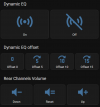
This is brilliant. The boost for top speakers and surrounds are different. Can you implement that, too?Quick and dirty Home Assistant script to adjust rear channels levels to compensate DynEQ volume boost.
Script
alias: Denon Rear Volume
mode: restart
icon: mdi:volume-source
sequence:
  - repeat:
      for_each:
        - SL
        - SR
        - SBL
        - SBR
        - TRL
        - TRR
      sequence:
        - service: denonavr.get_command
          data:
            command: /goform/formiPhoneAppDirect.xml?CV{{ repeat.item }}%20{{ adjvol }}
          target:
            entity_id: media_player.avr_4500
UI Buttons
type: horizontal-stack
title: Rear Channels Volume
cards:
  - show_name: true
    show_icon: true
    type: button
    tap_action:
      action: call-service
      service: script.denon_rear_volume
      data:
        adjvol: DOWN
    name: Down
    icon: mdi:volume-minus
  - show_name: true
    show_icon: true
    type: button
    tap_action:
      action: call-service
      service: denonavr.get_command
      target:
        entity_id: media_player.avr_4500
      data:
        command: /goform/formiPhoneAppDirect.xml?CVZRL
    name: Reset
    icon: mdi:volume-equal
  - show_name: true
    show_icon: true
    type: button
    tap_action:
      action: call-service
      service: script.denon_rear_volume
      data:
        adjvol: UP
    name: Up
    icon: mdi:volume-plus
This solution helps to adjust the channels levels for all rear speakers with one button.
Of course, it could be tied with the master volume level via automation
Yeah.. I also noticed difference as soon as I started to adjust values.This is brilliant. The boost for top speakers and surrounds are different. Can you implement that, too?
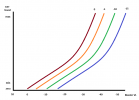
Anyway, I don't have dedicated setup and enough experience with REW to do a proper measurements. I use DTS-X Callout demo, interactive DTS Unbound app on Xbox, my ears and published measurements, like the one in the first post, to make an assumptions.
I think boost applied something like I painted.
Measurements from 0db to -50db MLV with 5db steps would grately help to understand the pattern, but it will take a tremendous amount of time to gather such data.
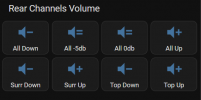
Split Tops and Surrounds? Sure, why not
alias: Denon Levels Volume
mode: restart
icon: mdi:volume-source
sequence:
  - repeat:
      for_each: "{{ avr_speakers }}"
      sequence:
        - service: denonavr.get_command
          data:
            command: /goform/formiPhoneAppDirect.xml?CV{{ repeat.item }}%20{{ adjvol }}
          target:
            entity_id: media_player.avr_4500
type: horizontal-stack
title: Rear Channels Volume
cards:
  - show_name: true
    show_icon: true
    type: button
    tap_action:
      action: call-service
      service: script.denon_levels_volume
      data:
        adjvol: DOWN
        avr_speakers:
          - SL
          - SR
          - SBL
          - SBR
          - TRL
          - TRR
      target: {}
    name: All Down
    icon: mdi:volume-minus
  - show_name: true
    show_icon: true
    type: button
    tap_action:
      action: call-service
      service: script.denon_levels_volume
      data:
        adjvol: 45
        avr_speakers:
          - SL
          - SR
          - SBL
          - SBR
          - TRL
          - TRR
      target: {}
    name: All -5db
    icon: mdi:volume-equal
  - show_name: true
    show_icon: true
    type: button
    tap_action:
      action: call-service
      service: denonavr.get_command
      target:
        entity_id: media_player.avr_4500
      data:
        command: /goform/formiPhoneAppDirect.xml?CVZRL
    name: All 0db
    icon: mdi:volume-equal
  - show_name: true
    show_icon: true
    type: button
    tap_action:
      action: call-service
      service: script.denon_levels_volume
      data:
        adjvol: UP
        avr_speakers:
          - SL
          - SR
          - SBL
          - SBR
          - TRL
          - TRR
      target: {}
    name: All Up
    icon: mdi:volume-plus
type: horizontal-stack
cards:
  - show_name: true
    show_icon: true
    type: button
    tap_action:
      action: call-service
      service: script.denon_levels_volume
      data:
        adjvol: DOWN
        avr_speakers:
          - SL
          - SR
          - SBL
          - SBR
      target: {}
    name: Surr Down
    icon: mdi:volume-minus
  - show_name: true
    show_icon: true
    type: button
    tap_action:
      action: call-service
      service: script.denon_levels_volume
      data:
        adjvol: UP
        avr_speakers:
          - SL
          - SR
          - SBL
          - SBR
      target: {}
    name: Surr Up
    icon: mdi:volume-plus
  - show_name: true
    show_icon: true
    type: button
    tap_action:
      action: call-service
      service: script.denon_levels_volume
      data:
        adjvol: DOWN
        avr_speakers:
          - TRL
          - TRR
      target: {}
    name: Top Down
    icon: mdi:volume-minus
  - show_name: true
    show_icon: true
    type: button
    tap_action:
      action: call-service
      service: script.denon_levels_volume
      data:
        adjvol: UP
        avr_speakers:
          - TRL
          - TRR
      target: {}
    name: Top Up
    icon: mdi:volume-plus
Attachments
Last edited:
I'm not familiar with Shortcuts or Homekit...I wonder if running such a script would be possible with IOS Shortcuts and Homekit.
Can it call a url?
Because in the nutshell script just call urls
Like this one to open the Channels levels menu
http://<AVR_IP>:8080/goform/formiPhoneAppDirect.xml?MNCHL
Based on your measurements, setting the offset to 15dB gets you to closest to volume levels with DEQ turned off. I've done that sometimes, as it comes in handy when I want to also use DVol to tame sounds spikes in some movies (I'm looking at you, Christopher Nolan).Overall I'm quite happy with what DEQ does to the frequency response (boosting bass and the high end); but I don't like what it does to the surround channel levels. I just made some measurements with different Dynamic EQ settings to confirm my impression that it boosts the surround channels too much.
(Please ignore the generally lumpy response - this isn't about that and I realised that my minidsp sub settings were messed up part way through).
For the centre and front channels the level of the mid frequencies remains fairly constant with different DEQ settings.
View attachment 223961
View attachment 223958
But for the surround channels it also boosts the overall level...
View attachment 223959
The situation is even worse when listening at lower levels...
View attachment 223960
In the kHz range I think the level should stay roughly where the black line (DEQ off) is. With the DEQ set at 0dB offset it boosts the surrounds by at least 6dB, relative to the fronts.
I assume this is how it is intended to operate (and not an implementation error in my Denon AVC-X receiver). But for me, since I sit a lot closer to the surrounds than the front speakers the boosted surrounds are pretty obnoxious.
For quiet listening in the evening the surrounds are close to me and louder. If I set volume based on the surrounds the centre channel is too quiet - reducing dialogue intelligibility (a common problem). Alternatively if I set volume based on the centre channel I get blasted by loud music and effects from the surrounds, eg when the adverts come on.
Edit: Added poll
Similar threads
- Replies
- 1
- Views
- 595

- Replies
- 13
- Views
- 1K
- Replies
- 4
- Views
- 781
- Replies
- 0
- Views
- 391