• Welcome to ASR. There are many reviews of audio hardware and expert members to help answer your questions. Click here to have your audio equipment measured for free!

Airplay 2 is not lossless, but Airplay 1 is

dutchman

Member
Joined
Dec 22, 2023
Messages
46
Likes
14
Hello!

For those who don´t know:

If you stream Songs from Apple Music to your receiver it´s not always lossless (but the app tells you it´s lossless).

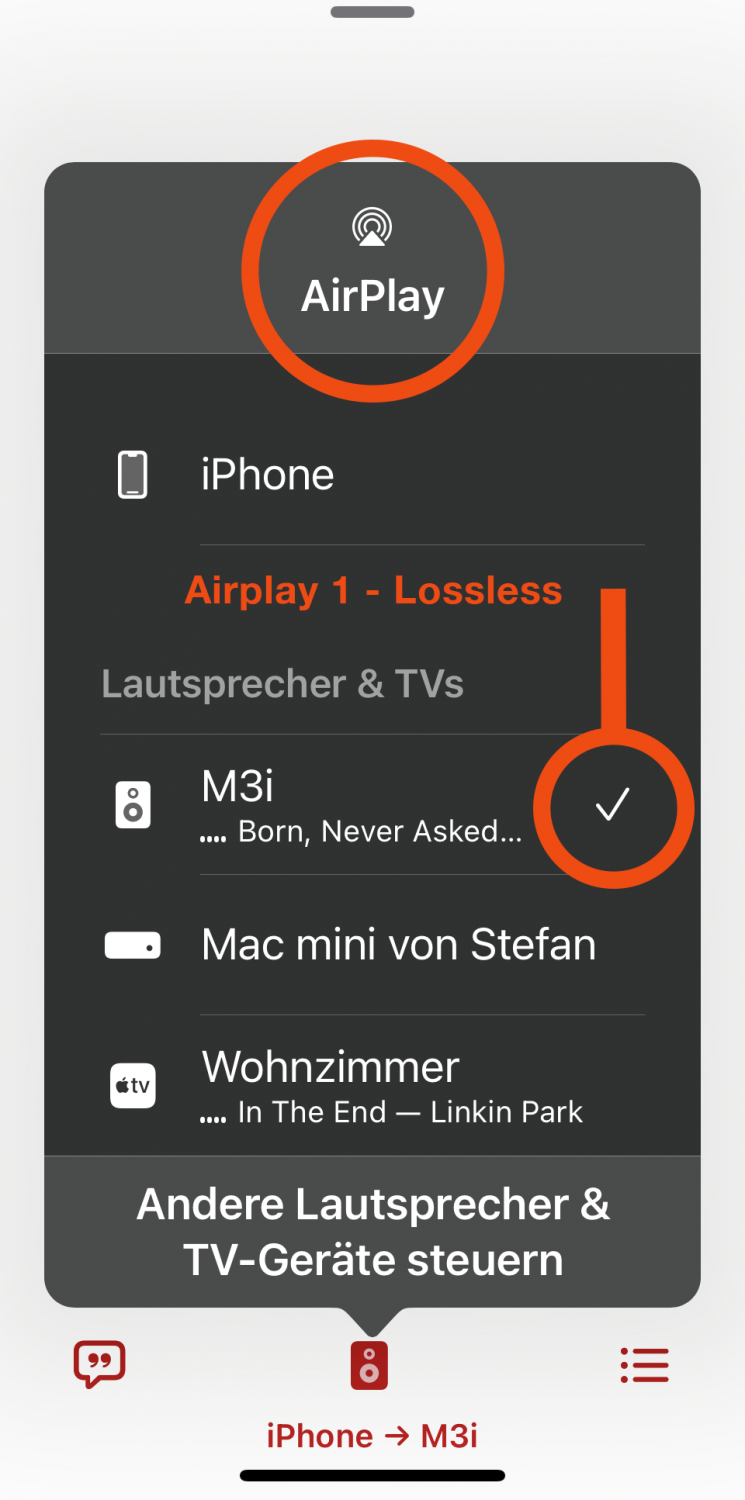
The easiest way to see if your iphone sends in lossless airplay 1 mode or in lossy airplay 2 mode is to look on you iphone.
The connected receiver is either only marked with a tick (lossless) or with a tick in a circle (lossy).
For more information watch Darko Audio´s Video on youtube.
I personally use the first gen (second edition) airport express (A1264) too stream lossless.
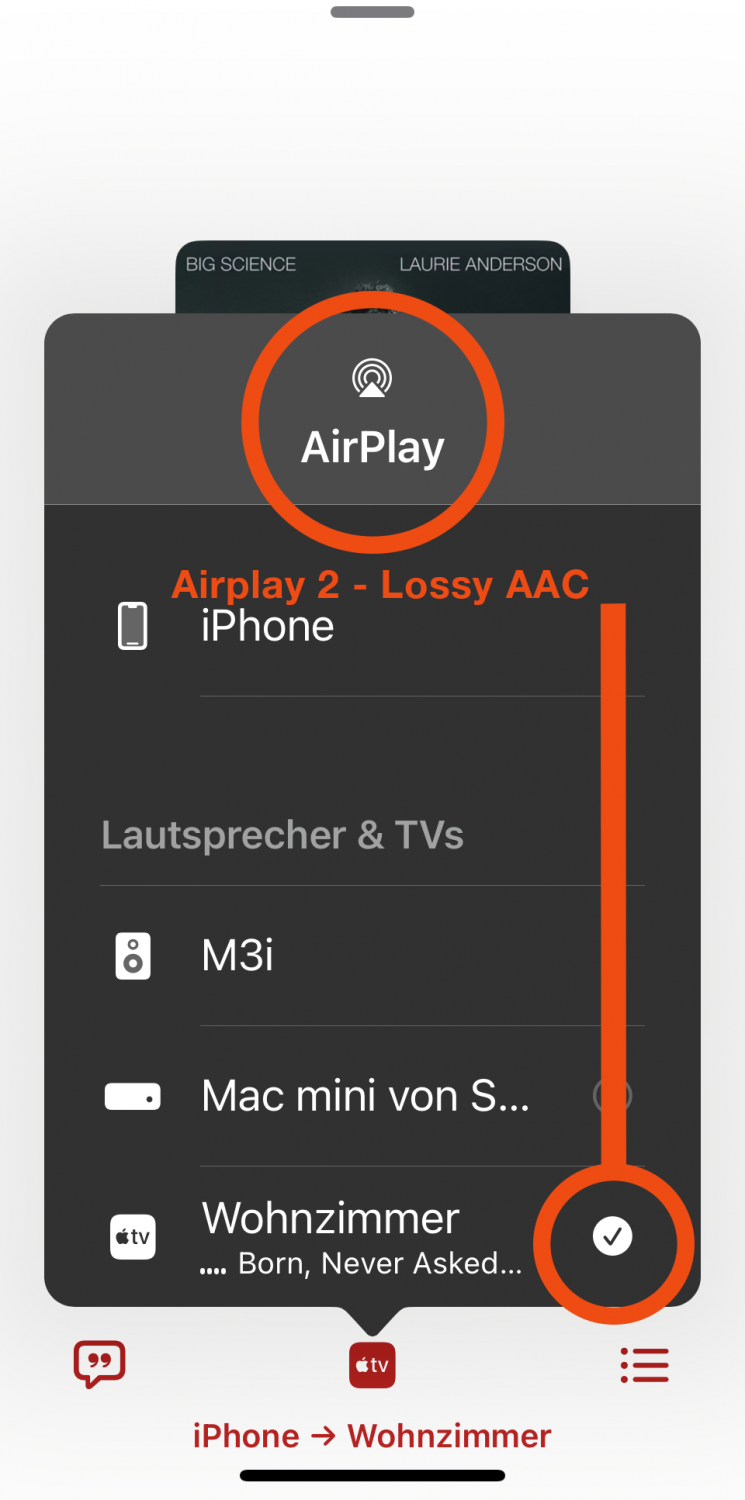
Lossy.png
Lossless.png


Attachments

  • Lossy.png
    Lossy.png
    449.2 KB · Views: 336
Having a lot of trouble with Airplay 1 compatibility in the new version of ROPIEEE. Mostly seems to be with device reservations that won't release.
 
Having a lot of trouble with Airplay 1 compatibility in the new version of ROPIEEE. Mostly seems to be with device reservations that won't release.
Sorry, I can´t help!
 
If I understand correctly, is it not possible to play high-res music from Apple Music via, for example, Wiim?
Or have I missed something?
I read that it is not possible to play Airplay (1) via Wiim, only Airplay 2 is supported, and then the music should be played in AAC 256 kb/s, right?
I am a complete beginner to streaming and switched from Spotify to Apple Music about three months ago.
 
If I understand correctly, is it not possible to play high-res music from Apple Music via, for example, Wiim?
Or have I missed something?
I read that it is not possible to play Airplay (1) via Wiim, only Airplay 2 is supported, and then the music should be played in AAC 256 kb/s, right?
I am a complete beginner to streaming and switched from Spotify to Apple Music about three months ago.
Yes, sad but true. If you switched only three months ago, you should be better to switch to Tidal e.g.
Or you can stream via an old apple airport Express and use the digital output. Or you use apple music on an Apple TV, but then you have always to turn your TV on to control it.
 
Yes, sad but true. If you switched only three months ago, you should be better to switch to Tidal e.g.
Or you can stream via an old apple airport Express and use the digital output. Or you use apple music on an Apple TV, but then you have always to turn your TV on to control it.
Thanks for the reply!
I'm thinking of skipping Apple Music and getting Qobuz or Tidal instead.
I had Spotify for many years, and now I've started to get used to Apple Music, the question is which service (Qobuz or Tidal) would be the best fit and which has an interface that is a bit like Spotify?
It's sad that Apple always has to be so incredibly difficult with their services.
 
Yes, sad but true. If you switched only three months ago, you should be better to switch to Tidal e.g.
Or you can stream via an old apple airport Express and use the digital output. Or you use apple music on an Apple TV, but then you have always to turn your TV on to control it.
Speaking of Tidal...
I read this from Darko Audio:

"However, if we pull up a CD-quality stream from Apple Music on, say, an iPhone 13 Mini and send that stream to a WiiM Pro Plus connected to a hi-fi system, the stream will be AAC compressed by Apple Music’s iOS app before dispatch. That’s because the Apple Music app, according to Brother Thomas, operates in AirPlay 2 mode. And so too does the Tidal iOS app.

Qobuz users can breathe easy. The French streaming service’s iOS app (at time of writing) runs in AirPlay 1 mode. So too do Amazon, Plex/Plexamp, Soundcloud and Spotify, again according to Brother Thomas’s research."

The whole story:

 
Speaking of Tidal...
I read this from Darko Audio:

"However, if we pull up a CD-quality stream from Apple Music on, say, an iPhone 13 Mini and send that stream to a WiiM Pro Plus connected to a hi-fi system, the stream will be AAC compressed by Apple Music’s iOS app before dispatch. That’s because the Apple Music app, according to Brother Thomas, operates in AirPlay 2 mode. And so too does the Tidal iOS app.

Qobuz users can breathe easy. The French streaming service’s iOS app (at time of writing) runs in AirPlay 1 mode. So too do Amazon, Plex/Plexamp, Soundcloud and Spotify, again according to Brother Thomas’s research."

The whole story:

Really? Hmmm, sounds bad.

@Håkan:
See the attched files in this Thread. You can see it on your iphone if it´s lossless or lossy.
The connected receiver is either only marked with a tick (lossless) or with a tick in a circle (lossy).
I think it´s only belongs to iphones.
 
Really? Hmmm, sounds bad.

@Håkan:
See the attched files in this Thread. You can see it on your iphone if it´s lossless or lossy.
The connected receiver is either only marked with a tick (lossless) or with a tick in a circle (lossy).
I think it´s only belongs to iphones.
Yes I know, but even if my iPhone says it's lossless from the phone, it will still compress to 256 kb/s if I read the article correctly?
 
Yes I know, but even if my iPhone says it's lossless from the phone, it will still compress to 256 kb/s if I read the article correctly?
I don‘t think so.
When I stream from the iphone to my NAD Amp eg it‘s lossy, as indicated with the tick.
When I stream to airport express it shows me that it’s lossless.
 

I don‘t think so.
When I stream from the iphone to my NAD Amp eg it‘s lossy, as indicated with the tick.
When I stream to airport express it shows me that it’s lossless.
AirPort Express support AirPlay and not AirPlay 2, that’s why you can play lossless audio.
Wiim only support AirPlay 2, and that is the problem according to the article on why AirPlay 2 is not lossless
IMG_3022.jpeg
 
AirPort Express support AirPlay and not AirPlay 2, that’s why you can play lossless audio.
Wiim only support AirPlay 2, and that is the problem according to the article on why AirPlay 2 is not losslessView attachment 476010
Yes, now!
You have to use Tidal Connect, not airplay!
 

Attachments

  • IMG_4294.jpeg
    IMG_4294.jpeg
    72.8 KB · Views: 127
How can I use Tidal Connect without AirPlay on my iPhone?
Press the symbol in the upper right corner of tidal.
If you then don‘t see tidal connect, just try to scroll down further.
That was my problem, when I first used tidal connect. It was there but I had to scroll down to see it.
 

Attachments

  • IMG_4295.jpeg
    IMG_4295.jpeg
    149.1 KB · Views: 112
  • IMG_4294.jpeg
    IMG_4294.jpeg
    72.8 KB · Views: 119
Press the symbol in the upper right corner of tidal.
If you then don‘t see tidal connect, just try to scroll down further.
That was my problem, when I first used tidal connect. It was there but I had to scroll down to see it.
Thanks!
You mean I can play Tidal from my iPhone to Wiim without AirPlay?
I was under the impression that AirPlay was a must on iPhone of you want to stream music via wifi
 
Thanks!
You mean I can play Tidal from my iPhone to Wiim without AirPlay?
I was under the impression that AirPlay was a must on iPhone of you want to stream music via wifi
Yes! Wiim does support tidal connect.

 
Yes! Wiim does support tidal connect.

But I still come back to this:
”However, if we pull up a CD-quality stream from Apple Music on, say, an iPhone 13 Mini and send that stream to a WiiM Pro Plus connected to a hi-fi system, the stream will be AAC compressed by Apple Music’s iOS app before dispatch. That’s because the Apple Music app, according to Brother Thomas, operates in AirPlay 2 mode. And so too does the Tidal iOS app.”
The last sentence say Tidal iOS app operates in AirPlay 2 and will therefore be compressed to AAC 256 kb/s.
And in your link to Wiim it says nothing on what quality you will have or if it’s Lossless or AAC.
 
Last edited:
But I still come back to this:
”However, if we pull up a CD-quality stream from Apple Music on, say, an iPhone 13 Mini and send that stream to a WiiM Pro Plus connected to a hi-fi system, the stream will be AAC compressed by Apple Music’s iOS app before dispatch. That’s because the Apple Music app, according to Brother Thomas, operates in AirPlay 2 mode. And so too does the Tidal iOS app.”
The last sentence say Tidal iOS app operates in AirPlay 2 and will therefore be compressed to AAC 256 kb/s.
And in your link to Wiim it says nothing on what quality you will have or if it’s Lossless or AAC.
Yes and no:
If you use the tidal app and stream via airplay it‘s lossy.
With Tidal connect it‘s lossless.

Tidal Connect does not stream from your iphone to the Wiim. It „tells“ the Wiim which song to play. And the Wiim connects to tidal.
 
You mean I can play Tidal from my iPhone to Wiim without AirPlay?
When you use Tidal Connect, the signal goes directly from your wifi to your streamer. Your phone is used only as a controller. Your WiiM streamer will play all qualities of Tidal (lossy to hi-res).

Tidal Connect does not stream from your iphone to the Wiim. It „tells“ the Wiim which song to play. And the Wiim connects to tidal.
Exactly!
 
Back
Top Bottom