• Welcome to ASR. There are many reviews of audio hardware and expert members to help answer your questions. Click here to have your audio equipment measured for free!

Topping DX5 II

There's something wrong with my setup:

1.jpg

Empty, no more default configs.

2.jpg

No info


4.jpg


Audition, Restore auto values, Export filter config, Apply this eq to...........they turn out to be not clickable.


Some time ago it appeared to me as an unknown device.
Any ideas?
Thanks.
 
Is there a device like the DX5II but with a digital output on the back? (Optical, Coax or USB)
 
Is there a device like the DX5II but with a digital output on the back? (Optical, Coax or USB)
 
Looks nice. Is it powerfull enough for a Dan Clark headphone?
 
So it's stuck in DFU (version V2.51) mode. I tried turning off the DX5 II, disconnecting the power and leaving it for a few minutes, it still boots straight to DFU (I am not holding the multi-function knob). Explorer also pops up on Windows showing the OK file for the previous version of the firmware...

View attachment 559126

It won't let me upload the old firmware file (.topping file) in this state. Any ideas what to try next?
My DX5 II will not update past V2.39. All newer Firmware, 2.41, 2.51, 2.53 reboots to the DFU mode screen without holding the multi-function knob in. No amount of plugging unplugging and power cycling brings it back to the start up screen.

I've tried a PC that had never had the DX5 II plugged into it (manual method) and the behavior was the same.

The only way I can get the DX5 II working again is the downgrade to firmware V2.39 or older.

Additionally, several emails to Topping, and not even an automated response for a reply. I had been seriously considering a pair of B200s, but not with this level of customer support.
 
Has anyone had theirs trip the safety while plugging in xlr balanced, wait a few mins, then it works again… but there is a slight electrical burnt smell?
 
My DX5 II will not update past V2.39. All newer Firmware, 2.41, 2.51, 2.53 reboots to the DFU mode screen without holding the multi-function knob in. No amount of plugging unplugging and power cycling brings it back to the start up screen.

I've tried a PC that had never had the DX5 II plugged into it (manual method) and the behavior was the same.

The only way I can get the DX5 II working again is the downgrade to firmware V2.39 or older.

Additionally, several emails to Topping, and not even an automated response for a reply. I had been seriously considering a pair of B200s, but not with this level of customer support.
I did a rollback from FW2.53 and installed FW2.39. Afterwards, I installed FW 2.53 without any issues except volume not being as before and some minor settings being set to their default. I am using an M1 MacBook Air with macOS 26.7.

You can try the rollback and reinstall FW2.39 and try again to install any later FW. You can download it here under 4.: https://www.toppingaudio.com/download/dx5-ii-version-v2-31-firmware-update

They are out of office until October 7th.
 
Has anyone had theirs trip the safety while plugging in xlr balanced, wait a few mins, then it works again… but there is a slight electrical burnt smell?

No, but also don't plug it back in, and get it replaced if you can.
 
There's something wrong with my setup:

View attachment 561451
Empty, no more default configs.

View attachment 561452
No info


View attachment 561453

Audition, Restore auto values, Export filter config, Apply this eq to...........they turn out to be not clickable.


Some time ago it appeared to me as an unknown device.
Any ideas?
Thanks.
I'm having the same issue, I can fix it temporarily by uninstalling the Tune software & drivers and reinstalling them. But when my computer restarts I get the same problem again. Hope someone knows the fix. For now the only thing that works is Topping Home, I can add PEQ there.
 
Last edited:
I'm having the same issue, I can fix it temporarily by uninstalling the Tune software & drivers and reinstalling them. But when my computer restarts I get the same problem again. Hope someone knows the fix. For now the only thing that works is Topping Home, I can add PEQ there.

Topping has removed Topping Tune from the DX5 II downloads page (also the DX1 II), so it seems they've removed the device as being compatible with that software in an effort to replace Topping Tune with the Home app.

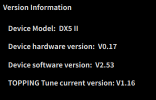
Some people don't seem to have any issues, even on the latest FW, so it might be useful information to know which hardware version you have (v0.15, v0.16 or v0.17) if you recall.
Thanks for you input. I currently have the V0.17 version. I have to reinstall the drivers for it to work, but I think I'm liking the Topping Home more now the more I use it.
 

Attachments

  • Screenshot 2026-10-02 171611.png
    Screenshot 2026-10-02 171611.png
    16.1 KB · Views: 55
Thanks for you input. I currently have the V0.17 version. I have to reinstall the drivers for it to work, but I think I'm liking the Topping Home more now the more I use it.

Do you have to constantly reinstall the drivers or only the once?

And yeah, I think Home is a much better app than TT
 
I did a rollback from FW2.53 and installed FW2.39. Afterwards, I installed FW 2.53 without any issues except volume not being as before and some minor settings being set to their default. I am using an M1 MacBook Air with macOS 26.7.

You can try the rollback and reinstall FW2.39 and try again to install any later FW. You can download it here under 4.: https://www.toppingaudio.com/download/dx5-ii-version-v2-31-firmware-update

They are out of office until October 7th.
Thank you for that. I was already at 2.39, but when I clicked the link above there was another recommendation to install the downgrade Firmware. That firmware left the unit at FW5.55 with the same behavior. I downgraded to FW2.31 then upgraded to FW2.53 and that worked for me. I am now at 2.53.
Thanks again!
That is what I was referring you to. You have to install a firmware up to FW2.39 after the rollback. Alas, you figured that out already. Good to know it works now.
 
No issues at all updating to FW 2.58 via Home web control centre.
 
Hello. New member here. Just joined and just purchased my first DAC and headphone kit, DX5II + Hifiman Edition XS. I searched the internet for info on the DAC and found this forum and thread. After reading and skimming through several helpful pages/comments, I was able to learn quite a bit and prompted me to do more research as well. If I understand correctly my serial number for the DAC starts with 26, so I think that means a newer unit that has been updated to protect the short-circuit issue associated with the 4.4mm port? I have no idea when this unit was manufactured, but I did buy new from the Toppings store on Amazon. I do have my XS connected to the 4.4mm port and read the warning not to hot pull or put the cable just in case. So for now I just leave the 4.4mm connected at all times regardless if th unit is powered on or off. Other than keeping that in mind, so far so good for a first few days of exploration and operation.
 
Back
Top Bottom