• Welcome to ASR. There are many reviews of audio hardware and expert members to help answer your questions. Click here to have your audio equipment measured for free!

Topping DX5 II

6. What's updated 2.51​

*Improved: The remote control mute function now adapts to the active input, with Bluetooth input controlling play/pause.

*Improved: The firmware upgrade process and verification mechanism.

*Fixed: Standby and wake status synchronization issues between the app, web interface, and device.

*Fixed: No audio when the device started in UAC 1.0 mode with a PS5.

*Fixed: After switching C1/C2, the polarity setting could differ from the actual effect.

*Fixed: The screen could not be awakened by adjusting the volume through the app or web interface after screen-off.

*Fixed: Abnormal cycle range selection and DoP sample rate display.

*Fixed: Several known issues.

 
I have something strange going on.

When I'm playing music on a low volume, the DX5 II and Mini 300 I combined barely get warm. But when I'm NOT playing music but my PC and the DAC and amp are turned on, they get very hot.

The DX5 II is connected via USB.

Are there any tests that I can perform that come to mind?
From a post from memory - the 12V trigger greatly increased standby current many firmwares ago.. If you aren't using the trigger change it to "off" and see if that helps.
 
An update on this device and Android TV - in my case an Nvidia Shield TV. I have no idea if this applies to other implementations of Android TV and/or Android proper.

Topping has confirmed that the Topping Home version of the firmware causes drop outs while playing. Reading between the lines of our correspondence I'm thinking that every time the device tries to "ping" Topping Home it causes the data errors. I've no idea if this is going to be fixed or a timeframe. I'm probably very much a fringe use case.

However, this did get me thinking - has anybody who uses the web base UI logged to see if the device is trying to access the internet when the web application is not running?
 
Measure the power consumption.
Okay. i'll start there.

On another note:
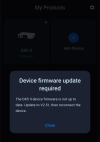
Apparently my phone app updated by itself and now refuses to control the DX5 II via the phone app unless I update the firmware.

I'm on my couch, ill and tired, I just want to control the volume

Omg! Time to turn off auto updates for the Topping app I guess.
 

Attachments

  • Screenshot_20260908-162946.png
    Screenshot_20260908-162946.png
    182.5 KB · Views: 69
An update on this device and Android TV - in my case an Nvidia Shield TV. I have no idea if this applies to other implementations of Android TV and/or Android proper.

Topping has confirmed that the Topping Home version of the firmware causes drop outs while playing. Reading between the lines of our correspondence I'm thinking that every time the device tries to "ping" Topping Home it causes the data errors. I've no idea if this is going to be fixed or a timeframe. I'm probably very much a fringe use case.

However, this did get me thinking - has anybody who uses the web base UI logged to see if the device is trying to access the internet when the web application is not running?
The DX5 II doesn't have a network connection of it's own and has no way to do this.
 
The DX5 II doesn't have a network connection of it's own and has no way to do this.
It's got to present as something more than just a USB sound device to be able to interact with the web browser. I'm not suggesting anything nefarious.

On my Shield TV it gets recognized as mouse and breaks things. So I assume it uses the HID API.
 
It's got to present as something more than just a USB sound device to be able to interact with the web browser. I'm not suggesting anything nefarious.

On my Shield TV it gets recognized as mouse and breaks things. So I assume it uses the HID API.
The website uses the WebHID API to connect to the DAC via the browser. The DAC is controlled by the USB host (the PC), not the other way around.

I suppose it's possible that the 'Topping Helper' app, that is required for firmware updates on Windows, could remain resident and communicate with both the DAC and the internet, but you could say the same for the Topping Audio drivers.
 
I have something strange going on.

... But when I'm NOT playing music but my PC and the DAC and amp are turned on, they get very hot.

Define "very hot."
 
Define "very hot."

Like, clearly hotter than when actually not playing music. I don't have an IR thermometer, but the difference between playing and not playing is pretty clear without changing any other variables such as volume etc.

It's strange as I connect the DX5 II via USB so I don't expect noise, the EQ graph also doesn't show any sound being played.

I'm going to arrange a power meter to measure what the difference is in power consumption per device.
 
Last edited:
Like, clearly hotter than when actually playing music. I don't have an IR thermometer, but the difference between playing and not playing is pretty clear without changing any other variables such as volume etc.

It's strange as I connect the DX5 II via USB so I don't expect noise, the EQ graph also doesn't show any sound being played.

I'm going to arrange a power meter to measure what the difference is in power consumption per device.
Just out of curiosity I measured mine. After playing for a few hours, as a pre-amp fed by an optical input, the highest temperature on the top of the enclosure is 33.1 degrees Celsius. After being idle for an hour, with the display on, the highest temperature on top of the enclosure still is 33.1. The Marantz NA8006 it sits on measures 28.5 degrees.
 
Last edited:
Like, clearly hotter than when actually playing music. I don't have an IR thermometer, but the difference between playing and not playing is pretty clear without changing any other variables such as volume etc.

It's strange as I connect the DX5 II via USB so I don't expect noise, the EQ graph also doesn't show any sound being played.

I'm going to arrange a power meter to measure what the difference is in power consumption per device.

My only other questions would be: how long after playing content did you feel the top of the DX5 II, and how long after letting it sit idle did you feel the top of the device? And how is the air flow around the devices? Are they tucked into a tight shelf or out in the open?
 
Sorry, meant to say hotter when actually NOT playing music
They are the same. As the amp is advertised as class B, it should be hotter when playing loud in a low impedance headphone. In my situation where no power was delivered the equal results are exactly as expected. Had it been a class A, you could get the results you report as in that case the power that goes into load doesn't heat up te device.
 
Then the thermal behavior seen by SampleSizeOne is quite well possible. There is a thread here on ASR

Let's stop calling Class D amplifiers "efficient" when they are not.​

that discusses this.

I haven't personally noticed any difference in temperature when the mini 300 is idle vs. when it's playing content. Same with my DX5 II.
 
Let me share my experience with DX5 II running different firmware versions. When I got my Unit the firmware version was 1.93 and there was no audio problem at all. Then I was start upgrading firmware as sun as a new version (2.10, 2.14, 2.31, 2.39, 2.46) was posted on Topping website. DX5 II was performing very well until I Installed version 2.31. Prior to that version Unit didn't have any problem with audio. There was only occasional error about DC Voltage displayed on DX5 II screen, but only when noting was played. Problem starts with Firmware version 2.31. After about half hour from start playing music or movie I hear cracking noise in audio and couple seconds later there was no audio at all. Versions 2.39 and 2.46 partially fix that problem, crackling noise was still coming out but the audio didn't stop playing. When new version 2.51 was posted I decide to downgrade back to version 2.14, so far after couple hours of playing there is no problem with audio.

PS. I also sent that text to Topping Support team.

I haven't had anything like that with my DX5 II.
 
Back
Top Bottom