Follow along with the video below to see how to install our site as a web app on your home screen.
Note: This feature may not be available in some browsers.
Welcome to ASR. There are many reviews of audio hardware and expert members to help answer your questions.
Click here to have your audio equipment measured for free!
I would say in this day and age it's just more practical to use software at the source to achieve this. Infinite possibilities, higher fidelity, more control of the signal, 1 less physical box and less cables.
The problem with a software solution is that you have to be using a computer as a source. My main headphone and 2-Channel speaker system doesn’t have a computer attached.
I do use a PC as a source but room EQ is delegated to my Genelec monitors/subwoofer using their onboard DSP, and my RME ADI-2 DAC FS takes care of my headphones as well as the eminent Dynamic Loudness for both monitors and headphones.
This works very well for me: I plug-in the headphones and the EQ for them is enabled, otherwise it’s the one in the Genelecs, apart from dynamic loudness. No fumbling with software on my PC when switching.
I also like physical buttons for volume and tone balance, which the RME DAC has.
Or you can also use one of the many VST plugins that generates distortion and noise to mimic tube and tape sound. Such as: FabFilter Saturn 2, Waves PuigTech, Izotope Ozone Exciter, etc.
Suprised topping is adding this functionality , seems contrary to thier whole usp.
I suppose it's keeping up with the Jones's (smsl) who have had this feature in thier higher price dac's for a long time (sound colour)
… and i suppose it is a piece of cake to implement: setting the right registers to make the ESS THD compensation feature work “backward”, adding H2 & H3 instead of compensating for!
Based on the obscure ESS DAC registers configuration, it may also mess up the ESS hump control… But why would anybody care if the goal is to add distortion artifacts?
Thanks, I don't think there is a way to add VST to Tidal, not that I know of anyway. VSTs, as far as I know, needs a VST Host (well by definition since it's a Plugins). Maybe there's a way to have Tidal embedded in one of these VST supported Players? Which are they anyway, haven't played with that for a long time, It used to be mainly for DAWs.
Jriver has a WDM driver making it 'systemwide'
All sound will go through Jriver's DSP engine then
This is what I have been doing for years now and it works like a charm
I do use a PC as a source but room EQ is delegated to my Genelec monitors/subwoofer using their onboard DSP, and my RME ADI-2 DAC FS takes care of my headphones as well as the eminent Dynamic Loudness for both monitors and headphones.
This works very well for me: I plug-in the headphones and the EQ for them is enabled, otherwise it’s the one in the Genelecs, apart from dynamic loudness. No fumbling with software on my PC when switching.
I also like physical buttons for volume and tone balance, which the RME DAC has.
I use the RME ADI2 DAC ford headphone EQ as well. I’ve been using a MiniDSP DDRC-22D for speaker EQ, but since I’m moving from full-range powered towers to a bookshelf + sub setup I’m trying to decide between upgrading to the SHD or just getting subs that have speaker-level ins and outs and connecting them to the bookshelves that way.
I wonder if it sounds more euphonic in tube mode with the increased 2nd harmonic distortion and if it's jarring in transistor mode compared between them and between normal mode; assuming no distortion is the best; If something meant to sound in a particular way, It should have been created that way during the music production and besides, audio gear should emulate musical instruments and vocals, not electronic components...
The D90SE has the same settings and I cannot tell any difference between any of the three but didn't listen for long but did listen using well recorded music. Totally sighted listening but assumed I would hear at least a bit of difference with the "valve" setting but didn't.
To add a basically but not utterly irrelevant aside, if I may:
Long, long ago, there was a flurry of "sub-bass synthesizer" products (all analog, AFAIK) that did the same thing, but in the other direction (i.e., added some signal at half the fundamental frequency).
Thanks for the reminder. I saw that somewhere else but then I didn't go on with it.
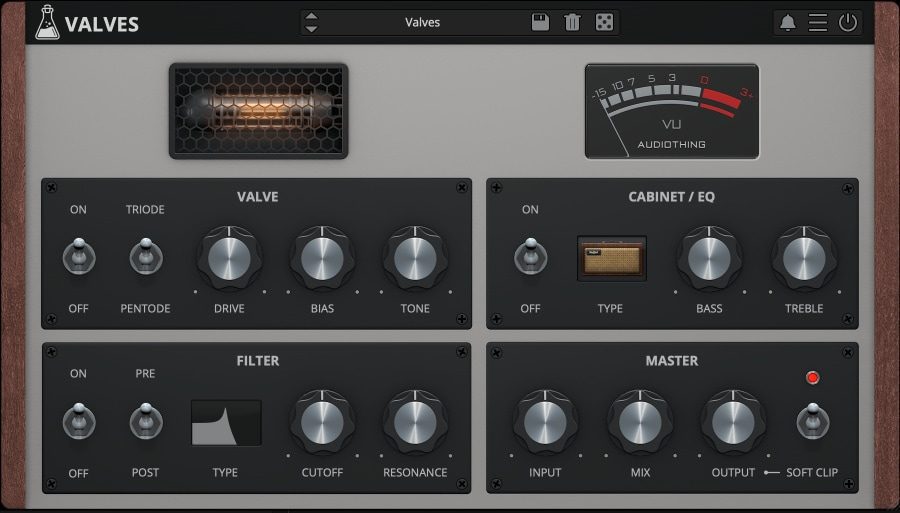
So now I installed this... https://www.audiothing.net/effects/valves/#demo ...and switched it on - hoping it wouldn't go crazy - but it seems to do nothing. I just left it all on the defaults but I'll have to start trying the settings/knobs. Maybe start a thread for advice.
In my previous measurements, I was peaking around 122dB SINAD measurement, with a direct ADC connection Using E1DA Cosmos APU Notch, (and some lessons learned from last REW editions), I was finally able to achieve a more relevant SINAD measurement of the D90LE Measurement is done with Topping...
To add a basically but not utterly irrelevant aside, if I may:
Long, long ago, there was a flurry of "sub-bass synthesizer" products (all analog, AFAIK) that did the same thing, but in the other direction (i.e., added some signal at half the fundamental frequency).
This one may have just been a tone control, though, for all I know.
Heck, I had the Radio Shack bass enhancer back in the day -- probably still have it in box in the basement somewhere.
As the pictures suggest, it gave a selectable boost at a selectable frequency. It worked well with closed-box bass to counter the long roll-off in that sort of design. Of course, it increased the power demand on the amplifier.
I have the Topping D90SE. I previously asked if anyone had downloaded the V1.87 firmware update. So far, no response. This is what is shown on the Topping website regarding this:
D90SE version V1.87 firmware update
This firmware is only for D90SE and is NOT applicable to any other models. If this firmware is flashed to other models, it will immediately cause the product to be unusable and unable to repair by yourself. If the firmware of your D90SE is already V1.87, then your D90SE needn't this update.
The firmware version of your D90SE could be check at this tool.
What's updated:
1. Added sound simulation function for Valve sound & Transistor sound.
2. Added channel balance setting within 10dB in 0.5dB steps.
3. Fixed the display issue of playing MQA in version V1.86.
Firmware and tools for Windows: Download here (This update requires a Windows 10 or higher OS with V4.82 or higher drivers installed. Drivers could be download here).
Firmware and tools for MAC: Download here
If you have questions about the update of your D90SE, please contact us before updating this firmware.
************
The reason I am posting here is because there is a discussion regarding the Valve sound and Transistor sound. I don't even know if my unit already has this update, and don't know how to check to see if I have it. Are the Valve and Transistor sounds on separate filters? I was reading amirs review of this unit and he mentioned that Filter #7 might be the preferred filter. Another review mentioned that Filter #5 would be preferable. I suppose this is all subjective, of course. But would someone in this particular forum be kind enough to let me know how to access the two simulation functions, and to find out if this particular update is already built into the unit? Thanks for any response.

@JohnYang1997 doesn't do everything at Topping! Plenty of other engineers and employees that can update existing device firmware ;) Fair enough... Just thought he'd want to come back and follow up on his creation since he was here during it's launch. Got the feeling he was pretty proud of it.
Or, using a more "classical" view (similar to Amir's IMD plot), with THD in %,:
THD % should decrease proportionaly to signal, until it starts raising above the noise.
Here-below, we see that, in "Valve" mode, it increases faster than level:
The maximal level of distortion is still inaudible for all practical usage. I challenge everybody to make the Klippel distortion test: https://www.klippel.de/listeningtest/ With pure sine wave signals, I managed to get a result of -54dB, which was already much better than the average one. With real music and masking effects and everything, even -40db (1%) are almost inaudible. But I may be proved wrong, so if anybody manages to get consistently better results than -40dB for music material, I will really be astonished.
The maximal level of distortion is still inaudible for all practical usage. (...)
With real music and masking effects and everything, even -40db (1%) are almost inaudible.