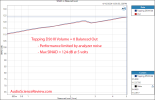
I have taken a close look at how the volume control on the RME ADI-2/4 Pro works, and I hope my input will clarify the discussion a bit
 The volume setting at the ADI digitally reduces the level fed into the DAC chip, but it also controls several relays that can switch the gain within the analog output stage.
So, it is a kind of hybrid volume control that operates in both the digital and analog domains.
In practice,
"Auto Reference Level" works as follows:
1. The DAC is set to full volume:
- The DAC chip receives the bit-perfect digital signal.
- The analog output stages are set to full gain via the relays.
2. The volume is reduced slightly:
- The DAC chip receives a digitally attenuated signal.
- The analog output stages remain set to full gain via the relays.
3. The volume is reduced by 6 dB:
- The DAC chip again receives the bit-perfect digital signal.
- The analog output stages are switched to -6 dB via the relays.
4. The volume is reduced by slightly more than 6 dB:
- The DAC chip receives a digitally attenuated signal.
- The analog amplifier stages remain set to -6 dB via the relays.
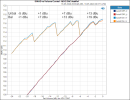
At -12 dB, the next stage is reached where the DAC chip is once again fully driven, and the relays switch to -12 dB attenuation. A third stage of analog attenuation occurs at -18 dB.
Beyond that point, only the input signal of the DAC chip is digitally attenuated, and the SINAD drops as expected.
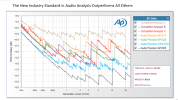
The diagram shown here therefore actually displays the ADI's SINAD at various volume levels, not the analyzer's ranges!
If you disable Auto Reference Level, the SINAD drops immediately because no analog signal attenuation via the relays takes place as shown in the diagram.
The ADI’s hybrid volume control therefore combines digital volume adjustment with a three-stage analog gain switch using relays. This technique ensures that a high SINAD is maintained across a wide volume range, even when the device volume is lowered.
Consequently, with "Auto-Ref-Volume" enabled, the ADI’s volume control is preferable to
digital volume control (such as that found in Roon). This is also the reason I offer
the "rooADI" Roon extension, which allows you to adjust the ADI’s actual device volume directly using Roon’s volume slider.
Best DrCWO


 so for my scenario, a good analog preamp would work? Well, I may not be able to tell the difference after all haha