
-
Welcome to ASR. There are many reviews of audio hardware and expert members to help answer your questions. Click here to have your audio equipment measured for free!
- Forums
- Audio, Audio, Audio!
- DACs, Streamers, Servers, Players, Audio Interface
- Digital To Analog (DAC) Reviews and Discussion
You are using an out of date browser. It may not display this or other websites correctly.
You should upgrade or use an alternative browser.
SMSL D1 - ROHM DAC for everyone

@Roland68 outlined a couple of confounding factors as differences between the test setup between the two devices. The headphone amplifier used, and volume control method. In other words not an identical test set up. It is possible - even likely - that was one of those causing audible differences rather than raw dac performance.Do you have publically available info on your testing methods and results? Love to see those thanks!
I did not realize transparent DAC's could be distinguished, especially here at ASR. Not so black and white overall, is that the message? I'm confused.
Measurements of the two test setups would be required to evaluate this further.
Last edited:

GPJ
Member
- Joined
- Jan 3, 2019
- Messages
- 34
- Likes
- 33
On my new D1, the touch button for switching the sound source does not work well. Sometimes it works fine, but mostly it doesn't work, no matter how hard I try to press it. Can you advise what to do about this?
The device has a protective film on the face from the factory. Did you remove it? Also just use light, quick presses with these type of interfaces.
There is no film there, and I did not remove it. I try to press differently, sometimes it works, sometimes it doesn’t.The device has a protective film on the face from the factory. Did you remove it? Also just use light, quick presses with these type of interfaces.
GPJ
Member
- Joined
- Jan 3, 2019
- Messages
- 34
- Likes
- 33
There is no film there, and I did not remove it. I try to press differently, sometimes it works, sometimes it doesn’t.
Did you buy it new? If so it has the film. I recently peeled one off my new unit. They are getting good at placing those films to where it's not obvious it's even on there. The face should be very shiny, like glass after it's removed.
I bought it new, but there is no film. The power button works perfectly.Did you buy it new? If so it has the film. I recently peeled one off my new unit. They are getting good at placing those films to where it's not obvious it's even on there. The face should be very shiny, like glass after it's removed.
GPJ
Member
- Joined
- Jan 3, 2019
- Messages
- 34
- Likes
- 33
I bought it new, but there is no film. The power button works perfectly.
That would be suspicious for me. Maybe a return was sold to you and you ended up with a defect.
I'm trying to return it. If they offer compensation for part of the amount, I might agree. Is it possible to fix this, do you think?That would be suspicious for me. Maybe a return was sold to you and you ended up with a defect
- Thread Starter
- #710
The first batch of the D1 was overly sensitive to the touch controls; perhaps they went a bit too far with the new ones.the seller offers monetary compensation. In the end it will cost me $40. I think I'll take the case apart and see what's wrong with the button.
Could you post a picture of the unit with the case open? I might be able to give you a few tips then.
Ideally, I'd like a shot of the circuit board from the front and from above, plus one showing the inside of the front panel.
Unfortunately, there is no suitable screwdriver. Perhaps it will be tomorrow. But tomorrow is the last day when I need to give an answer. Do you think the probability of fixing the problem is quite high?Could you post a picture of the unit with the case open? I might be able to give you a few tips then.
Ideally, I'd like a shot of the circuit board from the front and from above, plus one showing the inside of the front panel.
- Thread Starter
- #712
Since you mentioned that it works sometimes, this should be solvable.Unfortunately, there is no suitable screwdriver. Perhaps it will be tomorrow. But tomorrow is the last day when I need to give an answer. Do you think the probability of fixing the problem is quite high?
These touch buttons don't rely on pressure, but rather on capacitive energy. You might be pressing too hard; all it really takes is a light tap with your fingertip.
You could also try using a small piece of aluminum foil to switch it.
Could you post a picture of the unit with the case open? I might be able to give you a few tips then.
Ideally, I'd like a shot of the circuit board from the front and from above, plus one showing the inside of the front panel.
Attachments
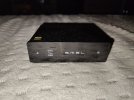
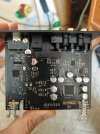
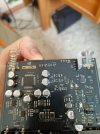
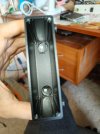
I press the spring in disassembled form - it works perfectly. I stretched the spring so that it was the same length as a well-functioning Power button. I insert it into the case - it doesn’t work!Carefully stretch the shorter spring by about 5 mm (it is best to hold it with pliers near the solder joint).
Do this in 5 mm increments and test it briefly each time, continuing until it works.
- Thread Starter
- #716
Please clean the front of the spring and the area inside the front panel using some isopropanol or an alcohol-based (ethanol) disinfectant spray.I press the spring in disassembled form - it works perfectly. I stretched the spring so that it was the same length as a well-functioning Power button. I insert it into the case - it doesn’t work!
Also, please check that the spring is positioned inside the hole at the front.
it seems to work! thank you so much, you helped me!Please clean the front of the spring and the area inside the front panel using some isopropanol or an alcohol-based (ethanol) disinfectant spray.
Similar threads

- Replies
- 15
- Views
- 5K

- Replies
- 31
- Views
- 2K
- Replies
- 3
- Views
- 1K
- Replies
- 40
- Views
- 9K