• Welcome to ASR. There are many reviews of audio hardware and expert members to help answer your questions. Click here to have your audio equipment measured for free!

PC/MAC for Dirac Processor

I switched from using my UMIK1 to my XLR phantom powered mic specifically because of timing issues for my 3 way XO. I'd gotten reliable results from REW with the UMIK but conflicting results sometimes from Dirac. Your set up is typical though and even Dirac recommends the UMIK so I'm at a loss why the big discrepancies. All I can say is keep trying. Can you share the results measured in REW so we can see what's going on?
Yes, I'm going to try Dirac calibration again tomorrow with less points and will take a measurement with REW as well. I'll post it here. It is very strange.
 

...

Cheap as chips per port, top SQ no preamps for mic though.

native drivers built into macOS but only up to macOS 12 / Monterey
 

...

Cheap as chips per port, top SQ no preamps for mic though.

native drivers built into macOS but only up to macOS 12 / Monterey
Thanks I already bought scarlet 6i6 gen2, I also need digital out, which very few inexpensive interfaces have. There are plenty of cheap interfaces with analogue outs only
 
I switched from using my UMIK1 to my XLR phantom powered mic specifically because of timing issues for my 3 way XO. I'd gotten reliable results from REW with the UMIK but conflicting results sometimes from Dirac. Your set up is typical though and even Dirac recommends the UMIK so I'm at a loss why the big discrepancies. All I can say is keep trying. Can you share the results measured in REW so we can see what's going on?
I uploaded the REW files above. This is what I have after Dirac, current crossover point it at 75hz:
1789731530753.png


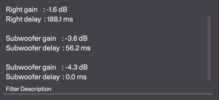
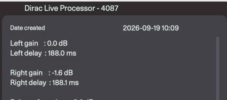
I also opened the support case with Dirac as I don't understand why it sets such delays. According to REW - delays looks like around 4ms between mains and subs and also subs are pretty much time aligned between each other.
 
Unfortunately those measurements have no time domain info. Upload the full .mdat file but change the suffix to .pdf so that you can. When seeking help refer to @Keith_W's REW guide here on ASR to consistently present data and proper naming conventions that make sense to the rest of us. I don't know what Mains_left, sub_left, and sub_right actually measured. Do you have 2 subs now or measurement from different positions?
 
Unfortunately those measurements have no time domain info. Upload the full .mdat file but change the suffix to .pdf so that you can. When seeking help refer to @Keith_W's REW guide here on ASR to consistently present data and proper naming conventions that make sense to the rest of us. I don't know what Mains_left, sub_left, and sub_right actually measured. Do you have 2 subs now or measurement from different positions?
Sorry I tried to upload it but it didn't allow me due to size. Even compressed it is over 7MB
Anyway, I've uploaded them to my onedrive - measurments
It is 2.2 system. All measurements taken from the same position. I called subs sub1 and 2 instead of left and right.
 
Last edited:
Unfortunately those measurements have no time domain info. Upload the full .mdat file but change the suffix to .pdf so that you can.

To .zip.

Anyway I took a look at your measurements (talking to @PaulF2020 now). Dirac has done an utterly horrible job. I have no idea what on earth it thinks it is doing, nothing is time aligned and it looks as if the sub has a ridiculous amount of delay. Look at this step response:

1789751498806.png


That eBook in my signature has examples of "good" and "bad" step responses so that you know what to look out for. I hope that someone on ASR will be able to help you with your Dirac issues. I don't use it, so I can't help. Good luck.
 
Last edited:
I'm no Dirac wizard either but I've seen worse results. Obviously the delays are way off and I'm not sure what step of your process is causing the issue. Did you try with fewer sweeps before going to the design stage to see if the delays are consistent between session? DiracBC typically will screw up step response with big waves exceeding the initial impulse but usually not this bad. Asking some questions on one of the threads dedicated to Dirac will probably be more helpful at this point since you've got the hardware and routing figured out now.

Have you tried the ART trial? I personally had issues with BC but ART is actually worth trying out even for a 2.2 system.

Below is a target curve of Harmon +6 for reference. Not sure what your "before" looks like or what exactly your measurements are supposed to represent with current labeling. Look through Keith's guide to help figure things out.

x.jpg
 
1789782759973.png


The problem with this step response is: one of those bumps will be Sub1, another will be Sub2, and that mess at the beginning of the impulse will be the sum of L+R mains. If you measure them all together like this, it is helpful to tell you what the frequency response is. But it won't tell you which bump represents which speaker. If you want to know, you will need to measure each individual speaker / sub through the DSP and with the same time reference. You then overlay this measurement over your combined measurement and it will tell you which bump is which. Your existing measurements of the subs have a time ref, but they don't have any DSP applied.

And i'm not sure what you would do with this information. Unless there is a way you can manually tell Dirac what delays you want, this exercise is a bit pointless.
 
Unless there is a way you can manually tell Dirac what delays you want, this exercise is a bit pointless.

There isn't. His main speakers have built in DSP which will cause some delay but not as much as the subs. There's something going wrong with the measurement process somewhere along the line. Look at post #37 where he has one sub with 0 delay, second with 113ms and mains at 252ms. Makes no sense.
 
I'm no Dirac wizard either but I've seen worse results. Obviously the delays are way off and I'm not sure what step of your process is causing the issue. Did you try with fewer sweeps before going to the design stage to see if the delays are consistent between session? DiracBC typically will screw up step response with big waves exceeding the initial impulse but usually not this bad. Asking some questions on one of the threads dedicated to Dirac will probably be more helpful at this point since you've got the hardware and routing figured out now.

Have you tried the ART trial? I personally had issues with BC but ART is actually worth trying out even for a 2.2 system.

Below is a target curve of Harmon +6 for reference. Not sure what your "before" looks like or what exactly your measurements are supposed to represent with current labeling. Look through Keith's guide to help figure things out.

View attachment 559610

I now trying with just one sweep to see what happens with delays and there is no difference, they're pretty spot on.

I think frequency response is more of a result of cancellations due to those delays. The reason I've uploaded REW, is more for delay data, you can see that delays are actually ok in sweeps directly from Scarlett . I'm currently on trial for BC and ART, but those delays are the same on either.

On a side note, I did run Dirac calibration on another laptop without reaper and I got delays which are still off, but different(at least consistently different). Probably just reaper delays is what the difference. Out of interest, I also tried to swap sub channels delay on subs do stick to subs, not channels.

I've already opened the support case, however I haven't heard anything for few days from Dirac, so not sure. I'll try to find some Dirac related forum.
 

Attachments

  • 1789811401580.png
    1789811401580.png
    88.7 KB · Views: 43
  • 1789811449686.png
    1789811449686.png
    83.8 KB · Views: 43
Last edited:
Running this through Reaper then, can't help with any potential issues there as I'm not familiar. I'd try the HLC trial and see if the delays are consistent over different convolution hosts. You didn't post pics of what your system is doing without Dirac and going directly through the 6i6, how does the timing look in REW that way?

Good luck hearing back from Dirac before your trial ends, usually takes a week or two and you may not get an answer as there are so many variables they have to take into consideration if you gave them an accurate description of issues and maybe a dump from Console.

If Dirac doesn't work out for you then at least you're now set up with 4ch output that you can use other means to EQ your system. As you've discovered, Dirac is not a magic bullet where you just push a button and get good results.
 
Running this through Reaper then, can't help with any potential issues there as I'm not familiar. I'd try the HLC trial and see if the delays are consistent over different convolution hosts.
If I run Dirac without reaper, I get same delays +/-, so I can rule reaper out.
You didn't post pics of what your system is doing without Dirac and going directly through the 6i6, how does the timing look in REW that way?
You can see delays in my REW uploaded data, I specifically took all speaker measurements without Dirac to understand if the issue somewhere in hw chain:
SUB1:
1789840078367.png

SUB2:
1789840130963.png


Front Left speaker:
1789840180015.png

As you can see - there nowhere hundreds of milliseconds.


Good luck hearing back from Dirac before your trial ends, usually takes a week or two and you may not get an answer as there are so many variables they have to take into consideration if you gave them an accurate description of issues and maybe a dump from Console.
I provided them with project files and all REW measurements without Dirac, so hopefully they'll be able to find out what's wrong.
If Dirac doesn't work out for you then at least you're now set up with 4ch output that you can use other means to EQ your system. As you've discovered, Dirac is not a magic bullet where you just push a button and get good results.
I don't expect magic results, however there is clearly something wrong with it. I've used Dirac live (basic 2 channel version) before using minidsp and there were no issues.
 
Ok, So I got another audio interface and re-installed MacOs. I still have issues with delays, but looks like only when I start Dirac calibration from reaper. If I do it directly I'm getting normal delays (within 5ms).

So not sure what's changed and what's the problem with reaper. I suspect some sample rate settings somewhere causing it etc, but I can't figure out where.
I also noticed that when listening to music I sometimes getting pops and clicks like on a vinyl, so there is somewhere clock drift or something. CPU is very low (<10%) while Dirac is running, so maybe coax cable to KEF wirelss2 is the issue.
1790463376113.png
 
It seems like you have a solution - don't use Reaper as a routing agent or dig into the manual to find out why it's causing delays. I gave you a few different options earlier in the thread to host convolution filters. You will need to set an audio buffer in whatever is hosting, usually 512 samples is adequate, which is probably why you're getting clicks and pops on occasion.
 
Ok, I got finally response from Dirac and I think what the issue was. So Dirac does not recommend using any sample rate higher than 48kHz and it is due to processor itself, nothing to do with hw apparently.
 
Are all the licensed proprietary DSP hardware devices limited to 48kHz when in DIRAC mode?

If so, that's brave...
 
Ok, I got finally response from Dirac and I think what the issue was. So Dirac does not recommend using any sample rate higher than 48kHz and it is due to processor itself, nothing to do with hw apparently.
??? Are you referring to the calibration process or to the playback process? I do understand the former but there is no such limitation for the PC/Mac version of Dirac. I've been running it at 14/192 for years on both Mac and PC.

Can you clarify your statement?
 
Back
Top Bottom