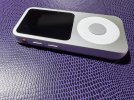
Fosi sent me a review sample of their new NEO dap. I thought I'd post just a few notes and photos about this new device.
The NEO costs about $80 with a 16gb SD card, or about $120 with a 64gb card. (The price of RAM these days is something. I'm not used to RAM prices going back up, but I guess that's here to stay.) I am using with an old 32gb card I had in one of my phones. There is no internal drive, all memory is flash card based. I think I read it will take up to a 256gb card as maximum.
I was excited about the NEO because of the iPod-like clickwheel, the compact size, and (hopefully) ease of loading music from another drive to create a nice on-the-go device.
Overall, I would say the NEO is a "decent value" dap. It is nice to have a new DAP with good battery life, as I have an aging fleet of older phones and iPod devices, most with very poor battery life. It overall has a very Apple-like look.
PROS: Nice compact unit, nice aesthetics and feels good in your hand, fine control on volume level via side buttons, easy to drag and drop music files, good sound, nice screen, reasonable price.
CONS: The clickwheel is physical, not electronic; BLUETOOTH always defaults to OFF, if using wirelessly, you have to re-select ON each time in the settings menu; BT ANTENNA does not seem very strong, need to keep fairly proximate to earbuds; no carrying case (yet,anyway)
The center button is used for single click to move forward or activate in menus, double click to back up. This becomes fairly second nature after a while, and the menu progression is pretty good. You can select from SONGS, PLAYLISTS, ARTISTS, ALBUMS or FOLDERS. It has, weirdly, an e-book reader function. It is such a tiny screen, I can't imagine anyone using it that way.
One of the main negatives for me is that the clickwheel is more of a gimmick and to give it an iPod look. It is not very functional. One uses it to unlock the device and then in menu screens, to scroll up or down. It is not used to control volume or step left or right or up in a menu, as with the old Apple clickwheel. Because it physically turns, you hear and feel a bit of rubbing as you operate it, which just feels wrong if you're an old Apple user. It looks like an iPod but the UI is different enough that for me, it creates a kind of mental friction. People who never used the old full size iPods will probably like the NEO better, as they don't have that brain/muscle memory of the old clickwheel. I assume Apple patents still protect their wheel from being used in other devices?
There is a way to update firmware, haven't tried that yet.
The manual is short and pretty poor, leaves a lot to the imagination. While these devices by nature must be pretty intuitive to operate, I had to get a few questions answered by going out to the web. For instance, it would not initially connect with my BT TOZO brand earbuds. You must disconnect them from any other device, such as one's phone, then they will pair successfully. (I was not able to pair it with some older BT speakers and its scanning for nearby BT devices was somewhat inconsistent from scan to scan.) Fosi does not have great documentation in general, but this manual did feel rushed and incomplete.
Photos below. I can answer questions if there are other details you would like to know about.