
-
Welcome to ASR. There are many reviews of audio hardware and expert members to help answer your questions. Click here to have your audio equipment measured for free!
- Forums
- Audio, Audio, Audio!
- DACs, Streamers, Servers, Players, Audio Interface
- Home Music Servers, Computers and Streamers
You are using an out of date browser. It may not display this or other websites correctly.
You should upgrade or use an alternative browser.
You should upgrade or use an alternative browser.
Multichannel audio on a Pi will get a whole lot easier and cheaper!
- Thread starter voodooless
- Start date


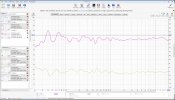
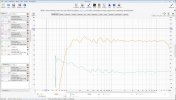
Hello my Friends, did my first FIR 3 Way Setup with CamillaDSP, may be not realy Perfect,
but sounds already Impressiv, specialy in the Low End it is much Pricise and faster than ever before.
I realy wished i found that solution earlier .
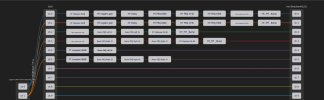
Processing Power: CamillaDSP went from 2% with IIR to 8% with FIR (16384 Taps, 96dB LR and 96kHz) thats realy Capabel to do his Job great
On That Measureings no Roomcorection was used, but for listenning i aplied the most Importand around the Woofers.
Nice week.
Robert
but sounds already Impressiv, specialy in the Low End it is much Pricise and faster than ever before.
I realy wished i found that solution earlier
.Processing Power: CamillaDSP went from 2% with IIR to 8% with FIR (16384 Taps, 96dB LR and 96kHz) thats realy Capabel to do his Job great
On That Measureings no Roomcorection was used, but for listenning i aplied the most Importand around the Woofers.
Nice week.
Robert
Attachments
-
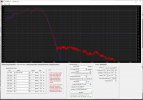 Bass_FIR.jpg476.6 KB · Views: 178
-
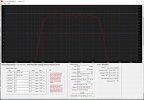 Midrange_FIR.jpg494.9 KB · Views: 200
-
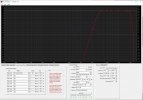 Tweeter_FIR.jpg444.2 KB · Views: 206
-
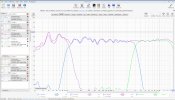 3_way_FIR_96dB_no_Roomcorection.jpg698.1 KB · Views: 188
-
 3_way_FIR_96dB_no_Roomcorection_Phase.jpg724 KB · Views: 176
-
 2Way_FIR_no_Roomcorection_Phase_Nearfield_50cm.jpg667.6 KB · Views: 175
-
 Camilla_pipeline.jpg89.8 KB · Views: 153
Thomas_Hamburg
Member
- Joined
- Mar 10, 2024
- Messages
- 6
- Likes
- 0
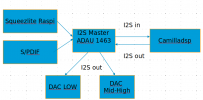
Hey together, the Camilladsp is a great job and also the installation docu. I installed Camilla like described in the docu here. In further projects, I used araspberry 3 with a general I2S driver (Slave) to drive my dac. In Squeezlite I could set my General I2S driver. Now the question: Have some of you experience to receive a signal on Raspbberry 4 via I2S (as Slave) with Camilla and send it after passing some FIR Filters back via I2S. s. pictures. Where to implement a driver for this? Has someone a driver ? Best regards Thomas
Attachments
It's the same driver (and DTS overlay) you used on your rpi3. You get playback and capture devices.Where to implement a driver for this? Has someone a driver ?
CDSP supports fast recovery from stalled devices which is very handy for I2S slaves.
frunse@moode:~ $ aplay -l
**** List of PLAYBACK Hardware Devices ****
card 0: b1 [bcm2835 HDMI 1], device 0: bcm2835 HDMI 1 [bcm2835 HDMI 1]
Subdevices: 4/4
Subdevice #0: subdevice #0
Subdevice #1: subdevice #1
Subdevice #2: subdevice #2
Subdevice #3: subdevice #3
card 0: b1 [bcm2835 HDMI 1], device 1: bcm2835 HDMI 1 [bcm2835 HDMI 1]
Subdevices: 1/1
Subdevice #0: subdevice #0
card 1: Headphones [bcm2835 Headphones], device 0: bcm2835 Headphones [bcm2835 Headphones]
Subdevices: 4/4
Subdevice #0: subdevice #0
Subdevice #1: subdevice #1
Subdevice #2: subdevice #2
Subdevice #3: subdevice #3
looks diferent 2 times HDMI 1 no HDMI 0 ???
may be something i need to add in /boot/config.txt
like this???
dtoverlay=vc4-kms-v3d
What is the different between vc4-kms and bcm2835 ???
Sorry need lots to learn about Raspberry i guess
Robert
Did you get this sorted? I believe vc4-kms-v3d is the recommended HDMI driver now so you should be using that (at least, if you've updated Raspi OS). In older releases of Raspi OS, they used the FKMS driver which shows up like above. From your aplay output on a later post, it looked like vc4hdmi1 was card #2, so you would need to put the number 2 in your /etc/asound.conf (I had 1 in my example).
Thomas_Hamburg
Member
- Joined
- Mar 10, 2024
- Messages
- 6
- Likes
- 0
thnx so aplay -l tells me yet:It's the same driver (and DTS overlay) you used on your rpi3. You get playback and capture devices.
CDSP supports fast recovery from stalled devices which is very handy for I2S slaves.
**** List of PLAYBACK Hardware Devices ****
card 0: Loopback [Loopback], device 0: Loopback PCM [Loopback PCM]
Subdevices: 8/8
Subdevice #0: subdevice #0
Subdevice #1: subdevice #1
Subdevice #2: subdevice #2
Subdevice #3: subdevice #3
Subdevice #4: subdevice #4
Subdevice #5: subdevice #5
Subdevice #6: subdevice #6
Subdevice #7: subdevice #7
card 0: Loopback [Loopback], device 1: Loopback PCM [Loopback PCM]
Subdevices: 8/8
Subdevice #0: subdevice #0
Subdevice #1: subdevice #1
Subdevice #2: subdevice #2
Subdevice #3: subdevice #3
Subdevice #4: subdevice #4
Subdevice #5: subdevice #5
Subdevice #6: subdevice #6
Subdevice #7: subdevice #7
card 1: Headphones [bcm2835 Headphones], device 0: bcm2835 Headphones [bcm2835 Headphones]
Subdevices: 8/8
Subdevice #0: subdevice #0
Subdevice #1: subdevice #1
Subdevice #2: subdevice #2
Subdevice #3: subdevice #3
Subdevice #4: subdevice #4
Subdevice #5: subdevice #5
Subdevice #6: subdevice #6
Subdevice #7: subdevice #7
card 2: Slave [Generic I2S Output - Slave], device 0: bcm2835-i2s-dit-hifi dit-hifi-0 [bcm2835-i2s-dit-hifi dit-hifi-0]
Subdevices: 1/1
Subdevice #0: subdevice #0
cat /proc/asound/cards delivers
0 [Loopback ]: Loopback - Loopback
Loopback 1
1 [Headphones ]: bcm2835_headpho - bcm2835 Headphones
bcm2835 Headphones
2 [Slave ]: simple-card - Generic I2S Output - Slave
Generic I2S Output - Slave
Am I on the right track, when I think this device be described in a config.yaml?
So I would make a description like this because I want to have the Alsaplayer using crad 2 (yet still missing the i2s input) :
devices:
samplerate: 48000
chunksize: 1024
capture:
type: Alsa
channels: 2
device: "hw:Loopback,0,0"
format: S32LE playback:
type: Alsa channels: 2
device: "hw:Generic I2S Output - Slave,2,0"
format: S32LE
Is this the right way? and would be this description be right ?
thnx in advance, Thomas
Do I understand correctly (based on your diagram) that you want CDSP to capture from I2S and playback to I2S? If so, why the loopback?
The device name string should use the card name, i.e. the single-word string before the parentheses. It should be hw:Slave for the playback. Check e.g. http://james.ahlstrom.name/alsa_names.html
Capture cards are listed by arecord -l . Read its output carefully, likely the I2S capture is device 1, i.e. hw:Slave,1
moode wans't working stable on HDMI Out, after some minutes of music play i got freeze and need to restart the RPI4 (moode) so i switched to picoreplayer and this works absolutly stable on HDMI Out on the same RPI4! so i am fine now.Did you get this sorted? I believe vc4-kms-v3d is the recommended HDMI driver now so you should be using that (at least, if you've updated Raspi OS). In older releases of Raspi OS, they used the FKMS driver which shows up like above. From your aplay output on a later post, it looked like vc4hdmi1 was card #2, so you would need to put the number 2 in your /etc/asound.conf (I had 1 in my example).
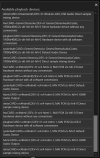
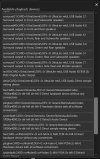
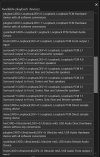
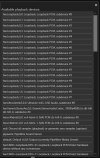
But may be it would be a good idea to translate all the different Sounddevices and his Names on ALSA and on CDSP, i get every time confused, why there are so many differend Drivers for the same Devices like HW Card, Plugw, sysdefault, and so on.....thats "pain in the arse"
when you need to switch the inputs on CDSP for let say Measuring.May be i start an List on this Forum and People could write his Statements for the different Device Names and Meanings of them. My is realy Long btw.
I am also moved from the idea to use REW on the same Device like CDSP works with MOTU UL. I got yesterday the Problem it works fine for some hour and than after i switched the Input devisec on CDSP to Music Play and then back for Measuring with REW and REW was not able to sync right and all Measurings look like the Timedomain was wrong.
I masured from 20 to 20 khz and the kurve for Midrange startet from 1 kHz to 20Khz thats inpossible and i tried averything to fixed this but no luck, different Devices on REW, on CDSP, offten new boot with RPI5 but no chance.
Than i used REW on my Windows PC with HDMI Out from GTX1080TI and HDMI in on RPI5 and Mic in on my Terratec DMX Fire and worked rock solid the whole day.
Tried hours to get it running on RPI5 with REW but no chance not sure what happen and iam not an Linux expert \o/.
Nice week
what are the Differences of and when i need to use one against the other and why???:
HW:CARD=UltraLitemk5
plugw:CARD=UltraLitemk5
sysdefault:CARD=UltraLitemk5
dmix:CARD=UltraLitemk5
front:CARD=UltraLitemk5
surroundxx:CARD=UltraLitemk5
hw:CARD=GenericStereoAu,DEV=0 (This is the Driver for the HDMI to I2S Board i use)
hdmi:CARD=vc4hdmi0 (HDMI OUT 0 and 1 of the PI)
And they all have Number DEV=0 and DEV=1 (i guess for Playback and Capture)
hw:CARD=Loopback,DEV=1 (That you need for Software like an Waverecorder for reckording or CDSP for feed in the Musicstreem of an Player)
hw:CARD=Loopback,DEV=0 (That you need for Software like Musikplayer Playback or REW for Output)
Robert
Attachments
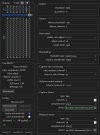
Last edited:
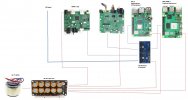
For People that want to do the Same i found this i2S Switching Board and i will try it!
https://www.audiophonics.fr/en/sele...or-4x-i2s-input-to-1x-i2s-output-p-11736.html
Switching between RPI4 I2S OUT or an HDMI to I2S or an SPDIF / ASE Ebu Stereo to I2S Input Board and may be an USB Streamer Board from minidsp also
https://www.audiophonics.fr/en/inte...nterface-module-ak4118-bluetooth-p-18770.html
Ordered both for testing.
to my RPI5 I2S Input CDSP Board!!!
For an most Kompatible DSP Solution with lots of different Digital inputs
Robert
Attachments
Last edited:
Thomas_Hamburg
Member
- Joined
- Mar 10, 2024
- Messages
- 6
- Likes
- 0
yes , you are right: CD and other signals into ADAU1763 and then from there I2S into the CDSP-Filter for the roomodes and back I2S to the ADAU 1463 and crossover FIR filters to the 2 dacs U use (bass and mid/high). Thank you for the link. So corrected, without the ALSA-Loop, I forgot to cut in the example,Do I understand correctly (based on your diagram) that you want CDSP to capture from I2S and playback to I2S? If so, why the loopback?
The device name string should use the card name, i.e. the single-word string before the parentheses. It should be hw:Slave for the playback. Check e.g. http://james.ahlstrom.name/alsa_names.html
Capture cards are listed by arecord -l . Read its output carefully, likely the I2S capture is device 1, i.e. hw:Slave,1
devices:
samplerate: 48000
chunksize: 1024
playback:
type: Alsa
channels: 2
format: S32LE
device: "hw:Generic I2S Output - Slave,2,0"
and if I am finding the next days a driver with i2S Input and i2s output o or be able to build it, may be named "Generic I2S -Slave handling"
there must be something as description additional like
capture:
type: Alsa
channels: 2
format: S32LE
device: "hw:Generic I2S Handling - Slave,2,1" (depending arecord will tell me)
Last edited:

somebodyelse
Master Contributor
- Joined
- Dec 5, 2018
- Messages
- 7,161
- Likes
- 7,166
The default alsa config on your OS has defined input using some useful plugins so you don't have to.what are the Differences of and when i need to use one against the other and why???:
HW:CARD=UltraLitemk5
plugw:CARD=UltraLitemk5
sysdefault:CARD=UltraLitemk5
dmix:CARD=UltraLitemk5
front:CARD=UltraLitemk5
surroundxx:CARD=UltraLitemk5
hw: hardware - direct access, only one thing playing to it at a time, and only allows formats directly supported by the underlying hardware.
plughw: Uses a plugin to auto-convert formats if the underlying hardware doesn't support what you're trying to play. Still only one thing playing at a time.
sysdefault: the one that will be used by default if you don't specify something else.
dmix: Mix playback from multiple programs - may be useful if you aren't using a sound daemon like pulseaudio, pipewire or JACK. Most desktop distros use a sound daemon though.
front, surroundXX - different channel groupings if you have multichannel hardware.
Asoundrc - AlsaProject
The card name is the string before the parenthesis in aplay/arecord -l. I.e. "hw:Slave", not "hw:Generic I2S Output - Slave" https://www.audiosciencereview.com/...easier-and-cheaper.48233/page-10#post-1912318yes , you are right: CD and other signals into ADAU1763 and then from there I2S into the CDSP-Filter for the roomodes and back I2S to the ADAU 1463 and crossover FIR filters to the 2 dacs U use (bass and mid/high). Thank you for the link. So corrected, without the ALSA-Loop, I forgot to cut in the example,
devices:
samplerate: 48000
chunksize: 1024
playback:
type: Alsa
channels: 2
format: S32LE
device: "hw:Generic I2S Output - Slave,2,0"
and if I am finding the next days a driver with i2S Input and i2s output o or be able to build it, may be named "Generic I2S -Slave handling"
there must be something as description additional like
capture:
type: Alsa
channels: 2
format: S32LE
device: "hw:Generic I2S Handling - Slave,2,1" (depending arecord will tell me)
So if i dont know what format comes from input i better use plugw: instead of hw: for input Device on CDSPThe default alsa config on your OS has defined input using some useful plugins so you don't have to.
hw: hardware - direct access, only one thing playing to it at a time, and only allows formats directly supported by the underlying hardware.
plughw: Uses a plugin to auto-convert formats if the underlying hardware doesn't support what you're trying to play. Still only one thing playing at a time.
sysdefault: the one that will be used by default if you don't specify something else.
dmix: Mix playback from multiple programs - may be useful if you aren't using a sound daemon like pulseaudio, pipewire or JACK. Most desktop distros use a sound daemon though.
front, surroundXX - different channel groupings if you have multichannel hardware.
Asoundrc - AlsaProject
www.alsa-project.org
Ok thats fine.
So i dont need to use the AsyncResempling stuff on CDSP, right.
Thank you.
somebodyelse
Master Contributor
- Joined
- Dec 5, 2018
- Messages
- 7,161
- Likes
- 7,166
That's a separate issue from formats. If you have different clock domains you need AsyncResampling otherwise sooner or later they will drift out of sync by more than the available buffer. This is because the data input and output are running at slightly different rates. An example would be input and output on different sound cards without a master clock to keep them in sync. If you only have one clock domain then you don't need it. That would cover input and output on the same interface, or a software player sending data to an output.So i dont need to use the AsyncResempling stuff on CDSP, right.
Did you get this sorted? I believe vc4-kms-v3d is the recommended (and default) HDMI driver for RPi5 so you should be using that. From your aplay output on a later post, it looked like vc4hdmi1 was card #2, so you would need to put the number 2 in your /etc/asound.conf (I had 1 in my example).
So if i dont know what format comes from input i better use plugw: instead of hw: for input Device on CDSP
Ok thats fine.
So i dont need to use the AsyncResempling stuff on CDSP, right.
Thank you.
From your screenshots, you are opening the I2S input and grabbing at 96kHz in S32_LE format. So it seems like you do know what samplerate and format is coming in - otherwise using hw: wouldn't work.
I can't see your playback samplerate - it seems to be cut off. You should probably enable AsyncResampling as the two devices (I2S and ULMK5) are almost certainly using different clocks and will drift apart (as mentioned by @somebodyelse). This was happening to me previously in my similar setup - every 45 mins I would get a buffer under-run and a small pause in playback. AsyncResampling has no measurable impact on sound.
The Picoreplayer at the moment sampling all to 96kHz 32bit and it works great so far, but you right if i use any other Device, let say my Blueray i need Async or plugw i guess or i need to switch the input Frequenz every time manualy on CDSP but this is not realy what i want to doFrom your screenshots, you are opening the I2S input and grabbing at 96kHz in S32_LE format. So it seems like you do know what samplerate and format is coming in - otherwise using hw: wouldn't work.
I can't see your playback samplerate - it seems to be cut off. You should probably enable AsyncResampling as the two devices (I2S and ULMK5) are almost certainly using different clocks and will drift apart (as mentioned by @somebodyelse). This was happening to me previously in my similar setup - every 45 mins I would get a buffer under-run and a small pause in playback. AsyncResampling has no measurable impact on sound.
And for the Setup with this I2S Switch, i need Async i guess too because there could be unknown Samplerates on all devices i switch between.
If i gett all the Boards i build up an Prototype and will test what will be the best solution. Lots to do (and test) still
Not all Bords was directly aviable so it could be i get them in April first.
For the SPDIF ASE / EBU Board i giot also an I2S Isolation Board but cant find one 4 Channel i2S for now \o/
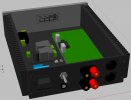
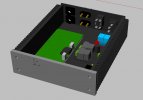
For now i working on my Hypex Amps Enclousures for the whole 5.2 Setup and my CNC (Converting it from 230V to 380V, and Changing to an Automatic Toolchanger Spindel) to do the Job
Robert
Attachments
Just a note ( as @somebodyelse already explained) - plughw is basically equvalent to CDSP Sync resampler (with CDSP being most likely much more CPU efficient unless you have some tweaked setup). CDSP async resampler is used to merge two clock domains which requires continually adjusting the resampling ratio and which the rate plugin called by the plug plugin cannot do.but you right if i use any other Device, let say my Blueray i need Async or plugw
Thx for that advice, i will do so than the Picoreplayer dont need to upsampling all because cdsp will do the job on Output to Motu already.Just a note ( as @somebodyelse already explained) - plughw is basically equvalent to CDSP Sync resampler (with CDSP being most likely much more CPU efficient unless you have some tweaked setup). CDSP async resampler is used to merge two clock domains which requires continually adjusting the resampling ratio and which the rate plugin called by the plug plugin cannot do.
Robert
Hmm i tried it right now but it didnt work like you say.Yes, that's IMO the best way. Running only one resampler (asynchronous or synchronous, as needed for the given input) in the whole chain.
i Setup Picoreplayer without resampling than i setup cdsp to AsyncSinc but he want that i put an Samplingfrequenz in and so on they cant switched automatikly if i play 41kHz file he need to have that number and when i want to play an 96KHz File i need to switch manualy again to that number! So at all anoying cant get it that way running with automatikly detection of incomming samplefrequenz.
Capturedevice is now plughw:Card....
Playback still hw:Card with fix frequenz to 96kHz on Out.
How i can setup CDSP that he switch to that inputfrequenz that comes from Capturdevice I am Confused.
Where i can use the sox resampler on CDSP??? is that not the right Software for that???
If i setup Resampler capture_samplerate to default isnt working at all on 41kHz files i gues default is then 96kHz
96kHz Files playing how they should.
The Chain need to be this way i guess:
Hdmi to i2S (any Frequenz from i2S Bus)---> SOX Resempler (resample anything to 96kHz) ---> CDSP AsyncSinc with 96kHz ---> MOTU with 96kHz
or i am wrong???
i am back to Resampling all to 96kHz in Picoreplayer, thats much easeyer dont know now how to aktivate this SOX resampling in CDSP capture Device need to llearn more about that Alsa stuff i guess

I read, much other People also asking for an Automatikly Samplefrequenz detection on CDSP may be not there yet...... ;(
May be i can find an I2S to i2S board with Rate conversion Chip and good reclocking thats help
Like that Chip AK4128A 8 Channel Asyncronous SRC
Robert
Attachments
Last edited:
