• Welcome to ASR. There are many reviews of audio hardware and expert members to help answer your questions. Click here to have your audio equipment measured for free!

LinFIR – DSP Software for FIR/IIR Filter Design and Speaker Correction

The key point is that near-field pressure and far-field pressure are different components of the acoustic field.

For a small circular loudspeaker at low frequency, the pressure field contains a reactive near-field component and a radiating far-field component.

A simplified expression for the pressure from a monopole source is:

p(r)∝(1r2+jkr)e−jkr
where

k=2πλ
The two terms are crucial:

1r2⏟near-field/reactivejkr⏟far-field/radiating
Notice the j multiplying the radiating term.

That j represents a 90° phase rotation.

So, in the region where the 1/r2 term dominates:

pnear≈1r2e−jkr
whereas sufficiently far away:

pfar≈jkre−jkr
Therefore:

∠pfar−∠pnear≈90∘
That is the origin of the 90° phase difference.
Sorry I am being lazy… thats ^^ an AI generated response. Its late here and I am not in my lab for a few weeks and dont have my original notes in which I went through the theory in more detail
 
This is wrong.
You are mixing up pressure with particule speed.
Please read some references, e.g.:

Section 2.2.
« There are two components of the particle velocity u in spherical wave. The far field component is in phase with pressure change. It falls off over distance with 1/r. The near field component is 90º phase shifted and decreases with 1/r^2 over distance. «

Now, please stop off topic posts.
 
As you wish, however, I will create a separate post about this topic in a couple of weeks and we can have a broader discussion with others. For now, I am not mixing particle speed and pressure, and I am not saying the pressure phase shift measured on axis, between Pz=0 (surface) and P(infinity) is exactly 90 degrees.
 
LinFIR 1.4.2 is on its way!

There is now Cumulative Spectral Decay (CSD) and burst decay plots.

All spectrogram transforms (CQT wavelets, STFT, CSD and burst decay) are now available as waterfall graphs.

waterfall_light.png

Best,

Arnaud
 
Hello!

LinFIR 1.4.4 is out.

Main addition: soundcard calibration. You can now correct the interface's own phase rotation in the bass and roll off near Nyquist. Just measure your interface once through a loopback cable (Settings -> Measurement Calibration -> Soundcard), then select it on a driver's IR window, and every angle (near-field/far-field splices included) gets corrected in magnitude and phase by a regularized Kirkeby inverse filter, stacked on top of the mic calibration if you're using one. It's sample-rate specific and embedded in the project file like mic calibrations already are.

Here is an example of correction on the loopback itself. :)
Capture d’écran 2026-09-16 à 17.04.11.png


Also new: a low-SNR sweep or import (peak below -25 dB) now prompts Keep Anyway / Discard instead of silently vanishing (clipping still gets rejected outright, that's corrupted data).

Fixed: harmonic distortion curves weren't applying the mic calibration to the harmonics, only the fundamental, now they do and update live. Phase centering reworked so the same measurement doesn't show a different slope depending on project sample rate. A couple of small UI bugs too.

Full changelog: https://demaudio.com/doc/linfir/release-notes.html
 
Hello!

LinFIR 1.4.5 is out.

Main addition: a Predicted In-Room Response curve, computed per the CTA-2034-A spinorama standard. Predicted In-Room is also a selectable reference for the global correction filter and global Auto EQ, alongside On-axis and Listening Window, so you can target a smooth in-room response instead of just on-axis or a narrow listening window.

Capture d’écran 2026-09-22 à 20.40.01.png


Project loading and saving got a lot faster on large projects, on my Mac mini M4 I'm seeing roughly 4x on both with a 560 MB project. The bigger the project, the more it matters.

Full changelog with the rest of the details: https://demaudio.com/doc/linfir/release-notes.html
 
Hello!

LinFIR 1.4.6 is out.

Biggest change is how the magnitude correction filter works. It used to be two fields you had to balance by hand, Max Attenuation and Correction Gain (tune one and you'd throw off the other). That's gone, replaced by a single Strength slider, 0 to 100%, untouched to fully matching your target curve. It references response and target to their own average level, so it's symmetric now too, bumps get tamed and dips get filled in. Correction Gain is still there as a plain broadband offset on top, but it's no longer doing double duty compensating for the old algorithm's quirks. This isn't backward compatible at the numeric level, so if you're relying on a correction filter, check it after upgrading and re-tune Strength as needed. There's a legacy toggle in Settings if you want the exact old behavior back.

Also: the CTA-2034 spinorama suite is complete now. Early Reflections, Sound Power and Early Reflections DI join Predicted In-Room, Listening Window and DI as their own curves, so LinFIR gives you the full standard set. And Listening Window / Predicted In-Room can now be used as a per-driver reference for correction and Auto EQ, not just globally, useful for voicing a driver's own off-axis behavior.

Separately from the app, I've also redone the whole website end to end, same docs but a lot more coherent and easier to actually find things in.

Full changelog: https://demaudio.com/doc/linfir/release-notes.html
 
Hello,

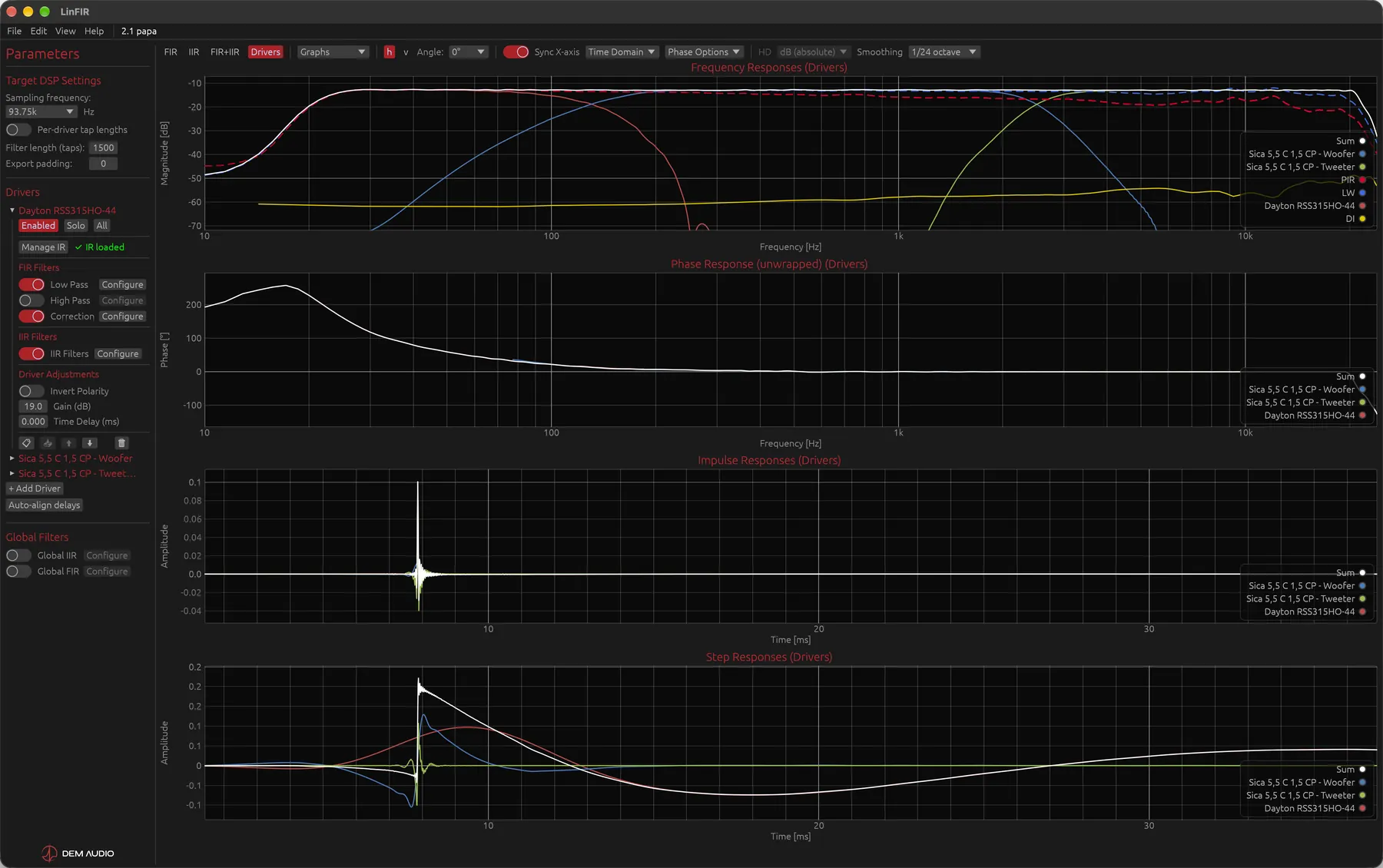
I'm happy to announce LinFIR 1.4.11. I've been working for a few months on an overhaul of the interface, and it's finally here. The left column is now a set of cards, one for the target DSP settings and one per driver edged with its colour, and every graph sits in its own card. Tabs, buttons, toggles and titles look the same everywhere, and all the secondary windows follow the same style, in light and dark themes. The goal was something more readable and intuitive, where you find what you need without hunting for it. While I was at it, I added drag and drop to reorder drivers and graphs, and a French translation of the whole interface (Settings, General, Appearance, Language).

IMG_0078.PNG
IMG_0079.PNG


Alongside the redesign, there are a few new tools. Auto-level, next to Auto-align delays, sets the gains so the summed response is as flat as possible across the system pass band, crossover regions included, without ever making a driver louder. And a rotation center correction for off-axis measurements: if your turntable axis wasn't at the baffle, which is typical when it sits somewhere under the cabinet, the off-axis measurements were taken further away and at a wider angle than nominal. You enter where the axis was, and LinFIR rebuilds the off-axis responses as if the speaker had turned about its baffle. This matters for the Listening Window, the sums and the directivity.

I also spent a lot of time under the hood. Slider drags with several drivers are much lighter, graph drawing costs a fraction of before, and the spectrogram CQT and Burst Decay are up to 13 times faster. The long list of fixes includes a few that deserve a mention: the Auto EQ optimizer was stopping after its first step, near-field splice levels for vents and passive radiators came out several dB too low (re-run "Match level to far-field" if you used them). Saving and quitting is also much safer than before.

Full changelog: https://demaudio.com/doc/linfir/release-notes.html

Feedback on the new look is very welcome.

Arnaud
 
Hello,

LinFIR 1.4.12 is out, and it’s a big one!

LinFIR now runs on pretty much any 64-bit Linux distribution released since 2020, as a .deb, an .rpm or an AppImage. I have to be honest here: these builds are only partially tested, simply because I don’t have the hardware to try them all. So if something doesn’t work on your setup, please let me know and I’ll fix it. The packages are available here:

The improvement I’m happiest with is the phase correction, which is finally stable. Depending on the situation, the correction could end up flipping a driver’s polarity, because of an ambiguity of plus or minus pi in where the phase was referenced. That could be really annoying, and it’s now solved.

Auto-align delays and Auto-level now stay on once you click them, until you turn them off or change a delay or a gain by hand. Every time you change something that can affect the relative levels or phases between drivers, a filter, a measurement, a driver turned on or off, they readjust automatically. It’s very handy when you’re tweaking a crossover and don’t want to realign everything after each change.
Capture d’écran 2026-10-12 à 09.25.33.png


FIR crossovers between drivers can also be linked now, so a driver’s low-pass and the next driver’s high-pass share the same settings. No more opening both windows to keep them in sync, and you can still unlock individual settings if you want them different on each side.

Finally, the documentation got a new look, easier to navigate and more readable.

There’s a lot more in this release that I won’t go into here, the full list is in the changelog: https://demaudio.com/doc/linfir/release-notes.html

Arnaud

 
Hi all!

LinFIR 1.5 is out. The biggest change is direct USB control of Hypex DSPs. LinFIR sends its filters to the DSP3-213 (FusionAmp) and DSP3-224 modules on Mac, Windows and Linux, without Hypex Filter Design. Several DSPs are handled at the same time, so a system with an FA253 in each satellite and an FA502 for the sub is set up in one click. LinFIR also controls the amplifiers while they play. I developed this in collaboration with Hypex, and it is part of the free version.

Other changes:
- measurements in dB SPL, calibrated with an acoustic calibrator or a sound level meter
- the enclosure and the turntable described in 3D, for the rotation-centre correction and the near-field splicing
- spinorama curves that average powers, as CTA-2034-A does
- Linux packages for ARM64
- a monthly license for the Advanced Module (€14.99, 14 days free), next to the lifetime license (€149)

Everything is explained, with screenshots, in the blog post:

Download: https://demaudio.com/linfir/#download

hypex-dsp-manager.png
Capture d’écran 2026-10-27 à 20.41.52.png
 
LinFIR 1.5 is out. The biggest change is direct USB control of Hypex DSPs. LinFIR sends its filters to the DSP3-213 (FusionAmp) and DSP3-224 modules on Mac, Windows and Linux, without Hypex Filter Design.
Wow! Great! I assume it doesn't support the old, original DLCP?
 
Thanks for your interest! I initially thought this section was the most appropriate, I just hadn’t noticed the dealer forum.

Videos are planned and I’ll post them later. In the meantime, anyone curious can download and try the software.
Dear Arnwald,

First of all thank you for the very useful tool you created and presented for all of us, DIYers in the first place :)

I am in the process of understanding the proper way of taking measurements and creating crossovers/filters through LinFIR and here are the questions I have at the moment:
1) Is there any difference in the final result between the measurements made in REW or in LinFIR?
2) Are there any kind of rules to take proper on-axis measurements, except for the standard tips like using cable loopback option, keep the acoustic cabinets that is being measured at least 1 m away from walls and obstacles and have at least 30 db headroom above noise floor?
3) Since using Fir is pointless with taps below 2000 and under 100 hz, do I get it correctly that the proper option for setting a 3-way active crossover system is to use Fir for Tw and Mid and IIR for Bass? Thus there will be Fir+IIR as a default option.
4) Also as you indicated in the description part if I take measurement in my living room I should not try to correct phase unless I use windowing. Does it mean that the basic understanding if I get usable measurement is that I have readable phase without unwrapping it? Or there are any other constraints in the regard?
5) Eager to see the video of the real workflow for 3 or 4 way loudspeaker from the start to the end :) (I saw 5 minute video on YouTube but I guess it was like a preview to the big one).
6) What is the best option - the same taps amount for all drivers or different per driver? I think it will be enough to have 512 taps for the TW and 1500 taps for the Mid for 96K project, but I am not sure if it will be ok to make it this way.

Best regards,
Andrew.
 
Last edited:
REW is not strictly needed because LinFIR can handle the entire measurement process itself. Or if you like use both together I guess?

LinFIR only does the filter creation, not the real-time convolution.

Don't limit yourself with low powered DSP engine. A mch interface enables use of a low cost quiet PC, even an RPi5 should be enough.

IMHO, any corrections welcome
 
I have adau1467 and SigmaStudio project under 96K. I am not trying to combine rew and LinFIR, I am trying to figure our the only most suitable and reliable way to create digital crossovers and filters.
 
That might be enough, but at high resolution and low frequencies you may need to spend a lot of time and energy figuring out hybrid approaches to fit within the taps budget, rather than just using FIR.

Using a processor with "unlimited" resources makes the filter creation process much simpler for us non-experts.

Going to 48Hz if you stick with that DSP will double your taps budget.
 
I have adau1467 and SigmaStudio project under 96K. I am not trying to combine rew and LinFIR, I am trying to figure our the only most suitable and reliable way to create digital crossovers and filters.
Don’t you just use LinFIR to produce the filter coefficients and then load them in to your ADAU1467 via sigma studio FIR filter - the FIR block that gives you the table of coefficients? Then you would need to also enter inter-driver delays and IIR filter coefficients from LinFIR also.
BTW related topic for you - I have just purchased the ADAU1467Z eval board with 4 in to 8 Out DAC to build an AM modulator and IQ demodulator at audio frequencies, an only been playing with it for a week or so, but I did find out that the order in which you place the processing blocks on the schematic can affect the phase relationship between signals as some processing blocks are processed before others. Getting the board to do 4 in 8 out was a PITA too.
 
That might be enough, but at high resolution and low frequencies you may need to spend a lot of time and energy figuring out hybrid approaches to fit within the taps budget, rather than just using FIR.

Using a processor with "unlimited" resources makes the filter creation process much simpler for us non-experts.

Going to 48Hz if you stick with that DSP will double your taps budget.
I think I will end up having IIR for LF/MID and fir for MID/TW crossover as well as frequesncy responce flatenning for the same Mid-TW range.
 
Don’t you just use LinFIR to produce the filter coefficients and then load them in to your ADAU1467 via sigma studio FIR filter - the FIR block that gives you the table of coefficients? Then you would need to also enter inter-driver delays and IIR filter coefficients from LinFIR also.
BTW related topic for you - I have just purchased the ADAU1467Z eval board with 4 in to 8 Out DAC to build an AM modulator and IQ demodulator at audio frequencies, an only been playing with it for a week or so, but I did find out that the order in which you place the processing blocks on the schematic can affect the phase relationship between signals as some processing blocks are processed before others. Getting the board to do 4 in 8 out was a PITA too.
As for the processing blocks in SS - can you share exactly which blocks need special attention? In my simple chematic I have just crossover and FR linearization. And by the way, there is no direct export of the "correct" biquads from LinFIR into sigmastudio, "a1" and "a2" coefficients need to be inverted as far as I get.
 
Back
Top Bottom