• Welcome to ASR. There are many reviews of audio hardware and expert members to help answer your questions. Click here to have your audio equipment measured for free!

LiDAR room scanning with Room modes and Speaker Placement

darius.m

Member
Audio Company
Joined
Jun 10, 2026
Messages
17
Likes
36
Hello you all
I'm Darius, software developer and audio science enthusiast.
I work with Andy from amcoustics.com . I'm sure by now you all know about his work with amroc and amroc pro .

Why
For almost three years we've been working on amscan, a LiDAR-based room scanner for iPhone and iPad.
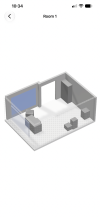
We never set out to replace full acoustic simulation software. That software already exists and works very well. Like the other tools in the amcoustics ecosystem, amscan aims to ask as few questions as possible and give you a fast, useful estimate. You can get the room modes of any room, including oddly shaped ones, in about 4 taps and roughly 5 minutes. That includes opening the app and scanning.

What it can do
  • LiDAR-based Scanner: You get real-time feedback and guidance while you scan. It detects walls, windows, openings and doors. You just need to make sure all hard surfaces in the room are covered by the yellow AR grid.
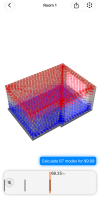
  • Room Modes calculation: Wave-based FEM eigenfrequency analysis on the actual scanned geometry, giving you the modal frequencies and their mode shapes.
  • Speaker Placement: Takes the Listener position (MLP) and solves the room with harmonic analysis for 20-200 Hz.
  • Simulation Geometry Mesh Export: If you'd rather use your own tools, amscan exports simulation-ready geometry: DWG, DXF, STEP, STL and OBJ. The meshes are low-poly, manifold and watertight, so you don't have to clean them up.

Pricing:
  • Free: The app is free to download. Scanning is free, and so are the first 5 room modes.
  • Paid: Speaker placement, and Additional room modes up to the Schroeder frequency, And Mesh Export
Platform and devices
Supported platforms: Currently iOS only
Supported Devices: iPhone 13 Pro to the latest iPhone Pro models, and iPad Pro ( essentially any iPad/iPhone with LiDAR on its back )

App Store Link
https://apps.apple.com/us/app/amscan/id6749589715


Scanner.jpg
RoomDetails-v2.jpg
RoomModes-v2.jpg
Graph-compare-v2.jpg
SimulationGeometry-v2.jpg
 
We both value this community's feedback and are happy to answer any questions.

Want to try the paid features for free?
Send me a private message saying which feature you'd like to test:
  • Speaker placement
  • Additional room modes
  • Simulation mesh export
I'll send you an offer code so you can try it at no cost. In return, we'd really appreciate your feedback.
 
Amcoustics reverberation time calculator is awesome, adding panels with your chosen coefficients is great.

So the mesh export does what exactly? Creates a 3D mesh of your room?

No android version?
 
Thanks!
The RT calculator is Andy's work, and I agree, being able to add panels with your own coefficients is really handy.


on Mesh export: Yes, it creates a 3D model of your room, but the point is that it's simulation-ready. The mesh is watertight and manifold, which FEM tools require, and it's low-poly, so simulations run much faster.

Btw, None of this is new. You can model your room in CAD, export it, then fix the double edges, open holes and extra polygons yourself before running a simulation. That can take a day or two, which is fine in a professional setting. amscan gives you that clean geometry in a few minutes.

For low-frequency work you usually don't need a perfect model anyway. At 200 Hz the wavelength is about 1.7 m, so errors of a few centimeters barely change the modal results. A quick, clean model of the real room is often more useful than a perfect one you have to spend days building.

And on Android: Not yet. amscan isn't just a UI that can be ported. It depends on a real LiDAR depth sensor and the scanning and on-device processing stack that iOS provides. Very few current Android phones have comparable depth hardware, and the devices vary a lot, so getting the same scan quality there is a much bigger project. It's not off the table, but iOS was the realistic place to start.
 
Thanks!
The RT calculator is Andy's work, and I agree, being able to add panels with your own coefficients is really handy.
Yes, very handy thanks so much for the availability of the software.
on Mesh export: Yes, it creates a 3D model of your room, but the point is that it's simulation-ready. The mesh is watertight and manifold, which FEM tools require, and it's low-poly, so simulations run much faster.

Btw, None of this is new. You can model your room in CAD, export it, then fix the double edges, open holes and extra polygons yourself before running a simulation. That can take a day or two, which is fine in a professional setting. amscan gives you that clean geometry in a few minutes.
I know, but I cannot create CAD files nor fix them up hence my interest in this option of mesh export.
For low-frequency work you usually don't need a perfect model anyway. At 200 Hz the wavelength is about 1.7 m, so errors of a few centimeters barely change the modal results. A quick, clean model of the real room is often more useful than a perfect one you have to spend days building.
Yes, I get you.
And on Android: Not yet. amscan isn't just a UI that can be ported. It depends on a real LiDAR depth sensor and the scanning and on-device processing stack that iOS provides. Very few current Android phones have comparable depth hardware, and the devices vary a lot, so getting the same scan quality there is a much bigger project. It's not off the table, but iOS was the realistic place to start.
Any other way to utilize the software without a phone?
 
Any other way to utilize the software without a phone?
Just Speaker placement is our next target to be available on amcoustics.com.

The scanning will stay in iOS Mobile for now.
But I can see the idea of fast modeling is needed for everyone interested in the topic, and I'm doing R&D day and night to bring easier ways and remove limitations like what we have.
But no concrete plan or date yet!
 
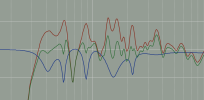
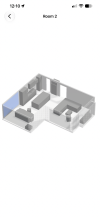
Really interesting tech. I'm not an expert but accurately profiled my room shape. Then the Room Modes correctly identified one of my key modes at 68hz, as identified by GLM for my 8341a's, particularly the left speaker (see images). The free trial of the speaker placement was fun to play with, and I did adjust my speakers a bit and probably got a bit better result on the low frequency when assessed by GLM. I'm definitely going to use to consider speaker placement in my oddly shaped other room.
 

Attachments

  • IMG_2606.PNG
    IMG_2606.PNG
    464.6 KB · Views: 66
  • Screenshot 2026-10-23 at 10.38.28.png
    Screenshot 2026-10-23 at 10.38.28.png
    384.4 KB · Views: 59
  • Screenshot 2026-10-23 at 10.37.22.png
    Screenshot 2026-10-23 at 10.37.22.png
    134.6 KB · Views: 60
Hello you all
I'm Darius, software developer and audio science enthusiast.
I work with Andy from amcoustics.com . I'm sure by now you all know about his work with amroc and amroc pro .

Why
For almost three years we've been working on amscan, a LiDAR-based room scanner for iPhone and iPad.
We never set out to replace full acoustic simulation software. That software already exists and works very well. Like the other tools in the amcoustics ecosystem, amscan aims to ask as few questions as possible and give you a fast, useful estimate. You can get the room modes of any room, including oddly shaped ones, in about 4 taps and roughly 5 minutes. That includes opening the app and scanning.

What it can do
  • LiDAR-based Scanner: You get real-time feedback and guidance while you scan. It detects walls, windows, openings and doors. You just need to make sure all hard surfaces in the room are covered by the yellow AR grid.
  • Room Modes calculation: Wave-based FEM eigenfrequency analysis on the actual scanned geometry, giving you the modal frequencies and their mode shapes.
  • Speaker Placement: Takes the Listener position (MLP) and solves the room with harmonic analysis for 20-200 Hz.
  • Simulation Geometry Mesh Export: If you'd rather use your own tools, amscan exports simulation-ready geometry: DWG, DXF, STEP, STL and OBJ. The meshes are low-poly, manifold and watertight, so you don't have to clean them up.

Pricing:
  • Free: The app is free to download. Scanning is free, and so are the first 5 room modes.
  • Paid: Speaker placement, and Additional room modes up to the Schroeder frequency, And Mesh Export
Platform and devices
Supported platforms: Currently iOS only
Supported Devices: iPhone 13 Pro to the latest iPhone Pro models, and iPad Pro ( essentially any iPad/iPhone with LiDAR on its back )

App Store Link
https://apps.apple.com/us/app/amscan/id6749589715


View attachment 561901View attachment 561895View attachment 561896View attachment 561898View attachment 561899
Wow. An impressive achievement!
 
oh man, now I have to buy a Lidar. Should I go with Class AB or Class D?
 
oh man, now I have to buy a Lidar. Should I go with Class AB or Class D?
:)
You need class P ( pro )

Some small good news here which is premature to share but related. We are practicing scanning with devices without LiDAR. Accuracy is reaching to good amount that we can use in our pipeline. We have a lot to build but I am very happy that we can open doors of amscan to more users in all platforms.
 
Last edited:
Nice!!

Btw you could later add auralization to hear what effects furniture, acoustic treatment, speaker and listening position have to perceived sound. Here my simplified room sim, focus is in realtime adjustability https://audioexperiment.com/pages/virtual-listening-test-suite/ - real diffraction/reflection effects on furniture is the hard part though.

Thanks! Auralization would be fun, but honestly it’s not where our heads are right now.

What we’re focused on is getting amscan to more people. The non-LiDAR scanning I mentioned above is the big one, and after that, speaker placement on amcoustics.com so you can use it without a phone at all.

Funny thing is, the feedback pulls both ways. Some people want more guidance and explanation, others want finer control, like mesh resolution. We come from the amroc way of doing things, simple tools that work for everyone, so finding the right mix is the fun part for us.
 
Really interesting tech. I'm not an expert but accurately profiled my room shape. Then the Room Modes correctly identified one of my key modes at 68hz, as identified by GLM for my 8341a's, particularly the left speaker (see images). The free trial of the speaker placement was fun to play with, and I did adjust my speakers a bit and probably got a bit better result on the low frequency when assessed by GLM. I'm definitely going to use to consider speaker placement in my oddly shaped other room.

Love this, thanks for testing it against GLM!
68 Hz match is great.

Would you mind sharing your speaker placement too? A screenshot of the heat map with your speakers, and if you still have them, the GLM curves from before and after you moved them.
That’s the part I’m most curious about.

And please post the odd-shaped room when you get to it!
 
This looks very interesting, I'll be trying it. The amcoustics site has been very useful btw and appreciated (a while since I've done any planning/setup so haven't been there recently)
 
Some small good news here which is premature to share but related. We are practicing scanning with devices without LiDAR. Accuracy is reaching to good amount that we can use in our pipeline. We have a lot to build but I am very happy that we can open doors of amscan to more users in all platforms.

@darius.m : This app looks exciting! I would buy an iPad Pro specifically for your software, though a standard iPad would be more convenient. Can you quantify the difference in accuracy and scanning speed between LiDAR and video-based methods?
 
@darius.m : This app looks exciting! I would buy an iPad Pro specifically for your software, though a standard iPad would be more convenient. Can you quantify the difference in accuracy and scanning speed between LiDAR and video-based methods?

Our target for the video based scan was to get the room dimensions within 3% of what LiDAR measures.
That number isn’t random. room modes move in proportion to the room’s size, so 3% off in size means the modes shift by about 3%, which is roughly half a semitone. Inside that, the room modes and the placement results stay useful.

In our tests so far, we’re at about 1.3% from LiDAR, so around a fifth of a semitone. That depends on a decent video and good lighting though, and it’s from our own test rooms, not out in the wild yet. The speed traget for us is being able to get to manifold model and the final calculation under 4 to 5 minutes.
depends on the GPU size and lenght of video, I reached to that too. So I guess I can keep the video only method fast enough.

Honest advice: don’t buy an iPad Pro just for amscan yet. Once the video method is out, any device should do the job, and you’ll get to try it first.
This is a bad advice for our business I guess :facepalm:
 
Last edited:
:)
You need class P ( pro )

Some small good news here which is premature to share but related. We are practicing scanning with devices without LiDAR. Accuracy is reaching to good amount that we can use in our pipeline. We have a lot to build but I am very happy that we can open doors of amscan to more users in all platforms.
When you say without LIDAR you mean on other platforms other than Iphone?
 
Back
Top Bottom