• Welcome to ASR. There are many reviews of audio hardware and expert members to help answer your questions. Click here to have your audio equipment measured for free!

KEF LS50 Metas - dips around 3 & 6 kHz on both speakers - fault or am I measuring wrong?

Yes very active helpful communities, great design tools available.

No need to lead with explicitly advertising the tubes aspect, so long as you know the component attributes you are looking for.
Sure, but just consider a DIY 16-ohm speaker, for instance. Commercial 16-ohm speakers probably aren't even available these days, as far as I know.
 
It’s a long shot, but stranger things have happened: the manufacturer might have wired them incorrectly. Unscrew the coaxial driver and check. While you're at it, take the opportunity to measure the driver with a multimeter.
I had a look - nothing looks out of place.

Defo going to give that lego speaker project a go!
 
Have just dropped the speakers off to the local KEF distributor. I showed the measurements, but the guy said they test by listening against another speaker ¯\_(ツ)_/

If it's the drivers, then under warranty, so I hope it's that and that they turn a blind eye to the scratched paint where I took out one of the drivers (and the small "toddler dents").
 
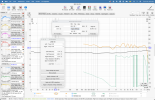
I bought KEF LS50 Metas a while back, but never quite fully engaged with them. I recently started experimenting with them (swapped amp, got a wiim ultra). Then in the process of adding a sub, I measured them this weekend and there's a big dip around 3 kHz on both speakers. Smaller ones again around 6 kHz and 9 kHz. My wife also pointed out the vocals sounded recessed, and I thought that listing to Netflix through them, the vocal sounded thin. I can't say though if this is something that's been there from new or has crept in.

Things I've tried, none of them changed it:

- moved the speakers forward, more toe in
- took the coffee table out
- blanket under the speaker, blanket around the mic
- speaker on the rug, off the stands
- measured at 20 cm, 1 m and 2.8 m
- mic pointing up and pointing at the speaker
- left and right on their own - same on both
- swapped the Nord amp for an old valve amp - same
- swapped the WiiM for a different DAC - same
- all EQ off, sub off

Then I put a Bose Bluetooth speaker in exactly the same spot with the same mic. Smooth through all three, no dips.

Blue is the KEF, pink is the Bose.

Mic is an EM-01 with the cal file loaded. SPL isn't calibrated so ignore the absolute numbers, I'm only looking at the shape.

So either I'm making a beginner mistake I can't see, or something is wrong with both speakers. Any ideas?

Best,
Rich


View attachment 558741

If your drivers are not covered by warranty, then the replacement driver will cost $235 each from the Speaker Exchange. I am pretty sure that your can’t just replace the tweeter assembly, but I came across a you tube video where a person just looked at the wiring from the terminal block to the voice coil and saw it had burned out and simply soldered the break back together. This off course doesn't help if the coil is burned out, but its worth a look if you decide to do the DIY route. Hopefully KEF wil help out out here - the tweeter are unusually delicate. I run mine in an active setup and have both a fast acting fuse (750mA) for overcurrent and capacitor for LF protection.
 
If your drivers are not covered by warranty, then the replacement driver will cost $235 each from the Speaker Exchange.
Thanks for the info. The Kef dealer has had them a week now and nothing from them so far - will call them later today. If it turns out they are not covered I'll pull them apart and have a closer look.
 
I got the speakers back from the local KEF dealer, and the have replaced both the drivers under warranty. However, it hasn't fixed the issue. Given that they told me they don't actually measure and therefore have no way of verifying if the issue is fixed, I am at a loss as to what to do next?

1791207083267.png

1791207094727.png
 
If the drivers were actually replaced with new ones, the issue is likely in the crossover. Its puzzling that the store did not compare your speakers to their reference after the drivers were replaced. I suggest you borrow a KEF LS50 Meta speaker (possibly from that store) and chart its frequency response in exactly the same way as your measured your defective LS50 Metas. Then (assuming the borrowed speaker did not measure with a similar issue) send all three frequency responses (both of your speakers and the borrowed one) to KEF and ask them how to proceed with a warranty repair.

​

 
However, it hasn't fixed the issue
This kind of response (along with the look of the impulses in post #39 and the fact that the dips are not consistently at the same frequencies) suggests to me that echo suppression processing is being applied to the microphone signal.
 
I got the speakers back from the local KEF dealer, and the have replaced both the drivers under warranty. However, it hasn't fixed the issue. Given that they told me they don't actually measure and therefore have no way of verifying if the issue is fixed, I am at a loss as to what to do next?

View attachment 562804
View attachment 562805
Wow, what the heck
This kind of response (along with the look of the impulses in post #39 and the fact that the dips are not consistently at the same frequencies) suggests to me that echo suppression processing is being applied to the microphone signal.
But why would the dealer replace drivers if the problem is with OP's measurements? Even if they only check by ear, the non-existence of such nulls in the frequency response would be audible, especially in a side to side comparison.
 
But why would the dealer replace drivers if the problem is with OP's measurements? Even if they only check by ear, the non-existence of such nulls in the frequency response would be audible, especially in a side to side comparison.
I don't think the local dealer support level is that sophisticated.
I'm now in contact with KEF UK support and have sent them some fresh measurements and the REW file.

I don't know, but 1) the measurements are not consistent with bad drivers or bad crossovers, and 2) I've seen a similar problem in a friend's measurements which was eventually traced to echo suppression.

I am running REW on a MacBook Pro with an Eversolo EM-01. I can't find anything that might be doing echo suppression. Have checked the mic icon in the menu bar and it is set to standard.

I haven't tried running REW on another laptop, but downloaded an app called HouseCurve and ran a measurement on there - image attached. It does it using white noise rather than a sine sweep. The gray line at the back is taken from 1m in front of the left speaker with no sub. The green is after I did room eq on the Wiim.

IMG_6603.PNG


I took another measurement on REW with Wiim Room EQ applied as well and got this:

1791281091663.png


Kids are preventing further testing, so will try playing with Room/PEQ tomorrow and see what I can further be improved.
 
If the drivers were actually replaced with new ones, the issue is likely in the crossover. Its puzzling that the store did not compare your speakers to their reference after the drivers were replaced. I suggest you borrow a KEF LS50 Meta speaker (possibly from that store) and chart its frequency response in exactly the same way as your measured your defective LS50 Metas. Then (assuming the borrowed speaker did not measure with a similar issue) send all three frequency responses (both of your speakers and the borrowed one) to KEF and ask them how to proceed with a warranty repair.

​


I’ll see what KEF come back with 1st, then suggest I come in with my macbook and microphone if not resolved.
 
I don't think the local dealer support level is that sophisticated.
I'm now in contact with KEF UK support and have sent them some fresh measurements and the REW file.


I am running REW on a MacBook Pro with an Eversolo EM-01. I can't find anything that might be doing echo suppression. Have checked the mic icon in the menu bar and it is set to standard.

I haven't tried running REW on another laptop, but downloaded an app called HouseCurve and ran a measurement on there - image attached. It does it using white noise rather than a sine sweep. The gray line at the back is taken from 1m in front of the left speaker with no sub. The green is after I did room eq on the Wiim.

View attachment 562947

I took another measurement on REW with Wiim Room EQ applied as well and got this:

View attachment 562948


Kids are preventing further testing, so will try playing with Room/PEQ tomorrow and see what I can further be improved.
If you take measurements 1 meter from the speaker to see the on-axis response you need to apply gating. From the gray dimmed curve it seems that it is not gated.
 
Take them outside away from building and get them as high as possible, then do an impulse measurement on axis at least 6x the radius of the driver away from the baffle to ensure you are measuring in the far field. Post the impulse response including the window you are using so we can see the placement of the window. Its highly unlikely the second set of drivers are faulty. The crossover is simple for the tweeter, but it possible that components are damaged but not likely in my opinion, and not on both speakers. In my opinion everything is pointing to a measurement error.
 
It looks like a measurement issue and that the speakers are fine.

I don't know, but 1) the measurements are not consistent with bad drivers or bad crossovers, and 2) I've seen a similar problem in a friend's measurements which was eventually traced to echo suppression.
To test this, I generated a file and played it through my phone to the Wiim rather than generating the sine sweep from REW through my MacBook (which is also the measuring device). And now I get this for left and right:

1791455495678.png


1791455520314.png


If you take measurements 1 meter from the speaker to see the on-axis response you need to apply gating. From the gray dimmed curve it seems that it is not gated.
This was done on a phone app with very few options, and no option to apply gating unfortunately.
Take them outside away from building and get them as high as possible, then do an impulse measurement on axis at least 6x the radius of the driver away from the baffle to ensure you are measuring in the far field. Post the impulse response including the window you are using so we can see the placement of the window. Its highly unlikely the second set of drivers are faulty. The crossover is simple for the tweeter, but it possible that components are damaged but not likely in my opinion, and not on both speakers. In my opinion everything is pointing to a measurement error.
It's a bit tricky to do that where I am, so set the speakers one at a time on a stand away from the walls, but I think all good now?

measuring setup 2.jpeg

1791456706954.png


1791456884532.png


Link to the measurements
https://drive.google.com/file/d/1Q56z_sMWPbw6gDNa3ag4WM2Ge3hOS2yZ/view?usp=sharing
 

Attachments

  • 1791456857023.png
    1791456857023.png
    579.6 KB · Views: 39
That looks good. Have your checked you microphone/measuring chain against another speaker? Do have a mic cal file that could be wrong?
Yes, I checked it against a Bluetooth speaker (Bose mini soundlink 2), and no issues there. Also tried without the cal files on the kefs and was still getting the dips. What i dont get though is that if some system level process is trying to remove echos, then why isn’t it doing it on the whole sine sweep?
 
To test this, I generated a file and played it through my phone to the Wiim rather than generating the sine sweep from REW through my MacBook (which is also the measuring device).
The new measurements look good, so doing offline measurements (as you did here) seems to be a viable workaround.

Looking at the second measurement in post #52, the sudden jog in the phase response between 7kHz and 8kHz is strange. Perhaps something is dropping samples sporadically? Do you hear any clicks or other abnormalities when playing the sweep from REW on your MacBook?
 
Back
Top Bottom