• Welcome to ASR. There are many reviews of audio hardware and expert members to help answer your questions. Click here to have your audio equipment measured for free!

Introducing DSPi | A powerful, user friendly and open source DSP for less than a cup of coffee

I tracked the volume level issue on my other system. That one uses an ES9081 DAC and instead of the level going high on one channel, it seems to go high on the mids and lower on the bass, on both stereo channels.
Here's a video where I caught it:
 
I tracked the volume level issue on my other system. That one uses an ES9081 DAC and instead of the level going high on one channel, it seems to go high on the mids and lower on the bass, on both stereo channels.
Here's a video where I caught it:
Could you possibly perform a little experiment the next time this issue recurs on your simpler stereo system? Disconnect VCC from just the affected DAC, reconnect it and see if the volume difference has resolved. Be sure to adjust downstream volume in case the DAC produces a loud pop.

If the issue is resolved after power cycling just the DAC, then we can eliminate the firmware as the origin. If it persists, then it confirms a hypothesis and the upcoming SPDIF RX overhaul will resolve it.
 
Could you possibly perform a little experiment the next time this issue recurs on your simpler stereo system? Disconnect VCC from just the affected DAC, reconnect it and see if the volume difference has resolved. Be sure to adjust downstream volume in case the DAC produces a loud pop.
Sure, but that's on my workplace so it will have to wait until next week.
If the issue is resolved after power cycling just the DAC, then we can eliminate the firmware as the origin. If it persists, then it confirms a hypothesis and the upcoming SPDIF RX overhaul will resolve it.
Up until now I only reset the DSP via the RUN button, without powering down anything, and the issue went away.
Edit: funny thing, while yesterday the mids were getting louder, today the highs do, which is bad since tweeters tend to blow when they distort. So it seems to be rather random.
 
Last edited:
I accidentally discovered the DSPi-Terminal project on GitHub. It need to add a link to it to the main page :) . The app is excellent. I ran it in the terminal on RPi5/Moode. Everything works fine. The only issue I've found so far is that the channel delay in the console is set to hundredths, in the preset, the delay is stored in hundredths. But in the terminal, it's displayed in tenths. It's preferable to display it in hundredths; that's necessary for twitter.
 
I noticed that the last volume I set when using the USB input is applied also when switching to SPDIF. Is it possible to tell SPDIF inputs to ignore the USB volume and use 100% always instead?
 
DSPi Terminal is still in the very early stages of development (hence the lack of announcement) but I'm glad that people are finding it useful! :)

I have just completed the final SPDIF RX overhaul merge, which has been several months in the making. We now have an extremely robust SPDIF RX that should be able to deal with the most jittery of sources (looking at you, LG TVs), proper ring IO buffers in place of the old buffer pools and the Soft VCXO for immensely cleaner clocking.

All of these changes are currently being bench tested, so I expect to release a new beta very soon.
 
Hi everyone, I need some help troubleshooting noise in my DSPi setup.

My current signal chain is:

Focusrite Scarlett 2i2 → PCM1808 ADC → Raspberry Pi Pico running DSPi → SPDIF DAC (192 kHz, purchased from Amazon) → Amplifier.

For the analog input, I'm connecting the Left and Right LINE outputs from the Focusrite to the PCM1808's LIN and RIN inputs, respectively. I'm using the positive signal and ground for each channel, leaving the negative terminal disconnected using XLR . So, I'm feeding an unbalanced signal directly into the PCM1808 without a balanced-to-unbalanced circuit.

The PCM1808 is connected to the Pico as per the connection diagram provided on the GITHUB and the Pico's output goes through a resistor-divider circuit to the DAC, which then feeds the amplifier.

The problem: I'm hearing a crackling noise, I noticed that the noise can also occur with the Focusrite disconnected.

I've tried reducing the Focusrite's gain, but it doesn't seem to make any difference. However, reducing the DSPi Console's master level makes the crackling less noticeable or eliminates it, and increasing the master level makes it louder again.

There was no noise when i played it through usb. It's only occuring when I'm playing it through ADC.

Could the issue be related to my unbalanced input wiring, the PCM1808 input level, grounding, or something in the DSPi configuration or output stage?

Has anyone used the PCM1808 with DSPi in a similar setup? I'd appreciate any suggestions on what to check next. I have attached the setup images below.
1791790931521.jpeg
1791790952076.jpeg
1791790969082.jpeg
 
Hi everyone, I need some help troubleshooting noise in my DSPi setup.

My current signal chain is:

Focusrite Scarlett 2i2 → PCM1808 ADC → Raspberry Pi Pico running DSPi → SPDIF DAC (192 kHz, purchased from Amazon) → Amplifier.

For the analog input, I'm connecting the Left and Right LINE outputs from the Focusrite to the PCM1808's LIN and RIN inputs, respectively. I'm using the positive signal and ground for each channel, leaving the negative terminal disconnected using XLR . So, I'm feeding an unbalanced signal directly into the PCM1808 without a balanced-to-unbalanced circuit.

The PCM1808 is connected to the Pico as per the connection diagram provided on the GITHUB and the Pico's output goes through a resistor-divider circuit to the DAC, which then feeds the amplifier.

The problem: I'm hearing a crackling noise, I noticed that the noise can also occur with the Focusrite disconnected.

I've tried reducing the Focusrite's gain, but it doesn't seem to make any difference. However, reducing the DSPi Console's master level makes the crackling less noticeable or eliminates it, and increasing the master level makes it louder again.

There was no noise when i played it through usb. It's only occuring when I'm playing it through ADC.

Could the issue be related to my unbalanced input wiring, the PCM1808 input level, grounding, or something in the DSPi configuration or output stage?

Has anyone used the PCM1808 with DSPi in a similar setup? I'd appreciate any suggestions on what to check next. I have attached the setup images below.View attachment 563909View attachment 563910View attachment 563911

Note: I haven't worked with XLR inputs/outputs yet—only with unbalanced connections. However, I've noticed two things:
a) The cheap purple PCM1808 board has a design flaw (final capacitor; see comments in the chat); I've thrown it away.
b) I only use the prototype board and flimsy cables for functional tests. I can’t evaluate the audio quality that way; for that, I build a prototype with good, soldered connections.
 
Without further information: If the crackling is present without the Focusrite the problem is not in there and also not in the unbalanced connection.
I also would check all connections on your breadboard. Devil is a squirrel.....
 
I would suspect clocking issues, since USB has none.

I plan - in a distributed system - for all AD/DA devices to be tied together in one BNC Word Clocking star, tied to one Master (the main input ADC)

and all hosts to have system clocks sync'd via PTPv2, that same input node acting as Grandmaster. The only USB up front input from the hub / preamp, no ASRC anywhere and not relying on in-signal clocking.
 
Note: I haven't worked with XLR inputs/outputs yet—only with unbalanced connections. However, I've noticed two things:
a) The cheap purple PCM1808 board has a design flaw (final capacitor; see comments in the chat); I've thrown it away.
b) I only use the prototype board and flimsy cables for functional tests. I can’t evaluate the audio quality that way; for that, I build a prototype with good, soldered connections.
Thanks for explaining! That makes sense. I'm currently using a breadboard and jumper wires for my functional tests, so I'll check the connections and consider making a soldered prototype. Also, what ADC did you use instead of the PCM1808? Was there a particular reason you chose it?
 
I would suspect clocking issues, since USB has none.

I plan - in a distributed system - for all AD/DA devices to be tied together in one BNC Word Clocking star, tied to one Master (the main input ADC)

and all hosts to have system clocks sync'd via PTPv2, that same input node acting as Grandmaster. The only USB up front input from the hub / preamp, no ASRC anywhere and not relying on in-signal clocking.
Thanks! Clocking could be the issue in my setup too. I'm using a PCM1808 ADC connected to a Raspberry Pi Pico 2 running DSPi over I²S, with a separate S/PDIF DAC at the output. . How would you recommend checking whether this is an I²S clocking issue in a setup like mine? any help would be appreciated
 
Thanks for explaining! That makes sense. I'm currently using a breadboard and jumper wires for my functional tests, so I'll check the connections and consider making a soldered prototype. Also, what ADC did you use instead of the PCM1808? Was there a particular reason you chose it?
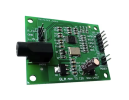
This board works fine for me. Just configure the three solder jumpers correctly:
 

Attachments

  • Bildschirmfoto 2026-10-12 um 10.44.30.png
    Bildschirmfoto 2026-10-12 um 10.44.30.png
    244.3 KB · Views: 94
a) The cheap purple PCM1808 board has a design flaw (final capacitor; see comments in the chat); I've thrown it away.
It was more or less a low pass filter quite low in frequency wasn't it? Didn't that affect just some of the boards, with it also being quite easily fixable? Mine did sound just fine though, so I take it it doesn't have that issue. Sure having to take a chance always sucks, but since it's so cheap why not?
 
Thanks for explaining! That makes sense. I'm currently using a breadboard and jumper wires for my functional tests, so I'll check the connections and consider making a soldered prototype. Also, what ADC did you use instead of the PCM1808? Was there a particular reason you chose it?

Make your life easier and get a wondom a2d pcm1822 board. It will make running balanced in much easier.
 
That’s not a rat’s nest..
This is a rat’s nest!

One pcm1801 in, four pcm5102 out all wire wrapped and as always way to compact for my own sanity.
Speaking of to small for my sanity.
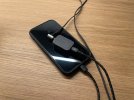
One tiny RP2350 one small pcm5102 and it all works with IOS device with usb-c, so now we can have a portable dac to the iPhone with eq compensation to taste. Or even make a pair of retrofitted vintage pair of headphones have its own eq profile. Previously I was bound to the computer and equalizer apo.
This was the first prototype https://www.waveshare.com/rp2350-ze...7l-lHayTIb-sKeqZFbbfr1hHLme9ZXrtnqdRqyvWeDJZZ

I can soon report if the next tiny rp2350 work to do the same. https://www.seeedstudio.com/Seeed-X...lTGdu4KmLmYcC50FkcfFFAir9qUw_JR3Uu1HhrPvBc6zh

Amazing project this is.
 

Attachments

  • att.46gdKTzeGMeE4YiCJzRIDRhlLZnPkHVWXm1ATtaJnLs.jpeg
    att.46gdKTzeGMeE4YiCJzRIDRhlLZnPkHVWXm1ATtaJnLs.jpeg
    41.3 KB · Views: 98
  • IMG_7422.jpeg
    IMG_7422.jpeg
    925.5 KB · Views: 104
Sure, but that's on my workplace so it will have to wait until next week.

Up until now I only reset the DSP via the RUN button, without powering down anything, and the issue went away.
Edit: funny thing, while yesterday the mids were getting louder, today the highs do, which is bad since tweeters tend to blow when they distort. So it seems to be rather random.
While testing the overhaul merge, I have been able to confirm that the level changes were a firmware problem. They were caused by the sequential output PIO divider writes required by the previous architecture.

Following the merge, this issue has been resolved. :)
 
Hi everyone, I need some help troubleshooting noise in my DSPi setup.

My current signal chain is:

Focusrite Scarlett 2i2 → PCM1808 ADC → Raspberry Pi Pico running DSPi → SPDIF DAC (192 kHz, purchased from Amazon) → Amplifier.

For the analog input, I'm connecting the Left and Right LINE outputs from the Focusrite to the PCM1808's LIN and RIN inputs, respectively. I'm using the positive signal and ground for each channel, leaving the negative terminal disconnected using XLR . So, I'm feeding an unbalanced signal directly into the PCM1808 without a balanced-to-unbalanced circuit.

The PCM1808 is connected to the Pico as per the connection diagram provided on the GITHUB and the Pico's output goes through a resistor-divider circuit to the DAC, which then feeds the amplifier.

The problem: I'm hearing a crackling noise, I noticed that the noise can also occur with the Focusrite disconnected.

I've tried reducing the Focusrite's gain, but it doesn't seem to make any difference. However, reducing the DSPi Console's master level makes the crackling less noticeable or eliminates it, and increasing the master level makes it louder again.

There was no noise when i played it through usb. It's only occuring when I'm playing it through ADC.

Could the issue be related to my unbalanced input wiring, the PCM1808 input level, grounding, or something in the DSPi configuration or output stage?

Has anyone used the PCM1808 with DSPi in a similar setup? I'd appreciate any suggestions on what to check next. I have attached the setup images below.View attachment 563909View attachment 563910View attachment 563911
Ahh guys, regarding this, I don't think the noise is because of the balanced-to-unbalanced connection, since I tried using an external bal-to-unbal circuit and also tested it with the Focusrite disconnected, but the noise was still there.

I'm thinking it might be a clocking issue with the ADC. I'm using a PCM1808 with the RP2040, GPIO21 for MCLK (default in the DSPi console), GPIO14 for BCK, GPIO15 for LRCK and GPIO4 for DOUT.

Has anyone faced a similar issue with the PCM1808 and RP2040? If it's a clocking issue, how do I go about fixing it? Is there anything specific I should check regarding the clock frequencies or timing?..Any help would be higly appreciated :) @Weeb Labs can you also look into it
 
Back
Top Bottom