Thank You very much for providing the audio player. Installed on Win11 Pro it works very good. What I really also like is the selection of web radio stations.Hi all. I’m the developer of HiFi Player, a free and open-source (GPL-3.0) music player for Windows. I’m posting here because this is the place where people will actually check the claims. No ads, no account, no paid tier.
Signal path (what it does and doesn’t do)
Output via WASAPI Exclusive (event-free polling mode) or ASIO. ASIO is driven directly through the driver’s COM interface, so no Steinberg SDK is used.
No DSP at all: no volume control, no EQ, no resampling, no ReplayGain, no dither. Samples go to the device unchanged; 16-bit material is padded into the device’s container (e.g. 16 in 24/32).
The device is opened at the file’s native rate. If it can’t do that rate, the track isn’t silently resampled: it reports that the format isn’t supported.
Gapless for consecutive tracks of the same format. Rate changes reopen the stream, and the UI says so.
The signal-path view shows the source format, the processing (normally “None”) and the device format. For ASIO it also shows the rate the driver reports it actually locked to, so a mismatch would be visible.
DSD
Native DSD over ASIO (DSD64–512) where the driver supports it, DoP for WASAPI or other DACs, and DSD→PCM only as a last resort, clearly labelled as not bit-perfect.
DSF, DFF, DST-compressed DFF (own decoder) and SACD ISO (stereo area).
A self-test plays a short, quiet DSD64 tone as DoP. If the DAC’s indicator shows DSD, the PCM path is bit-perfect, since DoP markers don’t survive any alteration.
Library / analysis
Per-track DR (TT method), integrated loudness (EBU R128), effective bit depth (OR of samples) and a high-frequency cutoff estimate. Together these flag upsampled “hi-res”, zero-padded 24-bit and probable lossy-sourced FLACs.
A spectrogram per track, for checking visually.
The meters/spectrum are display only: they read a copy of the stream timed to the output position, and DSD is shown through a separate display-only conversion.
Other inputs (all optional, and clearly not all lossless)
Spotify Connect via the unofficial librespot library: Ogg Vorbis 320 kbps, so lossy, decoded and sent unchanged at 44.1 kHz. Volume is fixed at 100%.
AirPlay 1 receiver: ALAC 16/44.1. The sender’s volume is ignored.
Lossless internet radio (FLAC streams such as Radio Paradise) and a DLNA renderer/server.
Known limitations
Windows 10/11 x64 only.
The installer isn’t code-signed yet, so SmartScreen warns. The SHA-256 hashes are in the release notes.
No multichannel output: multichannel files play their front L/R. There’s no upsampling and no DSP either, by design.
AirPlay 2 and Roon/RAAT are not supported.
What I’d appreciate
Bit-perfect verification with your own DAC/tools, for example a loopback capture compared with the source.
Reports from unusual ASIO drivers, DSD512 setups, and DACs that expose both ASIO and WASAPI.
Any case where the signal-path view claims bit-perfect when it isn’t.
Download (with SHA-256 hashes): https://github.com/ashenjay/hifiplayer/releases
Source code: https://github.com/ashenjay/hifiplayer
Thanks for looking. Critical feedback is the point of posting here.View attachment 567268View attachment 567269View attachment 567270View attachment 567271View attachment 567272View attachment 567273
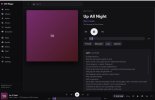
Up to now and further I use Audirvana (France) the old first one which works also very good. The layout and look of your program reminds me to Audirvana.,
Great work well done. Congratulations.