• Welcome to ASR. There are many reviews of audio hardware and expert members to help answer your questions. Click here to have your audio equipment measured for free!

E1DA Cosmos ADCiso

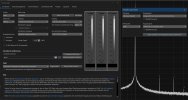
Like I said, you can run two instances of REW, one acting as the generator with the Motu and its ASIO driver, and the other for the Cosmos with Java driver.
Else buy a simple DDC like the SMSL PO100 Pro, no brainer.
Found a way to use REW with MOTU and COSMOS in one Instance with Flex Asio:

REW with MOTU and Flex Asio.jpg

Use Flexasio but don't aktivate WASAPI Exclusiv at FlexASIO Control Panel!
Now it works prety well ;)
 
How do you do that specifically?
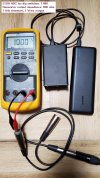
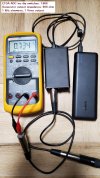
If you wish to measure AC voltage (ACV) at frequencies of 100 Hz or higher using a DMM, please check the DMM's frequency range specifications beforehand.
1746805693055.png
 

Attachments

  • 0101_e1da_adciso.jpg
    0101_e1da_adciso.jpg
    146.3 KB · Views: 66
  • 0102_e1da_adciso.jpg
    0102_e1da_adciso.jpg
    140.8 KB · Views: 62
Could I use these, connect one end to the processor out, other end to the Cosmos, then connect each of the pins using say stranded wire and measure the load that way
(measure it unloaded then loaded)?

View attachment 569188
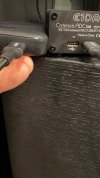
An XLR splitter cable is likely the easier way, see the pictures in the post above.
 
Could I use these, connect one end to the processor out, other end to the Cosmos, then connect each of the pins using say stranded wire and measure the load that way
(measure it unloaded then loaded)?

View attachment 569188
Sure, this would work.
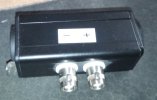
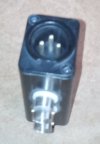
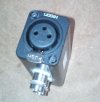
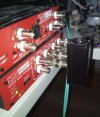
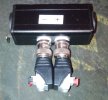
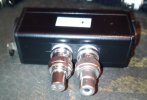
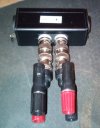
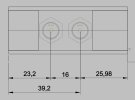
I made me this Adapter for BNC (Balanced Preamp to Scope, and for QA403 use , for all possibilitys, like XLR to RCA and so on)

IMG_20261029_122916_6.jpg IMG_20261029_121528_9.jpgIMG_20261029_121537_2.jpg IMG_20261030_164444_9.jpg IMG_20261103_220605_1.jpg IMG_20261103_220621_4.jpg IMG_20261103_220647_7.jpg

But you still need some XLR Wire from Source to ADC

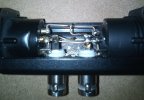
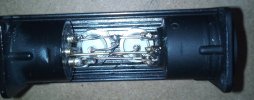
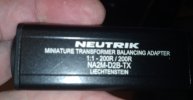
I had some Neutric XLR to RCA Isolators laying around, so i could remove the little Transformer and Changed the XLR (RCA) Connector on one Side to an Male or Female XLR Connector so i had both Versions on one Adapter and added two BNC Connectors to + and - with Silver wirering, 1mm i guess.

ebd4dc1fbad1d99b6a6101f29bf62b518537e05b.jpeg 67dea39eb3dd2420b8a9458c0cf91110905ce033.jpeg 5401207ce6d33d9c616fcc37100dada8db9dd8c3.jpeg ca86355c3357e894d24efafc13b20d7d1ef9da08.jpeg

For now this Isolators cost 35€ in Germany so not an cheep option, but i had 6 of them Unused for years so anyway ;)

If you want to make it cheeper you can buy this Neutric enclousure and XLR Connector's to build it by youre own completely:

https://www.thomann.de/de/neutrik_na_housing.htm

https://www.thomann.de/de/neutrik_nc3f_dlx_b.htm

https://www.thomann.de/de/neutrik_nc3m_dlx_b.htm

And 2 BNC Connector needed.
 
Last edited:
Ugh. Feeling quite humiliated/humbled/stupid at this point. Spent 12 hours trying to run measurements using the Cosmos. For the life of me, I can't get REW, Phonalyser, Sound Recorder or even the basic Windows Input sound test (when connected to the Cosmos) to recognize a signal.

Cosmos first powered on via powerbank, then plugged in via USB. Windows recognizes the Cosmos and my processor.

Front R XLR connected to the Cosmos (via Y-XLR cable), have tried both left and right. Left and right on Cosmos. Java. FlexASIO.

If I measure using a VMM or FINSRI, voltage is measured when I send a signal via REW (or just a bluray). Below is a chatgpt summary of what I've tried and results, if helpful.

Honestly at a loss as to what to try next.

Current status: We have confirmed that REW generates a signal that reaches the AT-600's analog XLR output. However, REW is not receiving a usable signal from the Cosmos ADC. We have also observed an unusually large voltage reduction when the Cosmos is connected and powered.

1. Equipment and configuration​

ComponentDetails
ProcessorTonewinner AT-600
ComputerWindows laptop, HDMI to AT-600
Measurement ADCE1DA Cosmos ADC
ADC sensitivityDIP switch row 3, nominal 1.66 Vrms at −0.5 dBFS
SoftwareREW V5.40 Beta 139
Audio interfaceFlexASIO initially; Java subsequently
OscilloscopeFNIRSI DSO-TC3
MultimeterKlein CL120
XLR connectionsHosa YXM121 splitter and XLR screw-terminal breakout
Test signal100 Hz sine, −6 dBFS
AT-600 volume−10 dB
Sampling rate48 kHz
Processor EQOff
Power amplifiersMuted
We previously verified the XLR breakout pin assignments:

Breakout terminalXLR pin
GNDPin 1
LPin 2 (hot)
RPin 3 (cold)
The FNIRSI oscilloscope was previously calibrated, and the breakout wiring was checked for continuity and shorts.


2. Analog output and Cosmos loading measurements​

These tests investigated whether connecting the Cosmos changes the AT-600's output voltage.

At 100 Hz — Klein CL120​

Cosmos connectionMeasured voltageChange vs. disconnected
Cosmos XLR disconnected0.288 VrmsBaseline
Cosmos XLR connected, USB power disconnected0.222 Vrms−22.9%
Cosmos XLR connected, powered by USB power bank0.126 Vrms−56.3%

At 1 kHz — Klein CL120​

Cosmos connectionMeasured voltageChange vs. disconnected
Cosmos disconnected0.344 VrmsBaseline
Cosmos connected, unpowered0.265 Vrms−23.0%
Cosmos connected, powered0.142 Vrms−58.7%
Important: The Klein CL120 is specified for AC voltage measurements at 45–400 Hz. The 100 Hz measurements are therefore more reliable than the 1 kHz measurements.

What we established​

Connecting the Cosmos produces a substantial measured voltage reduction, especially when powered.

The Cosmos's nominal balanced input impedance is approximately 8.8 kΩ. Such a large reduction is unexpected for a conventional low-impedance preamplifier output.

We have not established why this happens. Possible causes include loading, wiring interactions, ADC input configuration, or an output-stage issue. We should not conclude that either device is defective yet.


3. Earlier oscilloscope measurements​

Using the FNIRSI DSO-TC3 at 1 kHz, measuring individual balanced XLR legs relative to pin 1:

AT-600 volumeCosmosApprox. voltage
−20 dBDisconnected0.05 Vrms
−20 dBConnected0.04 Vrms
−10 dBConnected0.15 Vrms
−10 dBDisconnected0.17 Vrms
These measurements also suggested a voltage reduction when the Cosmos was connected, although the reduction was smaller than in the later Klein tests.

Because the oscilloscope measured individual XLR legs while the Klein measured the differential output, these results are not directly interchangeable.


4. Windows and REW troubleshooting​

We spent considerable time determining whether the problem was Windows audio routing, REW configuration, or the Cosmos ADC.

Test or changeResult
REW with FlexASIONo usable signal in RTA
FlexASIO output device changedDid not resolve problem
Cosmos selected as FlexASIO inputNo usable signal
Windows Sound Recorder using CosmosInitially unstable; subsequently remained running but showed no meaningful waveform
Windows microphone testInitially 0%
Changed Cosmos Windows format to 24-bit, 48 kHzWindows microphone test subsequently reported 29%
Checked Windows Device ManagerIntel Display Audio and Cosmos ADC both listed
Checked Windows Playback devicesAT-600 recognized and set as default
Windows audio activity barPulsated, indicating Windows playback activity
Changed REW driver from FlexASIO to JavaAT-600 and Cosmos became explicitly selectable
Selected EXCL: AT-600 outputREW recognized HDMI device
Selected EXCL: Cosmos ADC inputREW recognized ADC
REW output set to ROutput meter showed −6 dBFS
REW input set to L, then RNeither showed a usable tone
The Windows microphone test reaching 29% was encouraging, but it did not establish that REW could capture the correct analog signal.

Current REW settings​

SettingValue
DriverJava
Output deviceEXCL: AT-600 (Intel Display Audio)
OutputMaster Volume, R
Input deviceEXCL: Cosmos ADC
InputLINE_IN (Master Volume)
Input channelL or R tested
Sample rate48 kHz
Generator100 Hz, −6 dBFS

5. Definitive REW-to-AT-600 output test​

We measured the Front Right balanced XLR output using the Klein CL120 while toggling REW's generator.

Generator stateMeasured XLR voltage
ON — 100 Hz, −6 dBFS0.126 Vrms
OFF0 Vrms
Conclusion: REW is successfully producing a signal that reaches the AT-600's Front Right XLR output.

This rules out a complete failure of the REW-to-HDMI-to-AT-600 signal path.

It does not establish that the output level is correct or that the signal is distortion-free.


6. Cosmos input channel comparison​

With the 100 Hz generator running, we switched REW's input selection between Left and Right.

Cosmos input channelREW input meter
Left−89.52 dBFS
Right−87.68 dBFS
The RTA also displayed approximately −125 to −237 dBFS in different captures, without a clearly visible 100 Hz tone. These RTA figures are not directly comparable to the input-meter readings.

Conclusion: Neither selected input channel is showing the expected signal. Switching L/R did not fix the problem.

At the Cosmos's nominal sensitivity, a genuine 0.126 Vrms balanced input would ordinarily correspond to approximately −22.9 dBFS, assuming no additional attenuation. Our observed readings are dramatically lower.


7. What is confirmed versus unresolved​

QuestionStatusFinding
Does Windows recognize the AT-600? ConfirmedYes
Does Windows recognize the Cosmos? ConfirmedYes
Does REW send a signal to the AT-600? Confirmed0.126 Vrms ON, 0 V OFF
Are XLR breakout pins identified? ConfirmedPins 1, 2, 3 verified
Does Cosmos connection affect measured voltage? ObservedYes, substantially
Is REW capturing the expected signal? NoNeither input channel shows the tone
Is the Cosmos ADC itself defective? UnknownNot established
Is the AT-600's XLR output defective? UnknownNot established
Can we calculate reliable SINAD yet? NoValid ADC capture required

8. Recommended next steps​

I would stop changing REW's output settings. We have already proved that the generator reaches the processor.

The remaining work should focus on two separate issues:

  1. ADC capture: Verify the Cosmos's physical input connection, USB data connection, and actual signal capture independently of REW's generator. This should establish whether the ADC can correctly digitize a known analog signal.
  2. Unexpected loading: Once capture works, investigate why powering the Cosmos appears to reduce the AT-600's measured voltage from 0.288 to 0.126 Vrms.
Only after those issues are resolved should we calibrate REW's full-scale voltage, switch to a 1 kHz distortion test, and calculate SINAD.

Bottom line: We have made meaningful progress identifying the problem. The AT-600 receives the REW test tone and produces an analog output. The unresolved problem is the Cosmos measurement path, including the unexpectedly large voltage reduction when it is connected and powered. We should isolate that path before doing any more processor performance testing.

 
Has you something else to measure like an DAC or an Audiointerface with higher Level?

As long the green LED does not blink or Light on there is no signal thats goes into ADC DM, on all my tests every Time i play an Signal the green LED below XLR Connector goes on.

0,126 Vrms seems realy Low on XLR Out, I use an DAC thats gives 4,7Vrms into COSMOS ADC DM and that was already working with the defoult ADC DM switch position.
When i testet it first Time.

Has you installed the COSMO ADC DM Driver (SXW_setup_WHQL_20210429.rar) :

https://discord.com/channels/483873307251310592/893040136412082178

Look also here, nice dokumention / Review with all you need to know:
https://boizoff.com/language/en/e1da-cosmos-adciso-analog-to-digital-converter-review/

The ADC without an SCALAR has an Low Input impedance so may be that why youre AT-600 Output get down when connected to that ADC, only suggesting.

I got an SCALER after testing the ADC first Time, it makes it much more userfriendly ;)

Put the Switches up to the highest Value 9,5Vrms, and the SCALER has an Amplification Knop up to 26dB with 16 Position, and an Autoranger that's target to 4,6Vrms on Output.
So you don't need to fidle around with this little switches anymore.

Also puts the ADC in to mono Mode if only one input is used on the SCALER and both Output's are connected to the ADC DM.

129€ without Taxes isn't to much i would say.
 
Last edited:
Feeling quite humiliated/humbled/stupid at this point. Spent 12 hours trying to run measurements using the Cosmos.
The issue might be that you are wasting your time with AI.

What we established​

Connecting the Cosmos produces a substantial measured voltage reduction, especially when powered.

The Cosmos's nominal balanced input impedance is approximately 8.8 kΩ.

Which is simply false.

Test signal100 Hz sine, −6 dBFS
AT-600 volume−10 dB
This is also wrong. As I said in my previous post, first of all, you should set everything to maximum output (100% volume or 0 dB attenuation) and then verify the output voltage without a load.

Debugging the ADC side makes no sense if you can't measure the nominal 4 Vrms at the XLR output using a DMM.

Anyway, the Tonewinner AT-600, with its 1 kΩ output impedance, is not really suitable to be directly measured with the E1DA Cosmos ADCiso.
To be honest, I would consider such a high output impedance to be really poor engineering by today's standards. It's no longer the tube era, 50-100 Ω is the current standard.

A Cosmos Scaler with 100/200 kΩ input impedance, or any other high-input-impedance buffer, would be needed to measure AT-600 accurately.


BTW. What is your goal? Do you want to verify the AT-600's performance, or are you preparing a test setup for measuring other devices and testing loopback performance first?
 
The issue might be that you are wasting your time with AI.


Which is simply false.


This is also wrong. As I said in my previous post, first of all, you should set everything to maximum output (100% volume or 0 dB attenuation) and then verify the output voltage without a load.

Debugging the ADC side makes no sense if you can't measure the nominal 4 Vrms at the XLR output using a DMM.

Anyway, the Tonewinner AT-600, with its 1 kΩ output impedance, is not really suitable to be directly measured with the E1DA Cosmos ADCiso.
To be honest, I would consider such a high output impedance to be really poor engineering by today's standards. It's no longer the tube era, 50-100 Ω is the current standard.

A Cosmos Scaler with 100/200 kΩ input impedance, or any other high-input-impedance buffer, would be needed to measure AT-600 accurately.


BTW. What is your goal? Do you want to verify the AT-600's performance, or are you preparing a test setup for measuring other devices and testing loopback performance first?
Verify the AT-600 performance.
 
Last edited:
As an aside, when I plug the power bank into the Cosmos, I don’t get any sign that it is “on” unless I then plug the usb into a laptop. Is that normal or should there be some light that indicates it is properly powered?
 

Attachments

  • IMG_9770.jpeg
    IMG_9770.jpeg
    388.6 KB · Views: 22
Thats normal, here the Same.
Orange LED works only with that, close by, USB-C Connector not with the Power USB-C Connector.
 
Last edited:
Thats normal, here the Same.
Orange LED works only with tat, close by, USB-C Connector not with the Power USB-C Connector.
Ha…a simple led would’ve been appreciated to know it’s on! :)
 
Do I have my sound card preferences correct here? Have tried Windows input ADC volume at 0% (stereo) and 100% (mono), but I don't seem to get any input from the Cosmos? Have also tried Flex ASIO, L and R channels.

1794058693559.png
 
Which version do you have - Cosmos ADC, Cosmos ADCiso or the new Cosmos ADC DM?

I'm not sure how ADC DM works, but I suppose two channels are stereo regardless of volume slider position.
 
Newer one. DM. Also going to try it on my WiiM Ultra to see if it’s something weird with the AT-600. That impedance number seems odd…doesn’t show it on ToneWinners website. But I assume that snip was from marketing material at some point.
 
Alright, switched t omy WiiM Ultra and read a 1khz 0dbfs .wav file via USB at 100 volume, connected to my cosmos and REW. Reads 113db SINAD which I guess is pretty darn close to Amir's 115 (mabye the USB input is different from what Amir measured, and/or obviously significantly better equipment at his end).

So that at least tells me the Cosmos is working.
 
Alright, switched t omy WiiM Ultra and read a 1khz 0dbfs .wav file via USB at 100 volume, connected to my cosmos and REW. Reads 113db SINAD which I guess is pretty darn close to Amir's 115 (mabye the USB input is different from what Amir measured, and/or obviously significantly better equipment at his end).

So that at least tells me the Cosmos is working.
For the 113dB SINAD, what input sensitivity was the Cosmos ADC set to, and what dBFS input signal strength was reported by REW?
 
For the 113dB SINAD, what input sensitivity was the Cosmos ADC set to, and what dBFS input signal strength was reported by REW?
Left it at row 3 so the 1.66 setting.

Thinking about it though, I believe I had made a change in REW when I calibrated the sound card when playing around with the AT600. Actually, no, that was on the generator page so shouldn't impact anything as I didn't generate the tone via REW.

1794073204272.png
 
1. Set all volume levels on your hardware to 100% / 0 dBFS
2. Calibrate Generator "FS sine Vrms" in REW according to instructions
View attachment 569138

3. Calibrate Input "FS sine Vrms" in REW according to instructions
View attachment 569136

Remember to measure voltage differentially between XLR pin 2 and 3 using DMM.
Forgot to ask, in the first shot you have -9dbfs on the signal. Should I measure at that or at 0dDBFS?
 
Left it at row 3 so the 1.66 setting.
Just to make sure that we're on the same page:

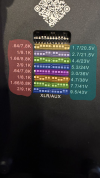
1793636618849.png

The Cosmos ADC has eight different input sensitivity settings.

On the left in Red are the Input impedances of each setting in kΩ (XLR/AUX).

On the right in Blue are the Input sensitivities in Vrms input for -0.5dBFS output (XLR/AUX).

The DIP switches must be set symmetrical to the colon symbol in the middle, to have the same sensitivity for both inputs.

With 0dBFS input and 100% volume, the WiiM Ultra will output 2.05Vrms.

That REW is showing -6.82dBFS with that signal amplitude, means that the Cosmos ADC was set to 4.4Vrms sensitivity.
 
Last edited:
Forgot to ask, in the first shot you have -9dbfs on the signal. Should I measure at that or at 0dDBFS?
It doesn't really matter as REW will take it into account.
I usually calibrate my devices at 0 dBFS, screenshot was just for reference.
 
Back
Top Bottom