• Welcome to ASR. There are many reviews of audio hardware and expert members to help answer your questions. Click here to have your audio equipment measured for free!

E1DA Cosmos ADCiso

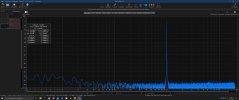
Same Problem with 48kHz, 41kHz

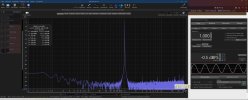
View attachment 566409 View attachment 566410

Is it an JAVA or MOTU Driver Problem , i need to ask LOOOL

I have an Terratec Interface with SPDIF may be it will work better or i use an HDMI to SPDIF Extractor i am Working on for my Project with CamillaDSP 7.1 full aktive Setup
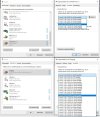
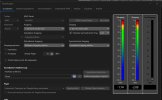
Open the Windows Sound Control Panel -> Playback -> right-click Motu mk5 -> Properties -> Advanced and send a screenshot of the available audio formats.

Also repeat the same for the Cosmos DM.
 
I used REW now for long time but never got this kind off Errormessage before, i could remember, LOOL
Before ui used QA403 for measuring (ASIO) or ZOOM U-44.
But now have an idea where to look at, i will tell you if i get this Fixed soon

Will try the ZOOM U-44 interface it has SPDIF in and Out also!
 
Window10 Soundsettings Formats.jpg
 
Got it , i use ZOOM U-44 SPDIF OUT to SU-2 it looks now this way much better also REW on 32Bit now, so it was an MOTU Driver problem i guess ;) :

SU-2 on ZOOM- U-44 SPDIF Out.jpg
 
I used REW now for long time but never got this kind off Errormessage before, i could remember, LOOL
Before ui used QA403 for measuring (ASIO) or ZOOM U-44.
But now have an idea where to look at, i will tell you if i get this Fixed soon

Will try the ZOOM U-44 interface it has SPDIF in and Out also!
Seems like REW with EXCL I/O cannot handle DACs and ADCs with different bit depth support.

(Perhaps @JohnPM could look into that?)

In the meantime, if you want to stick to REW on Windows, I suggest you use FlexASIO with the FlexASIO GUI and set the driver type to WMD-KS or Wasapi Exclusive.
 
Seems like REW with EXCL I/O cannot handle DACs and ADCs with different bit depth support.

(Perhaps @JohnPM could look into that?)

In the meantime, if you want to stick to REW on Windows, I suggest you use FlexASIO with the FlexASIO GUI and set the driver type to WMD-KS or Wasapi Exclusive.
I had Flextool installed with the latest Version longer time ago and this won't work with COSMOS from the beginning (ERROR Massages), now i reinstalled Flextool again with Version V1.10b and now it worked, LOOOL

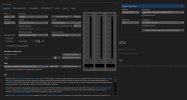
This had worked now:
Flex Asio.jpg

Sometimes Windows is a Bitch ;)
 
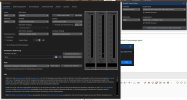
Tried MOTU again after reinstalling Flextool but no luck, Errormassage again!

1792931413485.png


Flex Asio MOTU Error.jpg
 
I installed REW so I can run multiple version of it. With the Motu Mk5, I use one REW instance with its ASIO driver and another instance with the windows driver (Java in REW) for the Cosmos DM.
Only the sweeps can’t be performed that way from RTA because one REW instance is only the Generator and the other the Analyzer.
Alternatively, with the Motu CueMix interface, you can set the input/output to be seen as EXCL in/out but I think I had the issues you describe, and I’m not using it that way.
Which Firmware and Cuemix version you are using on youre MOTU?
I have an second MOTU UL Mk5 with older Firmware i will test it this afternoon may be it has something with the Firmware to do, not sure.

Also geting my COSMOS Scaler this day ;) to play with another toy LOOL.

ON COSMOS ADC i don'T like this little smal switches for Inputlevel Switching, i wisch i could replace it with Relais Board and Arduino for an faster selection in an biger enclousure placing all 3 COSMOS Devices in.
 
If you use the scaler, go for 10V input on the ADC and adjust the input gain with the scaler to be close to 0dBFS so you get the max resolution of the Cosmos DM. Keep some headroom though, -0.1dBFS max at its input is safe.
You can also use the scaler in auto mode, quite practical for Distortion/IMD sweeps (when using REW).
 
Which Firmware and Cuemix version you are using on youre MOTU?
Here you go:

1793193409637.png


And see that I enabled Windows Audio Streams but I get the same error as you when trying to use the Java drivers in REW:

1793193599782.png


I think it worked in the past, probably a Windows update got in the way. No issue with the ASIO driver of the Motu though:

1793194491911.png
 
Alright, if your DUT has noise(the THD component is far from that level -137db, so we'll omite that) -126db, and ADC as well -126db, the result should be 3db worse i.e. -123db. Hence, your DM THD+N = -126db. So, what is your verdict? Is DM grade B better than ADCiso grade 0?
Hi Ivan, sorry I never replied to your question.

For the way I've been using the ISO, that is with 10V input and the scaler in front, to measure high res DAC at 4Vrms output, and meaning I increase the gain by 7dB, I think yes.

For instance this is the ISO (in mono mode) measuring the SMSL DO400 (no APU notch here):

1793203556984.png


Now the same with the Cosmos DM in stereo mode:

1793203916961.png


It's logically almost identical.

Now if I use the virtual balanced mode of REW, therefore using both inputs of the Cosmos DM Grade B, then I get:

1793204082798.png


That's indeed better.

Anyways, worst case scenario, the Cosmos DM can report the same performance as the AP of Amir, because the SMSL DO400 I used for these tests is the one that Amir reviewed here (I bought it back from him). And this is without using a notch, meaning it's really interesting performance when it comes to run high precision sweeps.

The DM Grade B in virtual (REW) balanced mode beats the ISO Grade 0 in that particular case, but also when set at other input voltages, eg here below:

1793206167156.png
 
Why do you use that Zoom interface?
Try PC (REW) -> SU-2 -> Cosmos DM -> PC (REW).
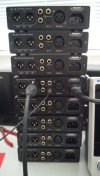
SU-2 didn't has USB!!! I only need it for AES in and XLR Out 8 Devices 16 Channels on RME HDSPe AES Card ;)

Best Picture ever ;) LOOOOL

8x SU-2.jpg

An other Problem i don't understand is the Outputlevel on SU-2 Datasheet says :

1793213493050.png

I am Measure only 2,54Vrms from + to - on XLR Out with 0,5dBFs and around 2,7VRms at 0.0dB FS, thats wrong i would say!!!

I maesured on Scope from + to GND 1,3Vrms around at 1kHz so my Hanheld AC Meter works fine with ACrms at 1kHz!

I tested 2 different SU-2 and both the same, only 2,54Vrms at -0,5dBFS on an 1m Cable XLR to 3,5mm TRS (Balanced).
 
Last edited:
Found the Problem, is ZOOM U-44 i can't understand why but it gives only half Amplitude out on SPDIFF even Windows Soundsettings at 100% Outputlevel!!!

I used now the MOTU SPDIF OUT and full Power there at 0.0dBFS on SU-2 4,77Vrms now!!!
Can't believe this shit, also flashed to the new Firmware (1.1) on U-44 was not helping after rebooting,
Probbly on ZOOM U-44 the Volumeknob on the Device has overide over Driver Settings, not sure for now why the hell on SPDIFF Out too....!!!
 
that's cheap utility gear, the E1DA must be embarassed
 
Last edited:
Yeah Windows kepping beeing a bitch ......

Now with Motu again no chance to measure with COSMOS at the same time with ASIO or JAVA EXCL Driver.....!!!

Lost in Windwos COSMOS i would say LOOOOL

SO the only chance now using my HDMI to AES Extractor.....
 
Back
Top Bottom