• Welcome to ASR. There are many reviews of audio hardware and expert members to help answer your questions. Click here to have your audio equipment measured for free!

E1DA Cosmos ADCiso Review

Rate this ADC:

  • 1. Poor (headless panther)

    Votes: 4 2.3%
  • 2. Not terrible (postman panther)

    Votes: 1 0.6%
  • 3. Fine (happy panther)

    Votes: 17 9.8%
  • 4. Great (golfing panther)

    Votes: 152 87.4%

  • Total voters
    174
Hello all, and @IVX — this one's built around your hardware, so I hope it's welcome here.

I've released Phonalyser, a free, open-source (AGPLv3) audio analyzer for Windows / Linux / macOS (soon), written with the Cosmos ADC / ADCiso as the reference front end. The Cosmos is doing the heavy lifting; the software just tries to get everything out of it.
What it adds on top of the ADC:

  1. Coherent averaging with a frequency-locked loop. Frames are summed in the complex domain and the residual DAC↔ADC clock offset is tracked out, so incoherent noise falls as 1/√N while harmonics stay put. With the ADCiso's floor and a disciplined crystal-DDS source, the floor keeps dropping and THD becomes repeatable to 7 digits instead of wandering in the last decade. The FLL handles the usual case of DAC and ADC on different crystals, as long as each is stable.
  2. Automatic magnitude+phase compensation, one mouse click. Characterize loopback and notch once with a Farina log-sweep; every harmonic behind the notch is then corrected automatically, phase included. Several notch/filter profiles can be stored and switched with a single click — handy when swapping between an APU, a Twin-T, or different chains.

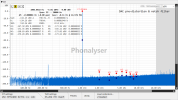
Example attached: 1 kHz through a −80 dB notch into a Cosmos ADCiso, a few thousand coherent averages. The source is a crystal-locked software DDS played out through a Kaamos Tech W-DAC v2 fed via a JLSounds I2SisoUSB (isolated) bridge — H5 sits at about −166 dBV and reads stably, invisible without the notch compensation and averaging working together. No mains spikes with suppression off, for what it's worth (Faraday-caged rig).
Also inside: FFT to 1M, HFT248D flat-top and other windows, overlap to 93.75 %, THD/THD+N/SNR/ENOB/IMD, an oscilloscope module with WAV/AIF/FLAC I/O, and frequency-response tools with RIAA overlays.
The UI is in 32 languages (Help currently in 3), but these are machine translations that need a human eye — native speakers, corrections to labels or Help text (especially the measurement terminology) are very welcome, via a GitHub issue/PR or just here.
Source and releases: https://github.com/dgo42/Phonalyser
Windows build (signed) on the Microsoft Store: https://apps.microsoft.com/detail/9nr1w5dkw71m
(macOS build tested, certification pending; a browser version with ~99.9 % of the functionality runs from the project page.)
Theory of operation — the algorithms and principles behind the coherent engine — is in the Help: https://dgo42.github.io/Phonalyser/web/help/en/theory/index.html
@IVX, I'd genuinely value your take, since it's your ADC making the numbers possible. And for anyone measuring DACs/amps with a Cosmos here — feedback, bug reports and "does your seventh digit survive this" challenges all welcome.

 

Attachments

  • fft-ultralow-thd.png
    fft-ultralow-thd.png
    70.3 KB · Views: 133
Wow, congrats!
 
well done ;-)
the possibility of using correction curves? Or even differentiated corrections for Left and Right?
;-)
 
well done ;-)
the possibility of using correction curves? Or even differentiated corrections for Left and Right?
;-)
There is a lot of things: frequency response measurement of loopback, notch filter which can be used to subtract it from calculated FFT or frequency response. There is also notch filter tuning wizard with fast Farina sweep (3-4 time per second), and DAC predistortion wizard, which calculates harmonics to be added to the DAC output to compensate DAC & it's amplifier outputs distortions.

The blue dots - is the calculated harmonics magnitude and red dots - are automatically compensated by negative freq response of both loopback and the filter. The entire THD table is also calculated using compensated values.
 
Last edited:
I was just thinking about correction curves to pair with the frequency response measurements... I don't really see it... ;-)
 
Have you installed the app? FFT calibration is under "Load calibration...". Help from web app https://dgo42.github.io/Phonalyser/web/help/en/fft.html#fft-tab-calibration

You need first make frequency response of loopback (DAC direct to ADC), save it to the file (Save to...), load it to frequency response "Load calibration..." to subtract loopback freq. resp. from next measured notch filter. Then measure freq. resp. of the notch filter and save it to the file too. The load both to the FFT calibration. Once it is done, you can repeat using this calibration. To avoid notch filter temperature drift you can specify fundamental magnitude manually in THD settings (It's analog to REW).
 
There was question in diyAudio and I think my answer can be interesting also here:
janfi67 said:
I'm not sure I understand the difference compared to using REW with a calibration file for the soundcard and the notch(es).
Main differences:
  • discontinuity detection (don't exists in REW)
  • more calculation precision - 8 decimal digits (only 6)
  • DAC predistortion wizard & generator with applied predistortion for single sine and dual sine for IMD measurement (don't exists in REW)
  • automated loopback/notch frequency response compensation on the graph and measurement table (in REW should be manually substracted/added on separate place)
  • notch filter tuning (don't exists in REW)
And multiple small bonus:
  • oscilloscope with stable trigger synchronization of 20uV signal RMS on 8uV noise RMS using mains filter and/or 80kHz LFP. Also present glitch trigger. And multiple signal measurements. AC/DC, linear/sin(x)/x interpolation. Can be used as separate tool (in REW much simpler)
  • All signal views oscilloscope/FFT/FreqResp has ability to zoom/pan using mouse wheel + shift + ctrl. There is also rubber band zoom in all view with ctrl+z rollback buffer per view. (In REW less possibilities - little bit complexer)
  • FFT/FreqResp readout cursor showing frequency and magnitude under cursor (and cursor y-position) (In REW only X/Y values not the signal magnitude)
  • all 3 view has presets - all current settings can be saved and later restored from the list (don't exists in REW)
  • generator & oscilloscope/FFT/FreqResp has calibration and possibility to create screenshot with desired resolution and user comment for documentation (same feature as in REW)
  • It is possible to save generator signal (ideal sine wave for example) or play some ready audio file. (same feature as in REW)
  • It is also possible to save audio signal in oscilloscope or load into it some audio file for manual investigation (both don;t exists in REW)
  • Both FFT&FrerResp can also save and load it files. FreqResp file is also used for FFT&FreqResp compensation. In FFT using FreqResp compensation is also possible apply compensation not only to fundamental& harmonics, but also to noise floor, but it make sense only in special cases. (works little bit different in REW and not everything is possible)
Almost forgotten:
  • In FreqResp module it is possible to show RIAA filter curve aligned with DUT FreqResp @1kHz, you ca also add IEC amendment or even reverse both to test reverse RIAA filter for measuring phono preamplifier. There is also compare method. This feature makes possible to measure freq. resp. of phono preamplifier very precisely independent of used reverse RIAA filter at all, because we are able tu subtract filter own response from measured filter -> DUT and then compare to ideal, based on formula. This feature I have completely missed in REW. Yes it is possible to calculated manually, but it is expensive! So this app is also practical for somebody building/developing phono preamplifier too.
  • In plan add some standard LPF, HPF, bandpass, notch filter response to ne able to tune or simple measure different active/passive filters
All files except audio has CSV format and also human readable.

P.S. To be clear. REW is a brilliant software and I have learned a lot from it. But I missed some crucial features and frankly - REW is little bit more suitable for acoustic measurements (with 3D and so on) where my app - only for audio device measurement without acoustic path.
 
Hello all, and @IVX — this one's built around your hardware, so I hope it's welcome here.

I've released Phonalyser, a free, open-source (AGPLv3) audio analyzer for Windows / Linux / macOS (soon), written with the Cosmos ADC / ADCiso as the reference front end. The Cosmos is doing the heavy lifting; the software just tries to get everything out of it.
What it adds on top of the ADC:

  1. Coherent averaging with a frequency-locked loop. Frames are summed in the complex domain and the residual DAC↔ADC clock offset is tracked out, so incoherent noise falls as 1/√N while harmonics stay put. With the ADCiso's floor and a disciplined crystal-DDS source, the floor keeps dropping and THD becomes repeatable to 7 digits instead of wandering in the last decade. The FLL handles the usual case of DAC and ADC on different crystals, as long as each is stable.
  2. Automatic magnitude+phase compensation, one mouse click. Characterize loopback and notch once with a Farina log-sweep; every harmonic behind the notch is then corrected automatically, phase included. Several notch/filter profiles can be stored and switched with a single click — handy when swapping between an APU, a Twin-T, or different chains.

Example attached: 1 kHz through a −80 dB notch into a Cosmos ADCiso, a few thousand coherent averages. The source is a crystal-locked software DDS played out through a Kaamos Tech W-DAC v2 fed via a JLSounds I2SisoUSB (isolated) bridge — H5 sits at about −166 dBV and reads stably, invisible without the notch compensation and averaging working together. No mains spikes with suppression off, for what it's worth (Faraday-caged rig).
Also inside: FFT to 1M, HFT248D flat-top and other windows, overlap to 93.75 %, THD/THD+N/SNR/ENOB/IMD, an oscilloscope module with WAV/AIF/FLAC I/O, and frequency-response tools with RIAA overlays.
The UI is in 32 languages (Help currently in 3), but these are machine translations that need a human eye — native speakers, corrections to labels or Help text (especially the measurement terminology) are very welcome, via a GitHub issue/PR or just here.
Source and releases: https://github.com/dgo42/Phonalyser
Windows build (signed) on the Microsoft Store: https://apps.microsoft.com/detail/9nr1w5dkw71m
(macOS build tested, certification pending; a browser version with ~99.9 % of the functionality runs from the project page.)
Theory of operation — the algorithms and principles behind the coherent engine — is in the Help: https://dgo42.github.io/Phonalyser/web/help/en/theory/index.html
@IVX, I'd genuinely value your take, since it's your ADC making the numbers possible. And for anyone measuring DACs/amps with a Cosmos here — feedback, bug reports and "does your seventh digit survive this" challenges all welcome.
Hmm, perhaps I'm stupid, but how to install that? What about stright phonalyser.exe link?
chrome_g167SM6RYu.jpg
 
Hmm, perhaps I'm stupid, but how to install that? What about stright phonalyser.exe link?
Hmmm, this is my first experience with Microsoft Store. It was only one possibility to cheap sign app. Otherwise user will get note, that app is not signed.
The app is opened for all markts except one... Are you in China? Maybe it is some restrictions in China?
I'm currently in Spain and have tried to download app offline installer:
winget download --id 9NR1W5DKW71M --verbose-logs
But got:
Could not resolve host: storeapps.api.cdp.microsoft.com (Could not contact DNS servers)
Even manual added 8.8.8.8 & 1.0.0.1 as DNS doesn't help
But normal Microsoft Store works. I have reinstalled app successfully.
You can download exe installer or simple jar here: https://github.com/dgo42/Phonalyser/releases
You can use jar previously install Java 17 (for example corretto):
java -jar phonalyser-1.0.3-windows.jar
or simple use
Phonalyser-windows.bat
All assets on GitHub are build on GitHub CI and are safe.
P.S. MS Store shows some ISBN (it's not a book ) required:
1783493728149.png

P.P.S. I have downloaded signed offline installer and added it to the GitHub release also updated release readme.
 
Last edited:
New to the forum. Where can I buy one of these? Aliexpress doesn't seem to carry it currently.
 
New to the forum. Where can I buy one of these? Aliexpress doesn't seem to carry it currently.
Welcome to ASR. Cosmos ADCiso is discontinued and a new version Cosmos ADC DM is coming, see messages above.
 
There was question in diyAudio and I think my answer can be interesting also here:

Main differences:
  • discontinuity detection (don't exists in REW)
  • more calculation precision - 8 decimal digits (only 6)
  • DAC predistortion wizard & generator with applied predistortion for single sine and dual sine for IMD measurement (don't exists in REW)
  • automated loopback/notch frequency response compensation on the graph and measurement table (in REW should be manually substracted/added on separate place)
  • notch filter tuning (don't exists in REW)
And multiple small bonus:
  • oscilloscope with stable trigger synchronization of 20uV signal RMS on 8uV noise RMS using mains filter and/or 80kHz LFP. Also present glitch trigger. And multiple signal measurements. AC/DC, linear/sin(x)/x interpolation. Can be used as separate tool (in REW much simpler)
  • All signal views oscilloscope/FFT/FreqResp has ability to zoom/pan using mouse wheel + shift + ctrl. There is also rubber band zoom in all view with ctrl+z rollback buffer per view. (In REW less possibilities - little bit complexer)
  • FFT/FreqResp readout cursor showing frequency and magnitude under cursor (and cursor y-position) (In REW only X/Y values not the signal magnitude)
  • all 3 view has presets - all current settings can be saved and later restored from the list (don't exists in REW)
  • generator & oscilloscope/FFT/FreqResp has calibration and possibility to create screenshot with desired resolution and user comment for documentation (same feature as in REW)
  • It is possible to save generator signal (ideal sine wave for example) or play some ready audio file. (same feature as in REW)
  • It is also possible to save audio signal in oscilloscope or load into it some audio file for manual investigation (both don;t exists in REW)
  • Both FFT&FrerResp can also save and load it files. FreqResp file is also used for FFT&FreqResp compensation. In FFT using FreqResp compensation is also possible apply compensation not only to fundamental& harmonics, but also to noise floor, but it make sense only in special cases. (works little bit different in REW and not everything is possible)
Almost forgotten:
  • In FreqResp module it is possible to show RIAA filter curve aligned with DUT FreqResp @1kHz, you ca also add IEC amendment or even reverse both to test reverse RIAA filter for measuring phono preamplifier. There is also compare method. This feature makes possible to measure freq. resp. of phono preamplifier very precisely independent of used reverse RIAA filter at all, because we are able tu subtract filter own response from measured filter -> DUT and then compare to ideal, based on formula. This feature I have completely missed in REW. Yes it is possible to calculated manually, but it is expensive! So this app is also practical for somebody building/developing phono preamplifier too.
  • In plan add some standard LPF, HPF, bandpass, notch filter response to ne able to tune or simple measure different active/passive filters
All files except audio has CSV format and also human readable.

P.S. To be clear. REW is a brilliant software and I have learned a lot from it. But I missed some crucial features and frankly - REW is little bit more suitable for acoustic measurements (with 3D and so on) where my app - only for audio device measurement without acoustic path.
First my apology to all for out of topic. Because for DIYers E1DA Cosmos ADC is an ideal tool/hardware to start trying different measurment software. Now I'd comment on Phonalyser.
@dgo42
You did a great job releasing Linux version besides Windows Version. Comparatively user experience is better than REW. However it would be much better to expand FFT plot window by suppressing or hiding settings area. Once settings are done it should be in background.
For audio gear measurements, multitone generation is desperately needed. Only dual tone gereation is not enough.
 
Thank you for your feedback on my program!

However it would be much better to expand FFT plot window by suppressing or hiding settings area. Once settings are done it should be in background.
However it's already done. Double click on settings tab header collapse the tab. Tiles on the tabs are exactly for that reason - you can see core settings even if the tabs are collapsed:
1784757282762.png

1784757305431.png

Same behavior in oscilloscope and frequency response.
Idea to use tiles for settings readout I got the from LeCroy oscilloscope:
1784757594506.png
 
P.S. You can also collapse each of the modules on multifunctional tab: generator/oscilloscope/FFT. But between oscilloscope and FFT one should be always expanded.
1784757816717.png

Also main tabs can be rendered on the top or on the left sides.
 
And it's not really for this thread but I have released new version 1.1.0 with multiple new features:
  • Frequency-response ideal-filter overlay & compare.
  • Frequency-response flatness readout.
  • Oscilloscope residual view.
  • Per-card calibration profiles.
  • Dither depth in bits or dBV, checkable on the FFT.
  • Per-channel (left / right) calibration.
  • Card editor & automatic recognition.
  • Known-card catalog.
  • QA40x analyzer support.
  • Output-channel selection.
  • DSO-grade dense trace rendering.
  • Documentation update.
  • Tip of the day learns the new features.
  • Windows 32 bit legacy support.
  • Web version catch-up.
  • FFT averages: Off is reachable at all, and ∞ can be typed
Detailed changelog you can read here https://dgo42.github.io/Phonalyser/changelog.html
 
Dual Mono 3db lower noise=higher DR(grade 0 up to 132db(A) and more), 2db lower THD+N(grade 0 down to -127db).
What about THD+N at lower frequencies? Any improvement compared to the previous generations? I have the first generation of Cosmos ADC, which I love. My only gripe is that compared to 1KHz, performance drops by circa 8-10dB by the time we get to 20Hz.
 
Back
Top Bottom