
-
Welcome to ASR. There are many reviews of audio hardware and expert members to help answer your questions. Click here to have your audio equipment measured for free!
- Forums
- Audio, Audio, Audio!
- DACs, Streamers, Servers, Players, Audio Interface
- Audio Interfaces (ADC & DAC)
You are using an out of date browser. It may not display this or other websites correctly.
You should upgrade or use an alternative browser.
You should upgrade or use an alternative browser.
E1DA Cosmos ADC
- Thread starter mansr
- Start date

IVX
Major Contributor
Skj, I'm not familiar with apps you using but did you read about Cosmos ADC stereo/mono mode switching? https://e1dashz.wixsite.com/index/cosmos-adc
Thanks. If we use tweak app to switch to stereo and unplug the adc, does it remain in stereo mode or every time it needs to be swiched to stereo mode in tweak app? I think I am using the adc while "it is not in stereo mode" because of that channel 1 is recording L+R and channel 2 is recording R so getting lopsided recordings. May be if I set it in stereo mode I get correct recording. But the question if it will remain in stereo mode after unplugged from tweak app?Skj, I'm not familiar with apps you using but did you read about Cosmos ADC stereo/mono mode switching? https://e1dashz.wixsite.com/index/cosmos-adc

staticV3
Grand Contributor
- Joined
- Aug 29, 2019
- Messages
- 15,863
- Likes
- 28,341
Mode switching needs to be done on the device that you use to record.Thanks. If we use tweak app to switch to stereo and unplug the adc, does it remain in stereo mode or every time it needs to be swiched to stereo mode in tweak app? I think I am using the adc while "it is not in stereo mode" because of that channel 1 is recording L+R and channel 2 is recording R so getting lopsided recordings. May be if I set it in stereo mode I get correct recording. But the question if it will remain in stereo mode after unplugged from tweak app?
In USB Audio Recorder Pro, you can use the Master Gain control for this.
The threshold between Mono and Stereo is roughly -31dB there:
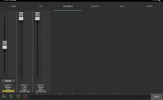
The Cosmos ADC's signal LEDs will light up green in Stereo and blue in Mono.
Super many thanks. Great and useful post. I didn't know about leds for stereo mode. So master gain volume will not effect any recording volume this way? Where is that led in adc?Mode switching needs to be done on the device that you use to record.
In USB Audio Recorder Pro, you can use the Master Gain control for this.
The threshold between Mono and Stereo is roughly -31dB there:
View attachment 333020
The Cosmos ADC's signal LEDs will light up green in Stereo and blue in Mono.
Also please help about tweak app. What does that read and connect does and what is the use of this app and how it is used. Thanks in advance.Mode switching needs to be done on the device that you use to record.
In USB Audio Recorder Pro, you can use the Master Gain control for this.
The threshold between Mono and Stereo is roughly -31dB there:
View attachment 333020
The Cosmos ADC's signal LEDs will light up green in Stereo and blue in Mono.
IVX
Major Contributor
IVX
Major Contributor
I don't believe if it does matter for your purpose, especially at 384-768k of sampling.
IVX
Major Contributor
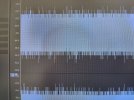
the input voltage is set at default 4.5v. its a 0 grade adciso unit. i recorded a 768khz wav file without any input. so imo it should record only the noise floor of the adc? i opened the file and zoomed vertically to see the limit of noise floor which is around -74db. shouldn't it be around -126 db or so ? if required i can upload the file. thanks !Skj, you didn't give usenoughany details regarding the conditions of your test.
IVX
Major Contributor
On the previous page of that thread, you can find my explanation about how to test the noise of Cosmos ADC. Shortly, you need the FFT software REW, and mono-mode A-weighted result within 20Hz-20kHz at 48k of sampling will show <=-129db(A). ADC's inputs are not connected i.e. float.
thank for the response. now i understand that in floating condition the nose floor will not be correct. isn't it ?On the previous page of that thread, you can find my explanation about how to test the noise of Cosmos ADC. Shortly, you need the FFT software REW, and mono-mode A-weighted result within 20Hz-20kHz at 48k of sampling will show <=-129db(A). ADC's inputs are not connected i.e. float.
IVX
Major Contributor
On the previous page of that thread, you can find my explanation about how to test the noise of Cosmos ADC. Pls take a look.
Inputs are float means the XLR inputs are not connected, and no cables are tied to these inputs.
Inputs are float means the XLR inputs are not connected, and no cables are tied to these inputs.
i
i also did not connect the cable in the input but still got -74db noise floor ?On the previous page of that thread, you can find my explanation about how to test the noise of Cosmos ADC. Pls take a look.
Inputs are float means the XLR inputs are not connected, and no cables are tied to these inputs.
IVX
Major Contributor
Sorry, I have no idea what you measured and how, hence, I can't make any conclusions about that. I said how to measure Cosmos ADC noise with REW, or with AP:
BW 20-20k A-weighted, mono-mode, Fs = 48kHz. I guess you measured the DC offset of the ADC which is not an audio noise floor.
PS: REW is FFT(and more) software https://www.avnirvana.com/threads/v5-30-beta-release.12707/
BW 20-20k A-weighted, mono-mode, Fs = 48kHz. I guess you measured the DC offset of the ADC which is not an audio noise floor.
PS: REW is FFT(and more) software https://www.avnirvana.com/threads/v5-30-beta-release.12707/

Grooved
Addicted to Fun and Learning
- Joined
- Feb 26, 2021
- Messages
- 716
- Likes
- 466
Hi,i
i also did not connect the cable in the input but still got -74db noise floor ?
like @IVX said, it's certainly the DC level. You need to open the file in a player with frequencies analyser, this level will only be around 5Hz and lower.
Easiest check is to install Spek ( https://www.spek.cc/p/download ) and load the file
EDIT: said "Spek" a bit quickly as it's not the best to check such low frequencies level, but it's the quickest to install and use
Last edited:
IVX
Major Contributor
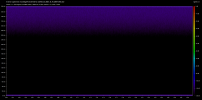
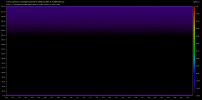
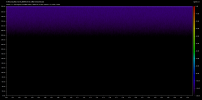
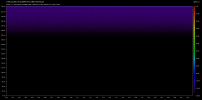
thanks got it. analyzed the recordings. i also analyzed after removal of some dc offset too. pls see. all files were recorded without any input. seems to be fine after dc removalHi,
like @IVX said, it's certainly the DC level. You need to open the file in a player with frequencies analyser, this level will only be around 5Hz and lower.
Easiest check is to install Spek ( https://www.spek.cc/p/download ) and load the file
EDIT: said "Spek" a bit quickly as it's not the best to check such low frequencies level, but it's the quickest to install and use
Attachments
Similar threads

- Replies
- 118
- Views
- 18K
- Replies
- 16
- Views
- 2K


- Replies
- 4
- Views
- 964

