that male/male straight adapter is equally hard to find (edit: I found one but really overpriced) and leaves you in doubt it actually works... I think I'll take all of my patience and try ordering it from AliExpress. @staticV3, can you suggest me the best one (if any)?If you can't find the same adapter on Amazon, then you could replicate it with a type c to type c u shape adapter
View attachment 178438
plus a type c male to type c male adapter.
View attachment 178439

-
WANTED: Happy members who like to discuss audio and other topics related to our interest. Desire to learn and share knowledge of science required. There are many reviews of audio hardware and expert members to help answer your questions. Click here to have your audio equipment measured for free!
- Forums
- Audio, Audio, Audio!
- DACs, Streamers, Servers, Players, Audio Interface
- Combination Audio DAC and Headphone Amplifiers
You are using an out of date browser. It may not display this or other websites correctly.
You should upgrade or use an alternative browser.
You should upgrade or use an alternative browser.
E1DA 9038D Review (portable DAC & Amp)
- Thread starter amirm
- Start date

staticV3
Master Contributor
- Joined
- Aug 29, 2019
- Messages
- 7,951
- Likes
- 12,755
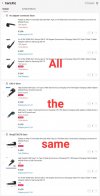
You can find the same exact adapter being sold by multiple retailers on AliExpress. They all come from the same factory.that male/male straight adapter is equally hard to find (edit: I found one but really overpriced) and leaves you in doubt it actually works... I think I'll take all of my patience and try ordering it from AliExpress. @staticV3, can you suggest me the best one (if any)?
Hi,
I'm using an iPhone 7s, Apple USB3 (the one with Lightening power socket) to Lightening convertor, Apple USB-C 5W charger, Sennheiser PX100 v1 or Shure SE110 with balanced armature drivers, Amazon Music HD, YouTube with tracks downloaded to iPhone. When I start music or YouTube I'll get clicking sound the orange led will flash. Either it will kick in and music will play or it will eventually it will stop. I will press the play button on the app and it will then it will play music or YouTube through the headphones. I'm using an Amazon Basics USB-C to USB cable to connect the E1DA 9038D to the convertor.
Wondering if anybody has had issues like this and if anyone knows what it's likely to be?
Thanks
Haider
I'm using an iPhone 7s, Apple USB3 (the one with Lightening power socket) to Lightening convertor, Apple USB-C 5W charger, Sennheiser PX100 v1 or Shure SE110 with balanced armature drivers, Amazon Music HD, YouTube with tracks downloaded to iPhone. When I start music or YouTube I'll get clicking sound the orange led will flash. Either it will kick in and music will play or it will eventually it will stop. I will press the play button on the app and it will then it will play music or YouTube through the headphones. I'm using an Amazon Basics USB-C to USB cable to connect the E1DA 9038D to the convertor.
Wondering if anybody has had issues like this and if anyone knows what it's likely to be?
Thanks
Haider
staticV3
Master Contributor
- Joined
- Aug 29, 2019
- Messages
- 7,951
- Likes
- 12,755
An iPhone 7s does not exist.Hi,
I'm using an iPhone 7s, Apple USB3 (the one with Lightening power socket) to Lightening convertor, Apple USB-C 5W charger, Sennheiser PX100 v1 or Shure SE110 with balanced armature drivers, Amazon Music HD, YouTube with tracks downloaded to iPhone. When I start music or YouTube I'll get clicking sound the orange led will flash. Either it will kick in and music will play or it will eventually it will stop. I will press the play button on the app and it will then it will play music or YouTube through the headphones. I'm using an Amazon Basics USB-C to USB cable to connect the E1DA 9038D to the convertor.
Wondering if anybody has had issues like this and if anyone knows what it's likely to be?
Thanks
Haider
We've had one case where a customer reported similarly strange behavior with the USB3 CCK from Apple. They ended up buying the Meenova Lightning to Type-C cable and the issues were gone.
Of course that cable doesn't allow simultaneous charging.
Last edited:
Sorry it's iPhone 7 Plus. I think it is something to do with the Apple adapter. I tried the USB-C to USB cable from my wife's Sony 1000XM3s headphones thinking that Amazon cheaped out on the construction of the cable but the problem still persists...Doesn't happen with PCs or laptops...An iPhone 7s does not exist.
We've had one case where a customer reported similarly strange behavior with the USB3 CCK from Apple. They ended up buying the Meenova Lightning to Type-C cable and the issues were gone.
Of course that cable doesn't allow simultaneous charging.
hey thanks @staticV3 , also for the nice picture editing eheh...You can find the same exact adapter being sold by multiple retailers on AliExpress. They all come from the same factory.
View attachment 178450

Alberto.CH
New Member
- Joined
- Jan 12, 2022
- Messages
- 1
- Likes
- 0
Hi, is there a place where I could leave my email to be informed when a new 9038D series is available? ThanksGuys, I'll try to produce the fixture I described above after I finish with Cosmos line.

- Joined
- Oct 25, 2019
- Messages
- 11,111
- Likes
- 14,774
That doesnt sound right. The software needs to be able to talk to the dac, but if it can play through it without EQ on, it should be able to with EQ enabled. It shouldn't matter which dac.Hi,
Does anyone know if the 9038D supports parametric EQ? I have been told that if use a equaliser app on the iPhone and have an external DAC+amp then it needs to support parametric EQ...
staticV3
Master Contributor
- Joined
- Aug 29, 2019
- Messages
- 7,951
- Likes
- 12,755
Not true. If you use software EQ, so for example an App on your iPhone that processes the sound and then sends out the EQed music to whatever DAC or Bluetooth receiver you use, then the DAC's capabilities don't matter. For it there's no difference between EQed music and un-EQed music. It's all just incoming ones and zeroes.Hi,
Does anyone know if the 9038D supports parametric EQ? I have been told that if use a equaliser app on the iPhone and have an external DAC+amp then it needs to support parametric EQ...
There's however another type of EQ called hardware EQ. It's where the audio processing takes place not on your source device, but on the USB DAC or Bluetooth receiver itself.
The 9038D does not support hardware EQ.
- Joined
- Oct 25, 2019
- Messages
- 11,111
- Likes
- 14,774
It's not massively easy on android but a few apps do work well.Seems like it not as easy to add a system-wide EQ for iOS unless you jail-break. No LDAC and no EQ on the iPhone...
Hi,
I updated the driver from the Microsoft one in Win10 x64 to the one from the website (https://drive.google.com/file/d/1tiDN9COD-TYt0G263m7FStVOOcbhlnL7/view?usp=sharing) E1DA_setup_WHQL.exe. The volume bar in Window provides no sound from 0-50%, most of the volume is contained in the 75-100% range. The Microsoft driver seems to be louder and did not have this volume issue. Is there any reason to use the driver from the E1DA website?
Thanks
Haider
I updated the driver from the Microsoft one in Win10 x64 to the one from the website (https://drive.google.com/file/d/1tiDN9COD-TYt0G263m7FStVOOcbhlnL7/view?usp=sharing) E1DA_setup_WHQL.exe. The volume bar in Window provides no sound from 0-50%, most of the volume is contained in the 75-100% range. The Microsoft driver seems to be louder and did not have this volume issue. Is there any reason to use the driver from the E1DA website?
Thanks
Haider
staticV3
Master Contributor
- Joined
- Aug 29, 2019
- Messages
- 7,951
- Likes
- 12,755
Hi, Microsoft's generic driver does indeed have a different volume curve than Comtrue's own driver:Hi,
I updated the driver from the Microsoft one in Win10 x64 to the one from the website (https://drive.google.com/file/d/1tiDN9COD-TYt0G263m7FStVOOcbhlnL7/view?usp=sharing) E1DA_setup_WHQL.exe. The volume bar in Window provides no sound from 0-50%, most of the volume is contained in the 75-100% range. The Microsoft driver seems to be louder and did not have this volume issue. Is there any reason to use the driver from the E1DA website?
Thanks
Haider
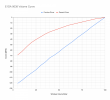
Reasons for using Comtrue's driver would be:
-you want to update your 9038D's firmware
-you want to use the 9038D's native ASIO interface
-you want to listen to DSD256 recordings
Using the Tweak9038 Android App you can customize your 9038D's Minimum and Maximum volume to your liking.
With it, you could make it so that volume 1/100 in Windows is exactly as quiet as you'd like and 100/100 is exactly as loud as you need.

IVX
Major Contributor
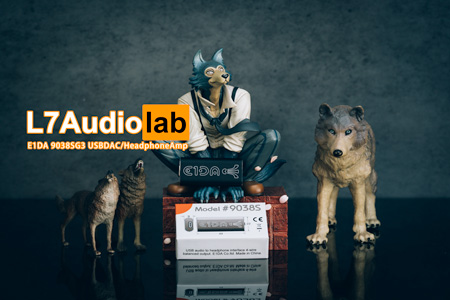
BTW, L7 made the review for 9038SG3
 www.l7audiolab.com
Measurements of E1DA 9038SG3 USBDAC/HpAmp - L7Audiolab
便携设备 话说最近测的小尾巴基本都让我有点失望,各种奇葩的事情层出不穷……而且很让我崩溃的是我其实一直抱怨价格过高的W2都一年了……还几乎就没有测量比较接近的产品……(W2小2K的价位我真的不开心)还好,我终于拿到了E1DA 9038SG3……
www.l7audiolab.com
Thanks for your help. As I'm not stressing out the amplifier any more than I would with the MS driver, I'm fine. Can I ask what are the advantages/disadvantages of '9038D's native ASIO interface'?Hi, Microsoft's generic driver does indeed have a different volume curve than Comtrue's own driver:
View attachment 180297
Reasons for using Comtrue's driver would be:
-you want to update your 9038D's firmware
-you want to use the 9038D's native ASIO interface
-you want to listen to DSD256 recordings
Using the Tweak9038 Android App you can customize your 9038D's Minimum and Maximum volume to your liking.
With it, you could make it so that volume 1/100 in Windows is exactly as quiet as you'd like and 100/100 is exactly as loud as you need.
staticV3
Master Contributor
- Joined
- Aug 29, 2019
- Messages
- 7,951
- Likes
- 12,755
ASIO is one of three ways to get your audio to the DAC directly, bypassing Windows' resampler and mixer.Thanks for your help. As I'm not stressing out the amplifier any more than I would with the MS driver, I'm fine. Can I ask what are the advantages/disadvantages of '9038D's native ASIO interface'?
There aren't really any advantages or disadvantages. If you need ASIO for your workflow, then you have that option with Comtrue's driver. If you don't, then you can simply use the generic driver.
staticV3
Master Contributor
- Joined
- Aug 29, 2019
- Messages
- 7,951
- Likes
- 12,755
Here's how to limit output to 2Vrms:Hi,
Does any one know how can I set it (9038D) to 2v line level output? I want to connect as line level input to a desktop headphone amp (Arcam rHead) when I'm working from home.
Thanks
Haider
Thanks mate, really appreciate your kind help...Here's how to limit output to 2Vrms:
Similar threads
- Replies
- 5
- Views
- 2K

- Replies
- 126
- Views
- 28K
- Replies
- 4
- Views
- 1K
- Replies
- 116
- Views
- 11K
