• Welcome to ASR. There are many reviews of audio hardware and expert members to help answer your questions. Click here to have your audio equipment measured for free!

DSPi ESP32 Front Panel & SD Music Player

Kingsnake

Active Member
Joined
Feb 6, 2026
Messages
115
Likes
220
I’ve been working on an ESP32 front panel for WeebLabs DSPi, bringing its everyday controls, audio displays and an SD-card music player into one compact interface. It lets you use the system without keeping a computer connected.

The hardware is a Waveshare ESP32-S3-LCD-2, with a 2-inch display, Wi-Fi, Bluetooth and an onboard microSD slot. The screen runs in landscape at 320 × 240, with navigation through a rotary encoder and optional BLE remote.

The music player uses the onboard microSD slot and supports cards formatted as FAT32 or exFAT, including SDXC cards. An SD card is only needed for music playback and file transfer; DSPi control, visualisers and firmware updates work without one.

Waveshare board details and wiki

Features
  • Volume, mute, input selection, volume limit, preset loading and saving.
  • Loudness, Crossfeed, Leveller, Psy Bass, Sub Synth, Tube Modeller basic controls and Output Limiter.
  • Analogue VU and stereo spectrum displays, with selectable enabled input/output channels.
  • Customisable text, accent, meter, spectrum-bar and peak-marker colours.
  • Full-screen volume and feature notifications, including changes made through DSPi Console.
  • BLE remote pairing, learned button mappings and configurable D-pad shortcuts.
  • Screen brightness, idle-display and timeout settings.
  • SD playback of WAV, FLAC and MP3, with folder browsing, album artwork, seeking and track controls.
  • Local browser-based music transfer and firmware updates over Wi-Fi.
The ESP32 handles the interface and music playback; DSPi still performs the audio processing. Control uses UART, while SD music is sent to DSPi over a single-wire, 3.3 V logic-level S/PDIF connection at 24-bit, 44.1/48 kHz.

The newer effects and spectrum display require compatible DSPi v1.1.6 firmware. Wiring, compatibility and installation instructions are in the repository. First installation is by USB; subsequent updates can use the local Wi-Fi page.

Source, build scripts and instructions:
DSPi ESP32 Front Panel — Media Player S/PDIF

Latest firmware — v1.3.1, OTA and full USB images:
Download release

Video of the current build, showcasing the Spectrum Analyser and overhauled menus:

Thanks to Troy at WeebLabs for DSPi, and to everyone who has helped test and improve the panel.
 
How much scope is there to add other audio sources? I'm thinking of things like squeezelite, bluetooth, AirPlay, SpotifyConnect (all available in squeezelite-esp32), SendSpin (available in ESPHome), or any others that are out there.
 
How much scope is there to add other audio sources? I'm thinking of things like squeezelite, bluetooth, AirPlay, SpotifyConnect (all available in squeezelite-esp32), SendSpin (available in ESPHome), or any others that are out there.
There’s scope for Wi‑Fi streaming the ESP32-S3 is capable but integrating those sources while keeping the display, BLE remote and audio reliable would be a substantial addition. Bluetooth audio would need separate hardware, as the S3 doesn’t support Classic Bluetooth.

I use a WiiM streamer myself, so I’ve kept network streaming separate. This panel was originally built just to expose DSPi settings without needing a PC; it’s already grown well beyond what I needed. I wouldn’t rule streaming out, but keeping the current functions stable is my priority.
 
ESP32 Front Panel update — v1.4.0

I’ve released v1.4.0, adding more direct DSPi configuration from the panel without needing a computer.

The main addition is an Outputs menu, with per-channel gain, mute, delay, routing, EQ and crossover controls. Frequency, gain and Q now have precise digit editing, and you can copy a channel’s EQ/crossover parameters to another output.

There are also speaker/subwoofer quick controls, editable L+R mono summing, preset naming and Save As New, plus custom input names, visibility and menu order.

The existing SD music player, Spectrum, analogue VU, BLE remote support and local Wi-Fi transfer/update remain included. I’ve also added a complete graphical menu guide to make the expanded controls easier to navigate.

v1.4.0 downloads and release notes
Graphical menu guide

Existing users can install the OTA.bin through System → Wi-Fi Transfer/Update. After updating, disconnect all power for at least 10 seconds before using the SD player.

The newer controls require compatible DSPi firmware.

01-overview.png
 
ESP32 Front Panel update — v1.4.0

I’ve released v1.4.0, adding more direct DSPi configuration from the panel without needing a computer.

The main addition is an Outputs menu, with per-channel gain, mute, delay, routing, EQ and crossover controls. Frequency, gain and Q now have precise digit editing, and you can copy a channel’s EQ/crossover parameters to another output.

There are also speaker/subwoofer quick controls, editable L+R mono summing, preset naming and Save As New, plus custom input names, visibility and menu order.

The existing SD music player, Spectrum, analogue VU, BLE remote support and local Wi-Fi transfer/update remain included. I’ve also added a complete graphical menu guide to make the expanded controls easier to navigate.

v1.4.0 downloads and release notes
Graphical menu guide

Existing users can install the OTA.bin through System → Wi-Fi Transfer/Update. After updating, disconnect all power for at least 10 seconds before using the SD player.

The newer controls require compatible DSPi firmware.

View attachment 565073
This is astonishingly good. Having a physical control is great, and I can hardly believe that two microcontroller boards can pack in so much.
 
This is really nice! The only wrinkle I've found is that I haven't figured out how to exit from the Presets menu. I don't know if it's a bug or if I'm doing it wrong. Overall, though, the combination of DSPi and this project are an indication of just how DIY hi-fi is going to blow away established manufacturers on feature set, usability and price in the digital realm. I haven't yet got to the remaining parts of the chain yet (DAC and power amplification) but I guess there will be some very neat projects coming out of this in the near future.

I got the touchscreen version of the Waveshare board (having the glass front it's easier to integrate with a faceplate neatly if you're not blessed with a CNC machine) and it'd be nice to be able to use the touchscreen for something. Also, it'd be really nice to have IR remote support. Maybe if I get around to it I'll fork and implement those things (although I'm still trying to figure out how to nicely integrate IR with a faceplate - would be nice if it would work through the border of the touchscreen glass).
 
The preset back bug was fixed some time ago.
I've been holding back a major update that addresses a number of bugs and brings several improvements. The Windows console with DSPi Link was released last night (unofficially), so I'll be pushing the update out soon.

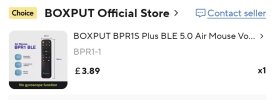
I strongly recommend using a BLE remote with this build, as the firmware has been designed with BLE remotes in mind.

This is the remote I'd highly recommend.

Screenshot_20261110_082118_AliExpress.jpg


This is really nice! The only wrinkle I've found is that I haven't figured out how to exit from the Presets menu. I don't know if it's a bug or if I'm doing it wrong. Overall, though, the combination of DSPi and this project are an indication of just how DIY hi-fi is going to blow away established manufacturers on feature set, usability and price in the digital realm. I haven't yet got to the remaining parts of the chain yet (DAC and power amplification) but I guess there will be some very neat projects coming out of this in the near future.

I got the touchscreen version of the Waveshare board (having the glass front it's easier to integrate with a faceplate neatly if you're not blessed with a CNC machine) and it'd be nice to be able to use the touchscreen for something. Also, it'd be really nice to have IR remote support. Maybe if I get around to it I'll fork and implement those things (although I'm still trying to figure out how to nicely integrate IR with a faceplate - would be nice if it would work through the border of the touchscreen glass).
 
Congrats! Super nice project. Care to share details about the case and knob?
 
ESP32 Front Panel update — v1.5.0

I’ve released v1.5.0, adding network music playback, DSPi Link and a new Retro display theme.

The main addition is SMB network playback. You can browse music folders shared by a Windows computer or NAS directly from the panel, with album artwork, scrolling filenames and the same Now Playing controls as the SD player.

Network audio supports WAV, FLAC and MP3 at 44.1 or 48 kHz, sent to DSPi through the existing 24-bit S/PDIF output. Higher sample rates such as 96/192 kHz aren’t supported. This is folder-based playback—not DLNA, Spotify Connect or phone casting. It uses 2.4 GHz Wi-Fi, so reliable playback depends on the wireless connection and server throughput, particularly with higher-bitrate files.

DSPi Link lets compatible DSPi Console applications connect over your local network through the ESP. The panel, encoder and BLE remote remain usable with external-source audio. SD and network music playback are unavailable while Link is active.

Wi-Fi setup now includes two QR-code screens: one to join the setup network and another to open the configuration page on your phone. There’s also a network picker, signal-strength display and strongest-access-point selection when starting Network playback.

Other additions include the Retro theme, selectable Master or User Volume display/control, and DSPi-stored input names shared with Console on compatible firmware.

The existing output controls, routing, EQ/crossovers, effects, SD player, Spectrum, analogue VU, BLE remote support and local Wi-Fi transfer/update remain included.

v1.5.0 downloads and release notes
Source and setup instructions

Existing users can install the OTA.bin through System → WiFi → Transfer/Update.

Use compatible DSPi v1.1.6 firmware and a Link-capable Console for the newer integration features.
 
Last edited:
Back
Top Bottom