• Welcome to ASR. There are many reviews of audio hardware and expert members to help answer your questions. Click here to have your audio equipment measured for free!

Built a speaker design tool I wish existed when I started – feedback appreciated

I am unable to proceed because there are no coaxial drivers listed, or the woofers I want to use. Is it limited to two way only?
Yes, there are some limits here as of now. I will add possibility for coax later. As for new speakers, you can add custom speakers your self. The library will however grow much over the next weeks.
 
Here are a couple of things i noticed while quickly going through it.
1. when choosing a vented box, it doesn't seem to carry over to later stages (nothing about port size or a hole for it)
2. prices are in NOK
3. no projected frequency response
Thanks for the input!

1) Will fix this, thanks.
2) Changed to USD now, thanks.
3) It shall be projected in step 4, can you try again?
 
Just tried it. It has the beginnings of an amazing tool! The visual part alone is worth developing it for.

It may be that you are trying to work out too many things at the same time - some of the outputs are at a very deep level of detalisation e.g. what hand tools are needed and exact cuts etc. It may be better to concentrate on getting the higher-level stuff right first like (at the expense of details - these can be added later):
- three ways, four-ways, side mounted woofers, subwoofers
- different driver types e.g. horns, waveguides, ribbons etc. shapes e.g. rectangular, oval etc.
- full set of filters available, passive and active
- very significant extension to driver database and verification of the data - it must be trusted
Thank you for your feedback! Glad you think it's promising.

I have made several improvements based on this feedback already.
1) Three way and sub ok. Four way and side mounted will come later.
2) Good point - this is not here now. Will come at a later stage.
3) Good point as well. This is high on priority list as many have requested this.
4) Yes, totally agree. This is an ongoing process, and I hope to have a more complete base in a week or two.
 
Great start!!

I would love to see:
- an option to be able to add drivers that are not in the list
- an option to add multiple drivers and driver configurations (like push-pull, push-push, Bessel array, various wiring options like series, parallel, series-parallel, etc.)

Thank you
Thanks for the input! Really appreciate it.
1) Its possible to add custom now.
2) Thanks. This is on the roadmap for sure.
 
Nice tool, nice UI. :)

A few immediate issues when testing it for a subwoofer:

  • I can't add more than one driver, not until the enclosure part, which is weird, since adding two there will obviously affect the result in the previous page.
  • On the enclosure page it says I'm building a bookshelf speaker despite choosing subwoofer earlier in the process.
  • The possibility of adding EQ points would of course be useful :)
Thanks a lot!
* You can select two way, three way og subwoofer at Step 3 Drivers.
* Well spotted, will improve that
* Yes, that is something that is coming.
 
Thanks a lot!
* You can select two way, three way og subwoofer at Step 3 Drivers.

Yes, but what if I want to build a subwoofer with two drivers? Or four for that matter. :)
 
Hi everyone,

I wanted to post an update here since several of you gave useful feedback on the first beta version of SoundForm.

We’ve now opened up Beta V2 testing.

SoundForm is a web app we’re building to make DIY speaker design more guided — from early idea, through enclosure design, drawings, BOM/cut lists, build steps, and later setup/tuning notes.

Since Beta V1, we’ve improved quite a lot based on feedback from this thread and other DIY speaker communities.

Beta V2 now includes:

• A larger driver library
• Custom driver input
• Subwoofer, full-range, 2-way, and 3-way design flows
• Sealed and vented enclosure modelling
• Better graphs and predicted performance views
• Improved cabinet drawings
• Cut lists and BOM
• A more complete build phase
• A more complete setup/tuning phase

To be clear, this is still beta. We’re not claiming it replaces proper measurements, crossover design tools, REW, VituixCAD, XSim, or experienced design work.

The goal is to make the DIY speaker journey more structured and accessible, especially for people who want help going from idea to something they can actually build.

We would really appreciate honest feedback on Beta V2, especially:

• What feels confusing
• What seems technically wrong or misleading
• What you trust or don’t trust
• What assumptions or calculations should be shown more clearly
• What would be missing before you’d use it for a real build

Here is the link: https://soundform-build-buddy.lovable.app

Thanks again to everyone who gave feedback earlier — it has genuinely helped shape the app.
 
Looks really good, Eirik. Still a bit to go to make it a one stop shop though.
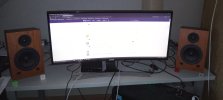
 
Looks really good, Eirik. Still a bit to go to make it a one stop shop though.
Thannks! Yes, still a lot of things missing. But I am working my way through the roadmap. Anything in particular you where thinking about?
 
Eirik, I haven't had time to give it a full test. I will offer more feedback when I can.
 
Test it right now and i miss the option to use 2 Ports with the same or different Length and diameter on one Enclousures.

Like this:

IMG_20260530_191520_3.jpg

They are Passive but will made them aktive soon with an MOTU Interface.

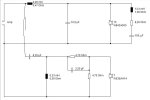
Is an 30mm Wavecore W030 WA14 and Scan Speak W15 8434G00

Sat_Weiche.jpgSat_Weiche_12db_2kHz.jpg
 
Classic llm ui look. But thats all good, it does a better job than trying to design yourself. What I wanted to call out is like all vibe coded llm ui there are problems with text readability. Ask claude to do a pass on text contrast.
 
Hi everyone,

It’s been a while since the last update here. SoundForm is now called Sonella, and we’ve continued working on it since the early version in this thread.

Several of you raised useful points about driver data, port modelling, cabinet drawings and readability. Here’s where things stand now.

Drivers and bass modelling

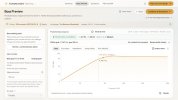
The catalogue currently has 468 drivers, and you can enter your own T/S parameters. The bass workspace shows predicted response, excursion, impedance, group delay and port velocity, with the input level and model assumptions available to inspect.

On Frunse’s earlier question about multiple ports: the model now supports multiple identical ports, including circular and slot ports. Different lengths or diameters within the same box aren’t modelled. That part of the request is still outstanding.

Cabinet planning

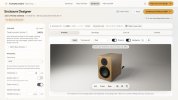
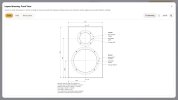
The enclosure view now brings together the 3D preview, front/side/back drawings, panel cut list and fit checks. You can fix cabinet dimensions and let the remaining dimension adjust to the target volume. There’s also a prototype PDF with drawings, parts, electrical settings and unresolved checks. Dimensions still need checking against the actual drivers, hardware and board thickness before cutting.

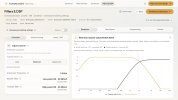
The attached screenshots show the same 14 L ported bookshelf example, using an SB Acoustics SB17CAC35-8 woofer and SB26STAC-C000-4 tweeter. It’s an unmeasured example design, not a validated speaker kit.

What the curves mean

The bass prediction uses a small-signal lumped-parameter model. It doesn’t include baffle diffraction, thermal compression or high-level nonlinear behaviour.

The Filters & DSP page shows electrical filter, gain and EQ responses. It does not calculate the combined acoustic response, directivity or driver phase alignment. The crossover settings are starting points to check with measurements of the drivers in the cabinet.

One clarification to the earlier updates: guided Build and Tune workflows aren’t available in the current version. The focus is the design and prototype plan; measurement and final tuning still happen in external tools.

You can open the example here without an account, or start your own design. It’s free during beta. An account is needed to save, share or download your own prototype PDF.

The model assumptions and limitations are listed here.

If anyone has a measured sealed or vented build they know well, we’d be interested in how the bass prediction compares when the driver parameters, net volume, tuning and input conditions match. A specific mismatch, with the setup details, would be useful feedback.

And if you tried the earlier version, does the current workflow make it clearer what is calculated and what still needs checking?

Thanks again for the input so far :)
 

Attachments

  • 01-enclosure.jpg
    01-enclosure.jpg
    82 KB · Views: 31
  • 03-bass-preview.jpg
    03-bass-preview.jpg
    87.7 KB · Views: 30
  • 02-drawings.jpg
    02-drawings.jpg
    51.8 KB · Views: 23
  • 04-electrical-filters.jpg
    04-electrical-filters.jpg
    83.3 KB · Views: 30
I tried an close Box and i miss the Q Factor for Closed Box is not showing anywhere! Or may be i am Blind....

Look on Soundimport side there it works very well and the Q Factor is clear visable for Seald Box! Thats crucial for me if i try to simulate an close Box let say for Mid Driver!

1792050374808.png


I need to look at Q 0.5, 0.707, and 1 for Comparence and simulation for an Sealed Box ;)

Best way would be you input an Target Q Factor and the Software say how much Liter you need for that closed Enclosures! And of course the F3 Point.

That why i use the most time BassCad thats realy easey to use for that:

1792049741495.png


Probably on the Goal Tab, left side, you need to switch between Q or F3 to select the Goal on closed Box;)

I am looking for an 8" Driver thats works down to 80Hz, there i will use an Ripole Sub so that why i will use an Closed Box for that 8" Driver in Combination with an Tweeter with Waveguide an Crossoverpoint around 1,5kHz! Most 6,5" Driver don't have enough Preasure below 100Hz
so i am looking for an 8" with minimum 90dB 1W/m thats has QTc above 0,4 for good Sealed Parameter and high Qms

But isn't easey to find for reasonable Price, Purifi is way to Expensive ;( and not much aviable with good Response on the higher Edge!

For now Satori WO24TX-4 seems an good option but it is already an 9,5" Driver and 1,5Khz Crossover could be a bit triky. Also noot cheep.
 
Last edited:
Bandpass enclosures?

I'm inspired by the ideas in Wolf's 'Overdrive10' project, aka Kilauea

Passive Radiator rather than port.

He used Unibox iirc in separate segments, but I've been told VituixCAD has direct support for enclosure modelling a band-pass with passive radiators

others suggest WinISD...
 
Back
Top Bottom