• Welcome to ASR. There are many reviews of audio hardware and expert members to help answer your questions. Click here to have your audio equipment measured for free!

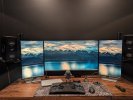
Budget coax vs 2way | no free space on the sides of the desktop.

First off: placing the speakers high up isn't the real issue for your soundstage.
The actual bottleneck here is your extremely short 70cm listening distance.

You mentioned being worried about losing the soundstage when moving your head 50–60 cm.
It's a timing issue, not a directivity issue: When you sit that close (70cm), moving your head even 20–30 cm to the side drastically changes the time it takes for the sound to reach your left vs. right ear. The speaker you move closer to will sound louder and arrive earlier, which breaks the phantom center effect = soundstage effect. A coax speaker won't fix this. This breakdown happens at short distances purely due to arrival time, no matter the speaker design.

Keep in mind that the stereo image and soundstage will always play out on a direct line between the two tweeters. Since your speakers are 50cm higher than your ears, your soundstage is also up there. If you're cool with that acoustically, go for it.

While coax options like the KEF Eggs or Tannoy Arenas sound great on paper as point-sources, a traditional 2-way design is almost always the better choice in this budget tier:
Coax drivers in budget setups usually lack cabinet volume and cone area. Standard 2-way speakers will give you much better extension down to your crossover point.
Designing a good coax driver is expensive. At lower price points, a 2-way speaker will simply give you better component quality and cleaner overall sound for the same budget.

Since you have to mount them high, place the 2-way speakers upside down (tweeters on the bottom, woofers on top) and just above the monitors. This gets the tweeters as close to your actual ear level as possible. Your brain can't easily localize low frequencies anyway, so it doesn't matter that the woofers are up top. Tilt them down 30 degrees to aim the tweeters right at your ears.

Look at the Kali Audio LP-6 v2. They have a decent waveguide that gives you a much wider, more forgiving sweet spot (in this case, sweet spot means the area before the frequency response changes much, not the area of the phantom effect). Plus, they have dip-switches on the back specifically designed to correct the EQ when you place speakers in weird positions (like high up on a wall or desk shelf).

Or check out these recommendations (best speaker for different budgets). https://www.audiosciencereview.com/...-recommendations-for-usa-by-sweetchaos.28269/
Thank you for detailed answer.
For my budget I can only get:
kef egg 1st gen - actually the cheapest way for uni-q drivers, 2nd hand about $100
moondrop mm3a
Jbl 104
some edifier's, mr3 etc..(don't like them)
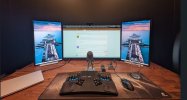
 
What size is your desk? I promise I won't hijack your thread, but your situation is so similar to mine its almost creepy:

42" monitor in the middle
27" on either side (mine are in portrait, are yours?)
72x30" desk
10'x10' room

In portrait it gives me just a little bit of room on the edges, which I plan on using for some desk clamps to get bookshelves to ear height. Is that something doable for you? Attaching a really bad picture of my halfway-finished setup for reference.
 

Attachments

  • Screenshot 2026-09-22 085104.jpg
    Screenshot 2026-09-22 085104.jpg
    601.5 KB · Views: 96
What size is your desk? I promise I won't hijack your thread, but your situation is so similar to mine its almost creepy:

42" monitor in the middle
27" on either side (mine are in portrait, are yours?)
72x30" desk
10'x10' room

In portrait it gives me just a little bit of room on the edges, which I plan on using for some desk clamps to get bookshelves to ear height. Is that something doable for you? Attaching a really bad picture of my halfway-finished setup for reference.
Desk is 80cm deep and 2m long. I feel you haha. Same, 42" in the middle. 21 on right and 27 on left side. So no chance to place the speakers correctly.
 
Desk is 80cm deep and 2m long. I feel you haha. Same, 42" in the middle. 21 on right and 27 on left side. So no chance to place the speakers correctly.
I mean, my plan is to do mounts on the sides. A little wider than "normal" but certainly correct enough IMO. They should be arriving today, I'll send a picture with my monoprice MTM100's (that I plan on replacing) when I get them mounted.
 
Find a pair of height speakers with the angled baffle and put them upside down on your desk so that they point up toward you. Even better, get a pair with coaxial drivers and save even more room. Philharmonic True Mini Airs shown below. You're going to cross them over to a sub anyway, right?

1790103846808.png
 
Yes, cross with sub. Ok now I'm trying not to make a mistake. Choosing between Moondrop mm3a(but 100hz 4% thd on 85db is too bad) Jbl 104 vs Kef Egg's with uniq driver. I’m also considering mounting the side monitors slightly higher and placing the speakers directly beneath them (this works for the 104 in a horizontal orientation and for the MM3A, as they are 16 cm tall).
Find a pair of height speakers with the angled baffle and put them upside down on your desk so that they point up toward you. Even better, get a pair with coaxial drivers and save even more room. Philharmonic True Mini Airs shown below. You're going to cross them over to a sub anyway, right?

View attachment 560280
 
Last edited:
Crazy idea: Move the side screens about 1 inch outside. Position the speakers behind the slit such, that you can see the tweeter.
 
Crazy idea: Move the side screens about 1 inch outside. Position the speakers behind the slit such, that you can see the tweeter.
I think the dispersion will suffer significantly in this case
 
Find a pair of height speakers with the angled baffle and put them upside down on your desk so that they point up toward you. Even better, get a pair with coaxial drivers and save even more room. Philharmonic True Mini Airs shown below. You're going to cross them over to a sub anyway, right?

View attachment 560280
How do these sound with regards to near field audio? I was interested in the full size PH true mini monitors for near field desktop use, but I really like how compact the airs are.
 
I use Genelec 8010a mounted on arms. Requires no desk space.
I just ordered the stuff (8010A, mounting stuff) to sign up for the experience. They will be connected on my home workstation to a JDS Labs Element 4. They shall replace my old Audioengine 2, which I have been perfectly happy with. But I am using the speakers more and more rather than the headphones, so why not go for more accuracy?
 
Last edited:
How do these sound with regards to near field audio? I was interested in the full size PH true mini monitors for near field desktop use, but I really like how compact the airs are.
The selling point is the SB Acoustics coaxial driver, which is quite nice at that form factor, but I would say that if you can find a pair of True Mini Monitors, those would be preferred overall. Nothing specifically wrong with the TM Airs, but it's a small, sealed speaker and rolls off pretty quick on both ends. Here's a graph from a recent Audyssey calibration:
Screenshot_20260919-103944.png

Pardon the room modes and the BBC dip that I hadn't removed yet, but you can see it dropping past -3dB around 120Hz. That's fine for atmospheric surround duty, but leaves a lot of Hz on the table for nearfields, even if you've got a decent sub in play. I have them back on surround duty for now.
 
The selling point is the SB Acoustics coaxial driver, which is quite nice at that form factor, but I would say that if you can find a pair of True Mini Monitors, those would be preferred overall. Nothing specifically wrong with the TM Airs, but it's a small, sealed speaker and rolls off pretty quick on both ends. Here's a graph from a recent Audyssey calibration:
View attachment 562871
Pardon the room modes and the BBC dip that I hadn't removed yet, but you can see it dropping past -3dB around 120Hz. That's fine for atmospheric surround duty, but leaves a lot of Hz on the table for nearfields, even if you've got a decent sub in play. I have them back on surround duty for now.
This helps a lot. Thanks!
 
The selling point is the SB Acoustics coaxial driver, which is quite nice at that form factor, but I would say that if you can find a pair of True Mini Monitors, those would be preferred overall. Nothing specifically wrong with the TM Airs, but it's a small, sealed speaker and rolls off pretty quick on both ends. Here's a graph from a recent Audyssey calibration:
View attachment 562871
Pardon the room modes and the BBC dip that I hadn't removed yet, but you can see it dropping past -3dB around 120Hz. That's fine for atmospheric surround duty, but leaves a lot of Hz on the table for nearfields, even if you've got a decent sub in play. I have them back on surround duty for now.
Oh, I too have this dip on about 3k on Kef's. Btw hts2001 (1st gen, black twitter) - sounds great for me. Coax seems like very, I mean VERY wide soundstage and Waiting for a umik1 or eversolo em01 for true measurements. Also bought a stands.
 
Fyi, i have a solution at least for me. The gator frameworks ID series creator trees have a speaker shelf that can support up to 35lb speakers on a 10" arm. I'm still installing them, but they position the speakers perfectly on the outside of my setup. Will post pictures once I'm done.
 
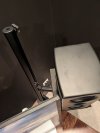
Okay, so the cables are not organized at all, still definitely a work in progress, but you can see the difference compared to how I had it before. I used this setup as the Uplift desk I use does not allow me to side-clamp a normal speaker stand (there are metal bars in the way), so I had to clamp at the back corner. The Gator Frameworks speaker stands have arms, so it swings out to the outside of the monitors and is fully height/tilt/angle adjustable to be perfectly ear level.

Its been set up for about 12 hours now, and it sounds fantastic.
 

Attachments

  • PXL_20261012_184549642.jpg
    PXL_20261012_184549642.jpg
    389.5 KB · Views: 49
  • PXL_20261012_184559494.jpg
    PXL_20261012_184559494.jpg
    119.9 KB · Views: 41
So I'm not sure about hts2001 after all. They weird and they have some problems in mid lows(120-160hz bump). I took some measurements just for fun on Iphone 15pro, from
40 to 9k it's should be true. Sub is Cambridge megaworks 250d converted to passive sub (dual 8ohm, 8 inch, fs is 45). Some EQ was applied in apo.


1792712966377.png


1792712912663.png
 
Back
Top Bottom