SBIR?I really have only one question about spatial room correction: Can it fix SBIR?(for some value of fix) If the answer is yes, then it's worth the extra money for the A1H just by itself and it's not even close. If not, then meh.

-
WANTED: Happy members who like to discuss audio and other topics related to our interest. Desire to learn and share knowledge of science required. There are many reviews of audio hardware and expert members to help answer your questions. Click here to have your audio equipment measured for free!
You are using an out of date browser. It may not display this or other websites correctly.
You should upgrade or use an alternative browser.
You should upgrade or use an alternative browser.
Big news coming from Sound United in 2023!
- Thread starter EB1000
- Start date

Speaker Boundary Interference ResponseSBIR?

Speaker Boundary Interference ResponseSBIR?
Effectively it's reflections on boundaries(walls) near the speaker and the cancellations they cause. It's famously difficult to fix without extremely thick room treatment, beyond the bounds of what most people are willing to put in their rooms. And multi-sub can't help in the 100-300hz range. This is one of the major things that stuff like controlled low frequency directivity(D&D 8C) and multi-woofer DSP systems like Genelec's W371A are designed to combat.
If spatial correction can fix or even just significantly improve those effects, by using other speakers to eliminate the cancellations, that would be a big deal, because all of the current solutions are very expensive and/or impractical.
FWIW, in setting up a room, you should always maximize the Positional EQ before relying on any additional Room Correction Protocol.
Let's face it. Setting up your room to the best of your ability isn't necessarily easy, but it is FREE!
The less digital processing through any algorithm, the better. I suspect we would all agree on that.
I had a serious suckout on my left side (-30dB!). While I suspect it was SBIR, I couldn't confirm it for certain at the time, however it also matched with the half-wave coming from the back wall... so maybe? Either way, I moved that Speaker about an inch further into the room and slightly changed the toe-in... #Boom-Pow Like it was never there. Once that was fixed, I ran room correction below the Schroeder Frequency to much greater effect than prior to fixing that suckout.
Let's face it. Setting up your room to the best of your ability isn't necessarily easy, but it is FREE!
The less digital processing through any algorithm, the better. I suspect we would all agree on that.
I had a serious suckout on my left side (-30dB!). While I suspect it was SBIR, I couldn't confirm it for certain at the time, however it also matched with the half-wave coming from the back wall... so maybe? Either way, I moved that Speaker about an inch further into the room and slightly changed the toe-in... #Boom-Pow
Like it was never there. Once that was fixed, I ran room correction below the Schroeder Frequency to much greater effect than prior to fixing that suckout.To further report on my first impressions of the 3800H, last night I tried some of the suggestions on this thread. I enabled the Dynamic EQ (DEQ) with the Audyssey settings of both Reference and L/R Bypass. I listened to reference recordings streamed from Amazon Music HD at volumes in the 45-55 range on the default 0-98 scale, and with 3 different ECO power settings.
With the Reference setting, treble got noticeably boosted, upper bass was quite weak, and only the very lowest bass was hearable, creating a "pulsating/thumping sensation" on some recordings (from the front speakers, since I do not have a subwoofer). At times, I even had to pause the playback to check if something outside the home was causing these kind of disturbing sounds.
With the L/R Bypass setting, the default 0 dB setting of the DEQ was overwhelming to the point of being unpleasant, while the 15 dB setting produced insufficient bass. The 5 and 10 dB settings were tolerable, but would have to be switched depending on whether I played electronica (e.g. Daft Punk's Random Access Memories), or jazz tracks, or something else. Just for complete evaluation purposes, I tried the Flat setting with DEQ on, and clearly heard an unpleasant distortion.
In the end, I concluded the best test would be to listen to some recordings with good acoustic bass (e.g. Brian Bromberg's Wood album) to determine if the setup faithfully reproduces the known instrument. Sadly, it did not (my reference, again, are studio monitor headphones driven by a different unequalized amp). With the Audyssey Reference setting, the bass was perceptibly underemphasized to the point of seeming to play "somewhere in the background." With the L/R Bypass setting, I could not find a close-enough reproduction with any of the 4 available DEQ sub-settings; it just did not sound natural.
Next, I tried some vocal-dominant recordings (e.g. tracks by Youn Sun Nah) and they did not sound as natural, clear or spacious as with the old AVR. I also tried some of the "natural-effects" tracks from Yosi Horikawa and most of them exhibited a narrow soundstage confined to the space between the front speakers; only one I tried was wider (as it should be).
I also tried a DTS jazz recording on a DVD and a live talk show in Dolby Surround. In both, the side surround speakers played at too high a level even with Audyssey set to its calibrated Reference. In combination with the announcement of the upcoming Dirac Live upgrade (with a possible bass management enhancement), all this tells me that even D/M does not consider Audyssey to be good enough. Also, I find the requirement to pay $20 for a dedicated tuning app on top of the $1,700 for the AVR itself to be simply ridiculous. I guess the real test of the effectiveness of the speaker/room correction embedded in this AVR would be to run a software like REW with a calibrated mic on a PC (I have no experience with that, but I think it would be worth an investment).
So, while I will keep experimenting with other material and my *subjective* AVR tests (while we all await objective measurements), I think this AVR does indeed exhibit a specific Yamauchi-san-tuned sound signature, instead of being close to neutral and transparent. Some may like it (if anything, by virtue of already owning some Denon equipment and feeling obligated to defend their purchases), while some others my not. My goal is simply to find the best reasonably priced replacement for my current AVR.
With the Reference setting, treble got noticeably boosted, upper bass was quite weak, and only the very lowest bass was hearable, creating a "pulsating/thumping sensation" on some recordings (from the front speakers, since I do not have a subwoofer). At times, I even had to pause the playback to check if something outside the home was causing these kind of disturbing sounds.
With the L/R Bypass setting, the default 0 dB setting of the DEQ was overwhelming to the point of being unpleasant, while the 15 dB setting produced insufficient bass. The 5 and 10 dB settings were tolerable, but would have to be switched depending on whether I played electronica (e.g. Daft Punk's Random Access Memories), or jazz tracks, or something else. Just for complete evaluation purposes, I tried the Flat setting with DEQ on, and clearly heard an unpleasant distortion.
In the end, I concluded the best test would be to listen to some recordings with good acoustic bass (e.g. Brian Bromberg's Wood album) to determine if the setup faithfully reproduces the known instrument. Sadly, it did not (my reference, again, are studio monitor headphones driven by a different unequalized amp). With the Audyssey Reference setting, the bass was perceptibly underemphasized to the point of seeming to play "somewhere in the background." With the L/R Bypass setting, I could not find a close-enough reproduction with any of the 4 available DEQ sub-settings; it just did not sound natural.
Next, I tried some vocal-dominant recordings (e.g. tracks by Youn Sun Nah) and they did not sound as natural, clear or spacious as with the old AVR. I also tried some of the "natural-effects" tracks from Yosi Horikawa and most of them exhibited a narrow soundstage confined to the space between the front speakers; only one I tried was wider (as it should be).
I also tried a DTS jazz recording on a DVD and a live talk show in Dolby Surround. In both, the side surround speakers played at too high a level even with Audyssey set to its calibrated Reference. In combination with the announcement of the upcoming Dirac Live upgrade (with a possible bass management enhancement), all this tells me that even D/M does not consider Audyssey to be good enough. Also, I find the requirement to pay $20 for a dedicated tuning app on top of the $1,700 for the AVR itself to be simply ridiculous. I guess the real test of the effectiveness of the speaker/room correction embedded in this AVR would be to run a software like REW with a calibrated mic on a PC (I have no experience with that, but I think it would be worth an investment).
So, while I will keep experimenting with other material and my *subjective* AVR tests (while we all await objective measurements), I think this AVR does indeed exhibit a specific Yamauchi-san-tuned sound signature, instead of being close to neutral and transparent. Some may like it (if anything, by virtue of already owning some Denon equipment and feeling obligated to defend their purchases), while some others my not. My goal is simply to find the best reasonably priced replacement for my current AVR.
Last edited:

Karls_speaker_works
Member
- Joined
- Mar 17, 2022
- Messages
- 73
- Likes
- 118
Ugh. This is not a good way to review using subjective impressions and assuming it is some sort of "tuned" sound. I'm more than frustrated at your approach to reviewing this AVR that so many are looking forward to purchasing.

- Joined
- Jun 5, 2020
- Messages
- 4,799
- Likes
- 3,744
I want you to confirm if Audyssey will work all 3 of your subs or if it's only for Bass Control. Please!Can't wait to set it up. I currently have a 4700 with an external 11 channel monolith amp and 3 subs running on a mini DSP. Hopefully this was the right choice rather than waiting for the 4800.
View attachment 234165
- Joined
- Jun 5, 2020
- Messages
- 4,799
- Likes
- 3,744
The issue is that he needs to figure out the room correction system and stop blaming the Denon AVR for having bad sound. He hasn't implemented the suggestion to get the app and take more control of the system. If he did it would make a world of difference.Ugh. This is not a good way to review using subjective impressions and assuming it is some sort of "tuned" sound. I'm more than frustrated at your approach to reviewing this AVR that so many are looking forward to purchasing.
DEQ On, start with 0 offset
Filter Frequency Range: 500 Hz
Audyssey Reference, no bypass
Bass: LFE, not LFE+Main
Midrange Compensation: depends on your speakers, look at the measurements to determine
Get a good subwoofer
And proper measurements in Aud, through the App.The issue is that he needs to figure out the room correction system and stop blaming the Denon AVR for having bad sound. He hasn't implemented the suggestion to get the app and take more control of the system. If he did it would make a world of difference.
DEQ On, start with 0 offset
Filter Frequency Range: 500 Hz
Audyssey Reference, no bypass
Bass: LFE, not LFE+Main
Midrange Compensation: depends on your speakers, look at the measurements to determine
Get a good subwoofer
I advise following Aud. directions absolutely. Do not try to out-think the program.
Of course, but this advice isn't nearly as useful as people seem to think. You cannot eliminate SBIR with speaker positioning, there will always be nulls caused by reflections in an untreated room regardless of speaker placement. All you can do is change what frequency it happens at for each boundary and then hope to compensate with subwoofers(if you can push the frequency very low) or room treatment(by pushing it high).FWIW, in setting up a room, you should always maximize the Positional EQ before relying on any additional Room Correction Protocol.
What are "studio monitor headphones", and why no equalization? Most headphones benefit from equalization, even very good ones.(my reference, again, are studio monitor headphones driven by a different unequalized amp)
Yeah that's how these features work. The AVR cannot analyze the source to determine the right bass volume, because all it gets is an instantaneous signal, so you have to tell it. Nonetheless, it's a useful feature for those who listen at low volumes. I personally always listen at the same high-ish volume(within a few dB of 80) so I don't use it.With the L/R Bypass setting, the default 0 dB setting of the DEQ was overwhelming to the point of being unpleasant, while the 15 dB setting produced insufficient bass. The 5 and 10 dB settings were tolerable, but would have to be switched depending on whether I played electronica (e.g. Daft Punk's Random Access Memories), or jazz tracks, or something else. Just for complete evaluation purposes, I tried the Flat setting with DEQ on, and clearly heard an unpleasant distortion.
You like the $200 Dirac upgrade with a likely additional $500 fee for bass management but not the $20 app? That seems inconsistent. FWIW; I agree the $20 fee is silly, but it's negligible compared to everything else.In combination with the announcement of the upcoming Dirac Live upgrade (with a possible bass management enhancement), all this tells me that even D/M does not consider Audyssey to be good enough. Also, I find the requirement to pay $20 for a dedicated tuning app on top of the $1,700 for the AVR itself to be simply ridiculous.
The reality is that Audyssey does a good job IF you have the app to give it a good target curve for your speakers and room. If you don't do that, then the performance varies. This is entirely normal, most people also change the default Dirac target curve.
It's not really possible for there to be a one-size-fits-all room curve, because the bass and treble vary both by personal preference and based on the amount of absorption in a room(for high frequencies), its size, and the listening position. So that's why you need the app. And yes, it is complicated to get this right, but if anything Dirac is even more complicated than Audyssey so it's not going to help anyone there.So, while I will keep experimenting with other material and my *subjective* AVR tests (while we all await objective measurements), I think this AVR does indeed exhibit a specific Yamauchi-san-tuned sound signature, instead of being close to neutral and transparent.
Calling the AVR "not neutral" after you've used multiple features(DEQ, Audyssey) that explicitly alter the sound with EQ, and apparently without using the app and understanding what's going on, is a little odd to me.
Certainly. However, it is possible to minimize certain effects to the point that they are somewhat "normalized." I am not claiming that ALL effects can be treated thusly. For the case which I cited in my room, I turned it from a -30 dB suckout to a -20dB suckout. It was much more narrow in FR and matched the boost preceding it in a way that made it come out as +10/-10 relative to 0 in a much smaller range of the FR.Of course, but this advice isn't nearly as useful as people seem to think. You cannot eliminate SBIR with speaker positioning, there will always be nulls caused by reflections in an untreated room regardless of speaker placement. All you can do is change what frequency it happens at for each boundary and then hope to compensate with subwoofers(if you can push the frequency very low) or room treatment(by pushing it high).
Is it perfect? No.
Is it better than it was? Yes.
Is it SBIR? I still don't know!
(As I said above, this specific case happened to be at the ~1/2 wave coming from the back wall (behind me).)
I'm always open to advice and further learning! If you have further insight, I welcome it.
- Joined
- Mar 1, 2020
- Messages
- 479
- Likes
- 853
Do you have some way to record the signal? Some audio interface, sound card, ADC?I think this AVR does indeed exhibit a specific Yamauchi-san-tuned sound signature, instead of being close to neutral and transparent
When I purchased my Denon AVR 4500H, which is two generations older then yours, I believed it sounded poorly. Just my perception. I also have a Jeff Rowland Capri stereo preamplifier, which is an audiophile darling, and I loved the sound of it. I also have RME Adi2 Pro FS Black edition AD to DA conversion which measures extremely well in AD conversion.
For experiment I recorded the song through Jeff Rowland analog stage and Denon's analog stage (Pure direct, no Audyssey, no subs, nothing) and used Deltawave software by member here, Pkane, if I am not mistaken. I found the two files 99,9% the same.
I was so sure I heard a difference between the two and was surprised to find that the sound of an average AVR is perfectly fine. No high-end preamp, whatever the cost, is not audibly better then a Denon AVR's preamp.
The point is that Amir measured a few of the Denon AVRs, found them audibly transparent (even though he is never satisfied in their SINAD numbers and demands more), so most of us will have doubts when you claim that Denon AVR has poor bass or faulty frequency response.
Of course, there is a possibility that these new AVRs have completly different circuits and behave poorly as you claim. You might be right, but we need objective proof.
So if you have some capability to record the signal through your AVR in pure mode, through a decent ADC, some sound card, it would help to prove your point or prove to yourself that your device is perfectly fine.
- Joined
- Mar 18, 2022
- Messages
- 3,326
- Likes
- 4,834
100% agree. Adding to it, getting REW and a UMIK1 mic will get the OP independent verification of the sound in the room. I very much suspect setup and room effects too, but we need objective proof. And only then the OP can see what possible changes have which affect, otherwise it is most likely an endless loop of trail and error mixed with subjective listening impressions which might fool the OP into thinking things have improved or not.Do you have some way to record the signal? Some audio interface, sound card, ADC?
When I purchased my Denon AVR 4500H, which is two generations older then yours, I believed it sounded poorly. Just my perception. I also have a Jeff Rowland Capri stereo preamplifier, which is an audiophile darling, and I loved the sound of it. I also have RME Adi2 Pro FS Black edition AD to DA conversion which measures extremely well in AD conversion.
For experiment I recorded the song through Jeff Rowland analog stage and Denon's analog stage (Pure direct, no Audyssey, no subs, nothing) and used Deltawave software by member here, Pkane, if I am not mistaken. I found the two files 99,9% the same.
I was so sure I heard a difference between the two and was surprised to find that the sound of an average AVR is perfectly fine. No high-end preamp, whatever the cost, is not audibly better then a Denon AVR's preamp.
The point is that Amir measured a few of the Denon AVRs, found them audibly transparent (even though he is never satisfied in their SINAD numbers and demands more), so most of us will have doubts when you claim that Denon AVR has poor bass or faulty frequency response.
Of course, there is a possibility that these new AVRs have completly different circuits and behave poorly as you claim. You might be right, but we need objective proof.
So if you have some capability to record the signal through your AVR in pure mode, through a decent ADC, some sound card, it would help to prove your point or prove to yourself that your device is perfectly fine.
If @lc6 would purchase the $20 app they could see before and after Audyssey frequency responses for each of their channels. This information may be very helpful in diagnosing the problems (likely room or config related) that they are experiencing. It would be great if they would also post them here. (It is a lower cost starting point for room measurements compared to REW+UMIK).
Edit: Also I believe lc6 mentioned only doing 3 measurement positions rather than the recommended 8.
Edit: Also I believe lc6 mentioned only doing 3 measurement positions rather than the recommended 8.
Last edited:
You may additionally want to try different DEQ settings in combination with different LFC settings to adjust the overall amount of bass).To further report on my first impressions of the 3800H, last night I tried some of the suggestions on this thread. I enabled the Dynamic EQ (DEQ) with the Audyssey settings of both Reference and L/R Bypass. I listened to reference recordings streamed from Amazon Music HD at volumes in the 45-55 range on the default 0-98 scale, and with 3 different ECO power settings.
With the Reference setting, treble got noticeably boosted, upper bass was quite weak, and only the very lowest bass was hearable, creating a "pulsating/thumping sensation" on some recordings (from the front speakers, since I do not have a subwoofer). At times, I even had to pause the playback to check if something outside the home was causing these kind of disturbing sounds.
With the L/R Bypass setting, the default 0 dB setting of the DEQ was overwhelming to the point of being unpleasant, while the 15 dB setting produced insufficient bass. The 5 and 10 dB settings were tolerable, but would have to be switched depending on whether I played electronica (e.g. Daft Punk's Random Access Memories), or jazz tracks, or something else. Just for complete evaluation purposes, I tried the Flat setting with DEQ on, and clearly heard an unpleasant distortion.
In the end, I concluded the best test would be to listen to some recordings with good acoustic bass (e.g. Brian Bromberg's Wood album) to determine if the setup faithfully reproduces the known instrument. Sadly, it did not (my reference, again, are studio monitor headphones driven by a different unequalized amp). With the Audyssey Reference setting, the bass was perceptibly underemphasized to the point of seeming to play "somewhere in the background." With the L/R Bypass setting, I could not find a close-enough reproduction with any of the 4 available DEQ sub-settings; it just did not sound natural.
Next, I tried some vocal-dominant recordings (e.g. tracks by Youn Sun Nah) and they did not sound as natural, clear or spacious as with the old AVR. I also tried some of the "natural-effects" tracks from Yosi Horikawa and most of them exhibited a narrow soundstage confined to the space between the front speakers; only one I tried was wider (as it should be).
I also tried a DTS jazz recording on a DVD and a live talk show in Dolby Surround. In both, the side surround speakers played at too high a level even with Audyssey set to its calibrated Reference. In combination with the announcement of the upcoming Dirac Live upgrade (with a possible bass management enhancement), all this tells me that even D/M does not consider Audyssey to be good enough. Also, I find the requirement to pay $20 for a dedicated tuning app on top of the $1,700 for the AVR itself to be simply ridiculous. I guess the real test of the effectiveness of the speaker/room correction embedded in this AVR would be to run a software like REW with a calibrated mic on a PC (I have no experience with that, but I think it would be worth an investment).
So, while I will keep experimenting with other material and my *subjective* AVR tests (while we all await objective measurements), I think this AVR does indeed exhibit a specific Yamauchi-san-tuned sound signature, instead of being close to neutral and transparent. Some may like it (if anything, by virtue of already owning some Denon equipment and feeling obligated to defend their purchases), while some others my not. My goal is simply to find the best reasonably priced replacement for my current AVR.
If your vocal heavy tracks are lacking, you could perhaps try varying the dialogue enhancement setting in the options menu?
Also, a question about your music listening: Is the source material stereo or multichannel? (If you press options how many channels does it show as the input)? Are you playing back in stereo or in one of the upmixing modes? The different modes vary quite a lot in the strength of the sound steering effects and in the amount of bass boost. (I usually favour the Dolby Surround one).
Last edited:
Do you have some way to record the signal? Some audio interface, sound card, ADC?
When I purchased my Denon AVR 4500H, which is two generations older then yours, I believed it sounded poorly. Just my perception. I also have a Jeff Rowland Capri stereo preamplifier, which is an audiophile darling, and I loved the sound of it. I also have RME Adi2 Pro FS Black edition AD to DA conversion which measures extremely well in AD conversion.
For experiment I recorded the song through Jeff Rowland analog stage and Denon's analog stage (Pure direct, no Audyssey, no subs, nothing) and used Deltawave software by member here, Pkane, if I am not mistaken. I found the two files 99,9% the same.
I was so sure I heard a difference between the two and was surprised to find that the sound of an average AVR is perfectly fine. No high-end preamp, whatever the cost, is not audibly better then a Denon AVR's preamp.
The point is that Amir measured a few of the Denon AVRs, found them audibly transparent (even though he is never satisfied in their SINAD numbers and demands more), so most of us will have doubts when you claim that Denon AVR has poor bass or faulty frequency response.
Of course, there is a possibility that these new AVRs have completly different circuits and behave poorly as you claim. You might be right, but we need objective proof.
So if you have some capability to record the signal through your AVR in pure mode, through a decent ADC, some sound card, it would help to prove your point or prove to yourself that your device is perfectly fine.
Thank you for this excellent suggestion and also for expressing it in a nice and constructive tone (instead of just blasting me, as some other members keep doing, for not following their instructions down to the letter, incl. getting a subwoofer, etc.). Unfortunately, I do not have an ADC or sound card to make such a test recording. I could only record sound with a smartphone but it would likely be of too low a quality.
What I would like to see is comprehensive measurements of the DEQ not only at various volumes and reference level settings, but also with signals of dynamically changing amplitude (i.e. not just set an amplitude and run a frequency sweep). If the DEQ is truly "dynamic," as its name implies, it might change its FR characteristics not just with those static settings, but also by determining the actual level and dynamics of the material (although that could introduce dynamic coloration).
I just found this video which shows plenty of "static" REW measurements that confirm my perceptions:
Dynamic EQ Reference Level Offset | Does it ACTUALLY help?
I do not listen at very high volumes, so the author's finding that with some reference settings the DEQ actually reduces bass and highs is of less importance to me. But one of the takeaways is very valuable: at moderate levels, the 0 dB reference setting does produce too much of "boomy" bass. Also, in terms of highs, it perceivably (i.e. by more than a dB or two) boosts frequencies only over 15 kHz, which most people cannot hear anyway. It does not boost frequencies in the 4-10 kHz range, which the equal-loudness contours suggest should be amplified as well. This explains why I did not hear any improvement of highs with the DEQ on. It may also explain why my old Yamaha receiver, which has a motorized-pot volume control with a fixed loudness curve, sounds much better in terms of mids and highs at low to moderate volumes.
Another finding is that the DEQ boosts the surround sound not just below 500 Hz, but over the entire frequency range into the highs, which causes an imbalance even with Audyssey corrections enabled. That explains why I heard the side surrounds playing too loud compared to the fronts and center with the multi-channel source material. The author says he therefore does not use the DEQ at all, but then he listens at volumes much higher than I do. With the DEQ off, I find the sound has just a hint of bass at the volumes I use, which is hardly acceptable when listening to music.
The bad news is that, per the above video, the DEQ is what it is and cannot be adjusted. The good news is that my hearing is not entirely crappy yet.
Last edited:
Thank you for this excellent suggestion and also for expressing it in a nice and constructive tone (instead of just blasting me, as some other members keep doing, for not following their instructions down to the letter, incl. getting a subwoofer, etc.). Unfortunately, I do not have an ADC or sound card to make such a test recording. I could only record sound with a smartphone but it would likely be of too low a quality.
What I would like to see is comprehensive measurements of the DEQ not only at various volumes and reference level settings, but also with signals of dynamically changing amplitude (i.e. not just set an amplitude and run a frequency sweep). If the DEQ is truly "dynamic," as its name implies, it might change its FR characteristics not just with those static settings, but also by determining the actual level and dynamics of the material (although that could introduce dynamic coloration).
I just found this video which shows plenty of "static" REW measurements that confirm my perceptions:
Dynamic EQ Reference Level Offset | Does it ACTUALLY help?
I do not listen at very high volumes, so the author's finding that with some reference settings the DEQ actually reduces bass and highs is of less importance to me. But one of the takeaways is very valuable: at moderate levels, the 0 dB reference setting does produce too much of "boomy" bass. Also, in terms of highs, it perceivably (i.e. by more than a dB or two) boosts frequencies only over 15 kHz, which most people cannot hear anyway. It does not boost frequencies in the 4-10 kHz range, which the equal-loudness contours suggest should be amplified as well. This explains why I did not hear any improvement of highs with the DEQ on. It may also explain why my old Yamaha receiver, which has a motorized-pot volume control with a fixed loudness curve, sounds much better in terms of mids and highs at low to moderate volumes.
Another finding is that the DEQ boosts the surround sound not just below 500 Hz, but over the entire frequency range into the highs, which causes an imbalance even with Audyssey corrections enabled. That explains why I heard the side surrounds playing too loud compared to the fronts and center with the multi-channel source material. The author says he therefore does not use the DEQ at all, but then he listens at volumes much higher than I do. With the DEQ off, I find the sound has just a hint of bass at the volumes I use, which is hardly acceptable when listening to music.
The bad news is that, per the above video, the DEQ is what it is and cannot be adjusted. The good news is that my hearing is not entirely crappy yet.
I watched that video up to the point he started showing what he called strange, about the loss of bass output at high volume settings using the offsets. Then I lost interest because the gentleman seem to forget Audyssey's DEQ offsets rely on the volume setting only so without seeing his trim level setting it is hard to assess how "strange" or interesting behavior he highlighted.
Regarding what he kept saying the increase in bass with DEQ on caused unbalance in sound, that's seems he does not understand why the increase is necessary and if he consider that as audibly unbalanced then he should not even bother using it and/or making such presentation. What he considered unbalanced, may be reasonably balanced by another, and he did not mention that fact, or at least not until the point I gave up watching it so that may be my fault.
The presenter would probably have done a better job if he read up on something like the following first:
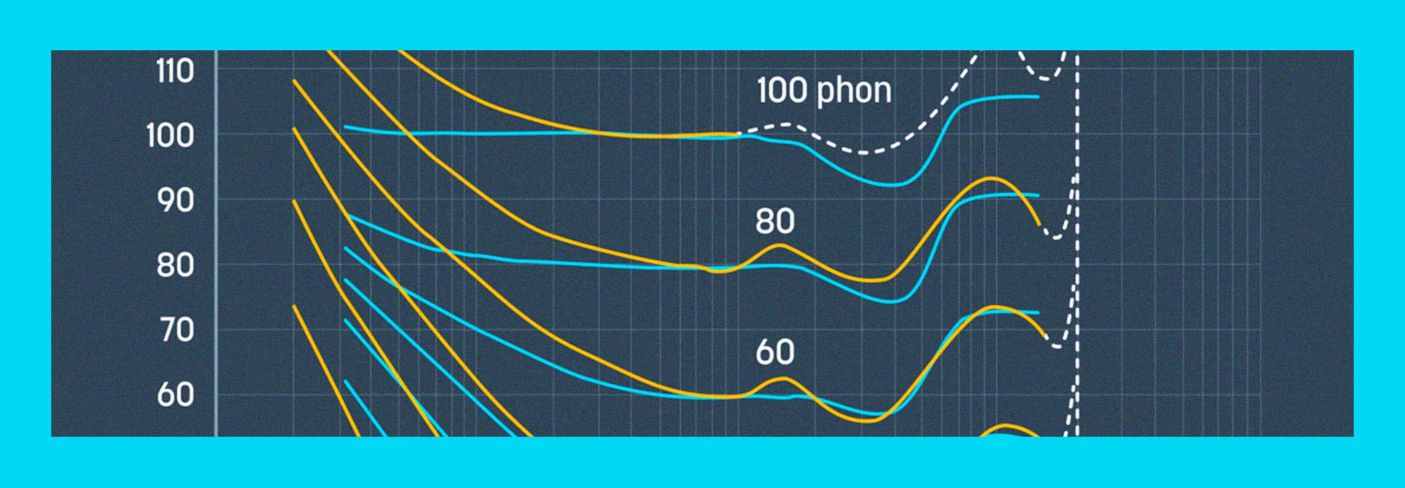
What is the Fletcher Munson Curve? Using Equal Loudness Curves in Mixing and Mastering
What are the Fletcher Munson curves, or equal-loudness contours, and how do they apply to audio mixing or mastering? This article will cover that all in detail.
Audyssey never claimed the follow the Fletcher Munson curve (I recalled they thought theirs were better.., obvously..)for their DEQ implementation but based on my REW curves, similar curves the presenter's, I would say Audyssey's not far off.
Audyssey's DEQ is not perfect, for one thing, the effects rely on the volume setting and we all know one user's volume 0, or -20 does not produce the same SPL as another user's volume 0, -20, enough said...
No one can argue with or challenge your subjective opinions anyway, because it is subjective so you heard what you heard.The bad news is that, per the above video, the DEQ is what it is and cannot be adjusted. The good news is that my hearing is not entirely crappy yet.
And others likely have difference preference than yours, even if all heard exactly the same.
Last edited:
Similar threads

- Replies
- 58
- Views
- 19K

- Replies
- 83
- Views
- 5K


- Replies
- 136
- Views
- 27K
