• Welcome to ASR. There are many reviews of audio hardware and expert members to help answer your questions. Click here to have your audio equipment measured for free!

AuraEngine Converter

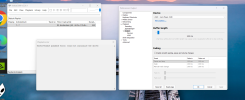
@Erogen The red line under your player is what Windows answered for the RME: AUDCLNT_E_ENDPOINT_CREATE_FAILED at 44.1 kHz. The driver refused to open the unit in exclusive mode before any sound was sent, and foobar's WASAPI exclusive output runs into the same refusal, so it points at the driver side rather than the player. Two usual causes:
• Another program holds the RME through ASIO: foobar2000 with its ASIO output open, or a DAW. While an ASIO host sets the unit's clock, the driver may not open an exclusive stream at another rate. Close it and press Play again.
• The rate is pinned in RME's Settings dialog. The player asks for the file's rate in BIT-PERFECT and for 176.4 kHz at FS×4. A driver held at another rate refuses, or may play it wrong, which could be the distortion you hear.
If it still fails, tell me which mode distorts (BIT-PERFECT or with the rack) and post the lines with "stream open" or "exclusive mode failed" from the session log in %LOCALAPPDATA%\AuraEngine\logs. The player has no ASIO output for now; exclusive WASAPI is its only route.
I don't know much about this.
I turned off all other programs while using AE.
The message is different now, but the sound is still crackling.
I'm not going to use it.


Clipboard_10-04-2026_01.jpg
 
[12:59:13.423] [PACK] instruments off; pack 2 not installed
[12:59:13.661] [UI] volume: 0 dB
[12:59:13.680] [UI] settings: PlayerSettings { mode: Aura, fs_multiplier: 4, taps: 30000000, phase: Alpha, apodizing: 0, adaptive_apodizer: true, headroom_db: 0.0, iir_dc_blocking: false, subsonic_hz: 20, declip: true, isp: true, adaptive_headroom: false, xtc: false, xtc_geometry: Geometry { speaker_span_mm: 0.0, left_distance_mm: 0.0, right_distance_mm: 0.0, head_width_mm: 180.0 }, use_gpu: true }
[12:59:13.680] [UI] device: {0.0.0.00000000}.{3e5decdd-1408-471e-b29d-d0cfc020ea93}
[12:59:13.680] [UI] add: 10 of 10 file(s) readable
[12:59:13.689] [UI] settings: PlayerSettings { mode: Aura, fs_multiplier: 4, taps: 30000000, phase: Alpha, apodizing: 0, adaptive_apodizer: true, headroom_db: 0.0, iir_dc_blocking: false, subsonic_hz: 20, declip: true, isp: true, adaptive_headroom: false, xtc: false, xtc_geometry: Geometry { speaker_span_mm: 0.0, left_distance_mm: 0.0, right_distance_mm: 0.0, head_width_mm: 180.0 }, use_gpu: true }
[12:59:16.807] [UI] play Some(1)
[12:59:16.808] [CONV] Decoding: 10 - Kiedy Przyjdziesz Do Mnie.flac
[12:59:17.061] [CONV] Decoded: 44100Hz 2ch 10274712 samples, artist='Agnieszka Chylińska', title='Kiedy Przyjdziesz Do Mnie'
[12:59:17.062] [CONV] Lab: analyzing source...
[12:59:17.123] [CONV] Static DC offset removed: L=-5.407305e-4, R=-6.112499e-4
[12:59:17.131] [CONV] Lab: declipping source...
[12:59:17.169] [DECLIP] longest run on the rail is 2 samples (gate 17) — a limiter ceiling, not clipping; standing down
[12:59:17.515] [player/gpu] context ready on 'NVIDIA GeForce RTX 5060 Ti' (DiscreteGpu, vendor=0x10de device=0x2d04)
[12:59:17.517] [POWER] {"cpuWidth":20,"renderPool":20,"powerPool":20,"mask":"0xfffff","machine":"Intel(R) Core(TM) Ultra 7 265@20","rayonGlobal":20,"ev":"pool","tMs":0.0,"unixMs":1791111557517}
[12:59:17.517] [POWER] {"key":"30M:176400:HP","reason":"fresh","hpDeferred":false,"ev":"pretrial.skip","tMs":0.267,"unixMs":1791111557517}
[12:59:17.552] [PLAYER] 10 - Kiedy Przyjdziesz Do Mnie.flac: the source stages streamed the whole track in 0.38 s, 21383 intersample overs corrected of 21480
[12:59:17.552] [ISP] max=+1.31dBTP clusters=21480 fixed=21383 unfixed=97 residual=+0.00dBTP
[12:59:17.553] [CONV] Adaptive Apodizer: source analysis...
[12:59:17.690] [CONV] Source analysis v3: cliff=21252 Hz (−34 dB), effective Nyquist=22050 Hz, 42 attacks judged, 19% ringing (sev 12.5 dB), ring freq=20124 Hz (5 bursts validated, 3 rejected as broadband/junk), aliasing=none
[12:59:17.696] [CONV] Adaptive Apodizer: brick-wall cliff at 21252 Hz but no pre-ring across 42 attacks — source filter is likely minimum-phase or already apodized; leaving untouched
[12:59:17.697] [CONV] Adaptive Apodizer: no actionable signature, leaving source untouched
[12:59:17.798] [PLAYER] bank fir_30M_176400_linear_phase.npy ×4 — 458 MB of spectra
[12:59:18.139] [PLAYER] bank fir_30M_176400_minimum_phase.npy ×4 — 458 MB of spectra
[12:59:18.140] [PLAYER] HP pair: the minimum-phase bank is in the cache (875 ms)
[12:59:18.140] [PLAYER] HP pair: both banks in 621 ms, built side by side
[12:59:18.291] [PLAYER] Analog (1+2) (RME ADI-2/4 PRO SE): exclusive mode failed at 176400 Hz — AUDCLNT_E_ENDPOINT_CREATE_FAILED
[12:59:28.470] [UI] settings: PlayerSettings { mode: Direct, fs_multiplier: 4, taps: 30000000, phase: Alpha, apodizing: 0, adaptive_apodizer: true, headroom_db: 0.0, iir_dc_blocking: false, subsonic_hz: 20, declip: true, isp: true, adaptive_headroom: false, xtc: false, xtc_geometry: Geometry { speaker_span_mm: 0.0, left_distance_mm: 0.0, right_distance_mm: 0.0, head_width_mm: 180.0 }, use_gpu: true }
[12:59:31.351] [UI] play Some(1)
[12:59:31.604] [CONV] Decoded: 44100Hz 2ch 10274712 samples, artist='Agnieszka Chylińska', title='Kiedy Przyjdziesz Do Mnie'
[12:59:31.629] [POWER] {"key":"30M:44100:HP","reason":"direct","hpDeferred":false,"ev":"pretrial.skip","tMs":14112.273,"unixMs":1791111571629}
[12:59:31.636] [PLAYER] stream open: device="Analog (1+2) (RME ADI-2/4 PRO SE)" rate=44100 ch=2 subfmt=PCM/EXTENSIBLE bits=16 valid=16 blockalign=4 packer=Int16 mode=Direct(16bit)
[12:59:31.636] [PLAYER] new stream: the old one closed in 0 ms, the pre-roll took 5 ms, the device opened in 5 ms alongside it
[12:59:31.637] [POWER] {"track":1,"source":"direct","quick":false,"taps":null,"gpu":false,"gpuFailed":false,"downgrade":null,"readS":0.0,"key":null,"entry":null,"ladder":[],"rtf":0.0,"bufferedS":4.458,"targetS":4.458,"ev":"audible","tMs":14119.78,"unixMs":1791111571637}
[12:59:42.922] [CONV] Decoded: 44100Hz 2ch 10274712 samples, artist='Agnieszka Chylińska', title='Kiedy Przyjdziesz Do Mnie'
[12:59:44.695] [ANALYZER] S spectrogram: 256 tiles, hop 628, in 0.22 s on 4 threads
[12:59:46.507] [ANALYZER] B spectrogram: 256 tiles, hop 628, in 0.23 s on 4 threads
[13:00:03.079] [UI] device: system default
[13:00:03.339] [PLAYER] output device changed: paused at 23.56 s — Play goes on there
[13:00:05.455] [UI] play None
[13:00:05.483] [POWER] {"key":"30M:44100:HP","reason":"direct","hpDeferred":false,"ev":"pretrial.skip","tMs":47965.129,"unixMs":1791111605482}
[13:00:05.489] [PLAYER] stream open: device="Analog (1+2) (RME ADI-2/4 PRO SE)" rate=44100 ch=2 subfmt=PCM/EXTENSIBLE bits=16 valid=16 blockalign=4 packer=Int16 mode=Direct(16bit)
[13:00:05.489] [PLAYER] new stream: the old one closed in 0 ms, the pre-roll took 5 ms, the device opened in 5 ms alongside it
[13:00:05.489] [POWER] {"track":1,"source":"direct","quick":false,"taps":null,"gpu":false,"gpuFailed":false,"downgrade":null,"readS":23.558,"key":null,"entry":null,"ladder":[],"rtf":6868.68,"bufferedS":4.458,"targetS":4.458,"ev":"audible","tMs":47972.514,"unixMs":1791111605489}
 
@Erogen Thanks for the log, it shows two separate things.
• With the rack, the driver refused 176.4 kHz: "exclusive mode failed at 176400 Hz — AUDCLNT_E_ENDPOINT_CREATE_FAILED". In BIT-PERFECT it opened the RME at 44.1 kHz straight away, so the unit looks held at 44.1 kHz. In RME's Settings dialog (the RME icon in the taskbar) the clock should be internal (Master) and the sample rate not fixed, so a program can switch it.
• In BIT-PERFECT the stream did open (44.1 kHz, 16-bit), so the crackling is a timing matter: the player asks the driver for close to the shortest buffer it offers, and an RME set for low ASIO latency may not feed that without clicks. Raising the buffer size in the same dialog (512 samples or more) should stop it. On my side, the next version will ask for a longer buffer by itself.
I understand if you'd rather stay with ASIO; the converter doesn't need any of this.
 
@Erogen Thanks for the log, it shows two separate things.
• With the rack, the driver refused 176.4 kHz: "exclusive mode failed at 176400 Hz — AUDCLNT_E_ENDPOINT_CREATE_FAILED". In BIT-PERFECT it opened the RME at 44.1 kHz straight away, so the unit looks held at 44.1 kHz. In RME's Settings dialog (the RME icon in the taskbar) the clock should be internal (Master) and the sample rate not fixed, so a program can switch it.
• In BIT-PERFECT the stream did open (44.1 kHz, 16-bit), so the crackling is a timing matter: the player asks the driver for close to the shortest buffer it offers, and an RME set for low ASIO latency may not feed that without clicks. Raising the buffer size in the same dialog (512 samples or more) should stop it. On my side, the next version will ask for a longer buffer by itself.
I understand if you'd rather stay with ASIO; the converter doesn't need any of this.
I prefer to stick with ASIO. It works flawlessly.
 
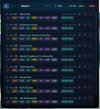
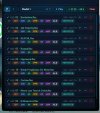
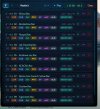
A good direction for the program's development might be a mode that predicts the optimal processing order for the recordings. If I queue up the same set of recordings but in reverse order—say, from 10 down to 1—the program sometimes processes them faster (or slower) than it does when going from 1 to 10.
It would be great if the program could automatically determine the best processing sequence—for example, processing recordings 1, 5, 7, and 9, followed by 4, 3, 6, and 2—to ensure the fastest overall processing time. Of course, that’s not easy, given the various dependencies and variables involved, but it might be feasible.
The program needs to show a bit of intelligence :)
The current speed—around 30x—is satisfactory, but it would be great if it could be even faster.
 
A good direction for the program's development might be a mode that predicts the optimal processing order for the recordings. If I queue up the same set of recordings but in reverse order—say, from 10 down to 1—the program sometimes processes them faster (or slower) than it does when going from 1 to 10.
It would be great if the program could automatically determine the best processing sequence—for example, processing recordings 1, 5, 7, and 9, followed by 4, 3, 6, and 2—to ensure the fastest overall processing time. Of course, that’s not easy, given the various dependencies and variables involved, but it might be feasible.
The program needs to show a bit of intelligence :)
The current speed—around 30x—is satisfactory, but it would be great if it could be even faster.
That's real, and the reason is simple. A batch converts several files at once and ends when the last one does. If a long track starts last, the other lanes sit idle while it finishes. The usual cure is to start the longest files first and let the short ones fill the gaps; it takes nothing cleverer than that. I'll try it on a few albums and see what it saves.

One more thing for a large library: each release can still change what a stage writes (1.5 did with TFS), so it pays to convert what you keep listening to rather than a whole archive at once.
 
The AI suggests exactly what you wrote.
I’ll have to check that out.

"How quickly the program finishes processing all 10 recordings depends on the order in which you add them to the queue. You are describing a classic task scheduling problem involving 4 processors (threads).
Here are the key rules regarding how the order affects the total time:
How can you save time? (LJF Rule – Longest Job First)
The best strategy for reducing the program's total runtime is to sort the recordings from longest to shortest.
• Why? The program starts with the 4 longest files. As soon as one finishes, the next long file takes the available slot. The shortest recordings are left for last, perfectly filling in the time gaps. This ensures all 4 channels remain active for as long as possible, preventing the program from waiting on a single massive recording at the end while the other 3 channels sit idle."
 
It’s not that simple. :)
From longest
To shortest
In order, from 1 to 10 -> fastest processing in this case.
 

Attachments

  • od najdłuższego.jpg
    od najdłuższego.jpg
    70.9 KB · Views: 43
  • od najkrtszego.jpg
    od najkrtszego.jpg
    74.2 KB · Views: 60
  • według kolejności.jpg
    według kolejności.jpg
    69.9 KB · Views: 49
Problem ;)

===============================================================
Aura Engine 1.6.1
===============================================================

This window is the engine's log: it shows what each conversion
is doing, step by step. Keep it open — closing it closes Aura
Engine. Minimise it if it is in the way.

Filters 30M taps — 5 output rates — linear + minimum
Session log C:\Users\winyl\AppData\Local\AuraEngine\logs\session-2026-10-18_10-25-10.log

Drop audio files on the window to start.
===============================================================

[10:25:10.644] [PACK] instruments off; pack 2 not installed
[10:25:10.645] [INPUT] listening for players on the link
[10:25:10.866] [UI] volume: 0 dB
[10:25:10.883] [UI] add: 1 of 1 file(s) readable
[10:25:10.883] [UI] settings: PlayerSettings { mode: Direct, fs_multiplier: 4, taps: 30000000, phase: Tfs, apodizing: 0, adaptive_apodizer: true, headroom_db: -0.5, iir_dc_blocking: false, subsonic_hz: 0, declip: true, isp: true, adaptive_headroom: true, xtc: false, xtc_geometry: Geometry { speaker_span_mm: 0.0, left_distance_mm: 0.0, right_distance_mm: 0.0, head_width_mm: 180.0 }, use_gpu: true }
[10:25:10.884] [UI] device: {0.0.0.00000000}.{809755be-efc8-4ed2-a8ac-fa644d8ca8b1}
[10:25:10.888] [UI] settings: PlayerSettings { mode: Direct, fs_multiplier: 4, taps: 30000000, phase: Tfs, apodizing: 0, adaptive_apodizer: true, headroom_db: -0.5, iir_dc_blocking: false, subsonic_hz: 0, declip: true, isp: true, adaptive_headroom: true, xtc: false, xtc_geometry: Geometry { speaker_span_mm: 0.0, left_distance_mm: 0.0, right_distance_mm: 0.0, head_width_mm: 180.0 }, use_gpu: true }
[10:25:24.743] [UI] settings: PlayerSettings { mode: Aura, fs_multiplier: 4, taps: 30000000, phase: Tfs, apodizing: 0, adaptive_apodizer: true, headroom_db: -0.5, iir_dc_blocking: false, subsonic_hz: 0, declip: true, isp: true, adaptive_headroom: true, xtc: false, xtc_geometry: Geometry { speaker_span_mm: 0.0, left_distance_mm: 0.0, right_distance_mm: 0.0, head_width_mm: 180.0 }, use_gpu: true }
[10:25:32.128] [UI] device: system default
[10:25:36.703] [UI] play Some(1)
[10:25:36.704] [CONV] Decoding: 02. Amsterdam.flac
[10:25:36.954] [CONV] Decoded: 44100Hz 2ch 8922240 samples, artist='Agnieszka', title='Amsterdam'
[10:25:36.955] [CONV] Lab: analyzing source...
[10:25:37.012] [CONV] Static DC offset removed: L=-6.174575e-5, R=-8.280029e-5
[10:25:37.019] [CONV] Lab: declipping source...
[10:25:37.050] [DECLIP] longest run on the rail is 3 samples (gate 17) — a limiter ceiling, not clipping; standing down
[10:25:37.050] [CONV] Headroom: output ceiling -0.5 dBTP (shipped -0.5)
[10:25:37.331] [player/gpu] context ready on 'NVIDIA GeForce RTX 5060 Ti' (DiscreteGpu, vendor=0x10de device=0x2d04)
[10:25:37.333] [POWER] {"cpuWidth":20,"renderPool":20,"powerPool":20,"mask":"0xfffff","machine":"Intel(R) Core(TM) Ultra 7 265@20","rayonGlobal":20,"ev":"pool","tMs":0.0,"unixMs":1792311937332}
[10:25:37.333] [POWER] {"key":"30M:176400","reason":"fresh","hpDeferred":false,"ev":"pretrial.skip","tMs":0.1,"unixMs":1792311937333}
[10:25:37.333] [TFS] Found cached TFS filter: C:\Users\winyl\Desktop\AuraEngine\aura-engine-v1.6.0-bundle-30M-windows-x64\aura-engine-v1.6.0-bundle-30M-windows-x64\fir-optimizer\output\fir_30M_176400_tfs_phase_v4.npy
[10:25:37.367] [PLAYER] 02. Amsterdam.flac: the source stages streamed the whole track in 0.32 s, 369 intersample overs corrected of 373
[10:25:37.367] [ISP] max=+1.07dBTP clusters=373 fixed=369 unfixed=4 residual=+0.00dBTP
[10:25:37.367] [CONV] Headroom: output ceiling -0.5 dBTP (shipped -0.5)
[10:25:37.368] [CONV] Adaptive Apodizer: source analysis...
[10:25:37.491] [CONV] Source analysis v3: cliff=18149 Hz (−45 dB), effective Nyquist=22050 Hz, 48 attacks judged, 75% ringing (sev 14.3 dB), ring freq=17757 Hz (32 bursts validated, 4 rejected as broadband/junk), aliasing=none
[10:25:37.495] [CONV] Adaptive Apodizer v3: pre-ring on 75% of 48 attacks (14.3 dB), ring at 17757 Hz is below the plausible ADC band (≥18963 Hz) — lossy pre-echo or spectral tilt suspected, using preset bucket → fc = 17993 Hz, 2048 taps, β = 24
[10:25:37.541] [CONV] Adaptive apodizing: 2048 taps, β=24, fc_norm=0.8160, cutoff=17993Hz
[10:25:37.544] [CONV] Adaptive Apodizer: applying...
[10:25:37.645] [PLAYER] bank fir_30M_176400_tfs_phase_v4.npy ×4 — 458 MB of spectra
[10:25:37.747] [PLAYER] Analog (1+2) (2 — RME ADI-2/4 PRO SE) would not open at 176400 Hz: another program holds it (an ASIO host), or the rate or the clock is locked in its driver's settings. Free it and press Play. [AUDCLNT_E_ENDPOINT_CREATE_FAILED at 176400 Hz]
[10:25:37.913] [CONV] Apodizing applied: 2048 taps on 8922240 samples (CPU FFT OLA + Rayon)
[10:25:57.527] [UI] device: {0.0.0.00000000}.{809755be-efc8-4ed2-a8ac-fa644d8ca8b1}
[10:26:01.678] [UI] play Some(1)
[10:26:01.702] [POWER] {"key":"30M:176400","reason":"fresh","hpDeferred":false,"ev":"pretrial.skip","tMs":24369.868,"unixMs":1792311961702}
[10:26:01.703] [TFS] Found cached TFS filter: C:\Users\winyl\Desktop\AuraEngine\aura-engine-v1.6.0-bundle-30M-windows-x64\aura-engine-v1.6.0-bundle-30M-windows-x64\fir-optimizer\output\fir_30M_176400_tfs_phase_v4.npy
[10:26:01.785] [PLAYER] Analog (1+2) (2 — RME ADI-2/4 PRO SE) would not open at 176400 Hz: another program holds it (an ASIO host), or the rate or the clock is locked in its driver's settings. Free it and press Play. [AUDCLNT_E_ENDPOINT_CREATE_FAILED at 176400 Hz]
[10:26:05.078] [UI] settings: PlayerSettings { mode: Direct, fs_multiplier: 4, taps: 30000000, phase: Tfs, apodizing: 0, adaptive_apodizer: true, headroom_db: -0.5, iir_dc_blocking: false, subsonic_hz: 0, declip: true, isp: true, adaptive_headroom: true, xtc: false, xtc_geometry: Geometry { speaker_span_mm: 0.0, left_distance_mm: 0.0, right_distance_mm: 0.0, head_width_mm: 180.0 }, use_gpu: true }
[10:26:06.199] [UI] play None
[10:26:06.450] [CONV] Decoded: 44100Hz 2ch 8922240 samples, artist='Agnieszka', title='Amsterdam'
[10:26:06.472] [POWER] {"key":"30M:44100","reason":"direct","hpDeferred":false,"ev":"pretrial.skip","tMs":29139.357,"unixMs":1792311966472}
[10:26:06.478] [PLAYER] Analog (1+2) (2 — RME ADI-2/4 PRO SE) would not open at 44100 Hz: another program holds it (an ASIO host), or the rate or the clock is locked in its driver's settings. Free it and press Play. [AUDCLNT_E_ENDPOINT_CREATE_FAILED at 44100 Hz]

 
Problem ;)
 

Attachments

  • Zrzut ekranu 2026-10-18 103349.png
    Zrzut ekranu 2026-10-18 103349.png
    516 KB · Views: 42
Hello

I can't see what's happening in the 0 Hz to 20 Hz range. :(


Zrzut ekranu 2026-10-18 163153.png
 
I can't see what's happening in the 0 Hz to 20 Hz range.
@Erogen Fair point. 1.6.2 shows it: https://github.com/ToxaDev/aura-engine/releases/tag/v1.6.2

The spectrum and the spectrogram now start at 5 Hz. In Whole, Ctrl+wheel zooms further down, to 1 Hz. Whole could already zoom below 20 Hz before, but it drew nothing there: it only ever asked for 20 Hz and up. That was a bug on my side.

One thing to know about Live and the spectrogram: below about 40 Hz they read from a 3-second window (the caption says so), because a short window can't tell 8 Hz from 12 Hz. A tone there shows at its own level; noise reads about 9 dB lower than above 40 Hz, because each band is narrower. That's how the reading works, not a filter. Whole has no such step.

And the longer buffer from #143 has been in since 1.6.0: in exclusive mode the player asks the driver for about 10 ms.

If you want one number, the Infrasonic RMS row in the table is the energy below 20 Hz, in dBFS. Thanks for pointing it out.
 
@Erogen Fair point. 1.6.2 shows it: https://github.com/ToxaDev/aura-engine/releases/tag/v1.6.2

The spectrum and the spectrogram now start at 5 Hz. In Whole, Ctrl+wheel zooms further down, to 1 Hz. Whole could already zoom below 20 Hz before, but it drew nothing there: it only ever asked for 20 Hz and up. That was a bug on my side.

One thing to know about Live and the spectrogram: below about 40 Hz they read from a 3-second window (the caption says so), because a short window can't tell 8 Hz from 12 Hz. A tone there shows at its own level; noise reads about 9 dB lower than above 40 Hz, because each band is narrower. That's how the reading works, not a filter. Whole has no such step.

And the longer buffer from #143 has been in since 1.6.0: in exclusive mode the player asks the driver for about 10 ms.

If you want one number, the Infrasonic RMS row in the table is the energy below 20 Hz, in dBFS. Thanks for pointing it out.
It works well now.


I don’t understand the Visualization feature. Is this option available within this program, or does it require an external program?

Visualizations​

In listening mode the player can draw the music. A scene is a GLSL shader in an .aura-vis file: 19 come with the app, and the studio (Visualization › Studio…) edits them, tunes their settings with sliders and saves new ones. It takes Shadertoy's multipass shaders — one pasted in keeps its author, link and licence — with the album cover as one of the inputs. Because the player renders a few seconds ahead of what you hear, a scene can see what is coming: it can show a kick on its way and have it land as it sounds. How to write one is set out in the specification that comes with the app, AURA-VIS-SPEC.md.

Most scenes draw the whole mix — its spectrum, beats and loudness. Three, the ones with instruments (Stage, Lineup, Diamond Dust Stage), draw each instrument of the song on its own: the kit piece by piece, the bass, the voice and the rest, with their hits and notes. They need a pack of models the app does not carry — 282 MB, downloaded once when such a scene is first chosen, and checked file by file before anything in it is used — and each track is analysed once, in the background, and kept; on an RTX 4090 a four-minute track takes 15–25 seconds. The separation wants a graphics card with 3 GB of video memory free; without one the CPU does it, and the drum kit is then told apart only by its bands. On a radio stream the instruments are found as the stream plays: it is taken apart on the graphics card a little ahead of what you hear, so they come a few seconds after a station starts, and each song's picture gains instruments as they join in. The kit comes piece by piece — the toms and the cymbals once they play — where the card has room for the drum network beside the separation (about 1.5 GB more of free memory); otherwise it is kick, snare and hi-hat taken from the drums' sound. Every instrument but the drums has its notes about two seconds before it sounds, and on a file and a stream alike it flashes on its strong notes. At first the notes of the guitars, the keys and the rest go to their places by pan; once their source has played some forty strong notes in the song, it is split into its instruments by their notes, as on a file, and each place is taken over by the instrument nearest to it, which keeps its slot and changes its colour once. Until the instruments are there, the scene draws the mix and says so ("Separating instruments…"); without a graphics card, or without enough of its memory free, it shows the mix and says why.
 
It works well now.


I don’t understand the Visualization feature. Is this option available within this program, or does it require an external program?

Visualizations​

In listening mode the player can draw the music. A scene is a GLSL shader in an .aura-vis file: 19 come with the app, and the studio (Visualization › Studio…) edits them, tunes their settings with sliders and saves new ones. It takes Shadertoy's multipass shaders — one pasted in keeps its author, link and licence — with the album cover as one of the inputs. Because the player renders a few seconds ahead of what you hear, a scene can see what is coming: it can show a kick on its way and have it land as it sounds. How to write one is set out in the specification that comes with the app, AURA-VIS-SPEC.md.

Most scenes draw the whole mix — its spectrum, beats and loudness. Three, the ones with instruments (Stage, Lineup, Diamond Dust Stage), draw each instrument of the song on its own: the kit piece by piece, the bass, the voice and the rest, with their hits and notes. They need a pack of models the app does not carry — 282 MB, downloaded once when such a scene is first chosen, and checked file by file before anything in it is used — and each track is analysed once, in the background, and kept; on an RTX 4090 a four-minute track takes 15–25 seconds. The separation wants a graphics card with 3 GB of video memory free; without one the CPU does it, and the drum kit is then told apart only by its bands. On a radio stream the instruments are found as the stream plays: it is taken apart on the graphics card a little ahead of what you hear, so they come a few seconds after a station starts, and each song's picture gains instruments as they join in. The kit comes piece by piece — the toms and the cymbals once they play — where the card has room for the drum network beside the separation (about 1.5 GB more of free memory); otherwise it is kick, snare and hi-hat taken from the drums' sound. Every instrument but the drums has its notes about two seconds before it sounds, and on a file and a stream alike it flashes on its strong notes. At first the notes of the guitars, the keys and the rest go to their places by pan; once their source has played some forty strong notes in the song, it is split into its instruments by their notes, as on a file, and each place is taken over by the instrument nearest to it, which keeps its slot and changes its colour once. Until the instruments are there, the scene draws the mix and says so ("Separating instruments…"); without a graphics card, or without enough of its memory free, it shows the mix and says why.
I don't understand the Visualization feature. Is this option available within this program, or does it require an external program?
@Erogen Glad it works. The visualizations are built into the player, nothing external.

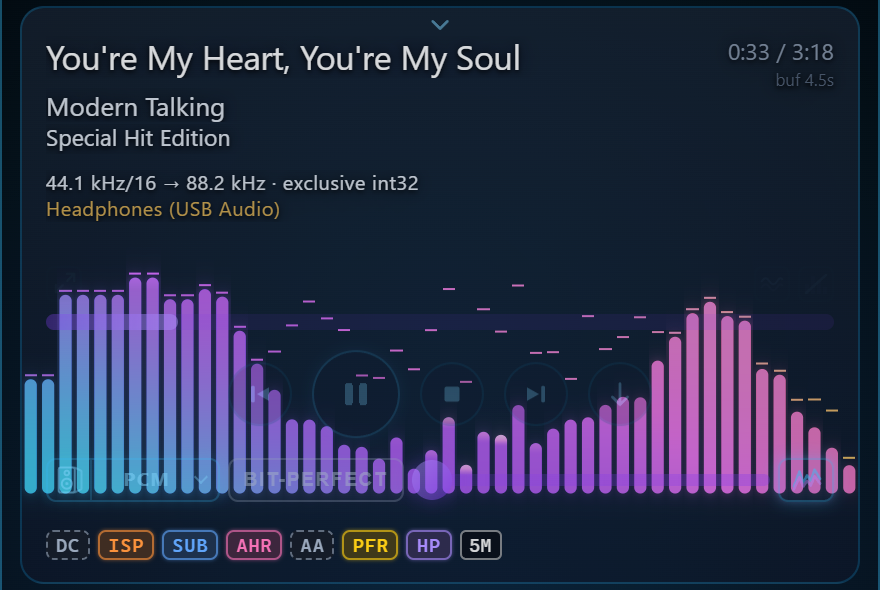
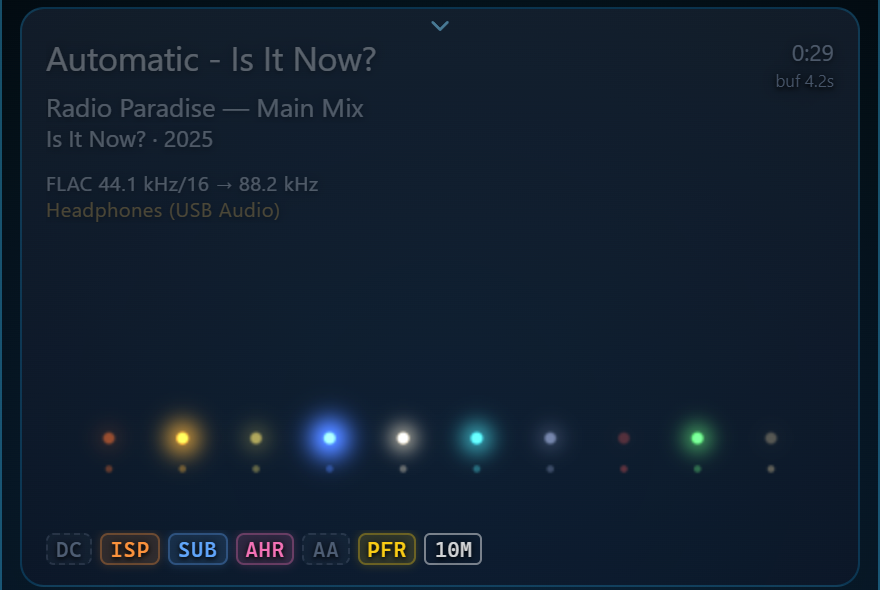
How to see one: play a track, then press L (or click the small tab that shows at the top edge of the player). That's listening mode: the settings fold away and the player takes the window. Right-click the player → Visualization → pick a scene. The waves button in the player's right corner steps through them, the arrows button in its left corner is full screen, Esc brings it back. Out of the box the player shows the album cover, so a scene has to be picked once.

aura-player-bars.png


1792358357593.png


1792358299942.png


Most scenes draw the whole mix: its spectrum, beats and loudness. Three of them, Stage, Lineup and Diamond Dust Stage, draw each instrument on its own. For those the player takes the song apart with neural networks on the graphics card: HTDemucs (Meta) splits it into drums, bass, vocals, guitar, piano and the rest, DrumSep splits the drums into kick, snare, toms, hi-hat and cymbals, and Basic Pitch (Spotify) finds the notes. Stage then shows every instrument as a light on a stage, where it sits in the mix: left to right, how far back, how high it sings, with a flash on each hit and note. The models are a 282 MB pack, downloaded once when you first pick such a scene; each track is analysed once in the background and kept (15–25 s for a four-minute track on an RTX 4090).

aura-scene-lineup.png


And you can make your own. Visualization → Studio… opens the scene editor. Find a shader you like on shadertoy.com, press New in the studio and paste the shader's code (its Image tab) over what's there. It runs as is: iChannel0 gets the music the way Shadertoy feeds its sound input, iChannel2 the album cover. A shader with buffers comes over too if you paste its JSON; the author, link and licence go into the scene's header. Tune it with the sliders, Save, Show in player, and it sits in the Visualization menu with the others. Copy prompt for AI does the same with an AI chat writing the scene for you.

More, with pictures: https://toxadev.github.io/aura-engine/#visuals
How a scene is written: https://github.com/ToxaDev/aura-engine/blob/master/desktop-app/src/vis/AURA-VIS-SPEC.md
 
V.1.81
V.1.62

[AE · 44.1k→176.4k · Kaiser 30M · f64 · DC·ISP·PFR·TFS]

These versions ruin the music.
The music fades out in one of the channels; some strange things happen with the stereo image.
My interest in this program wanes with every new version.


Last edited:
V.1.81
V.1.62

[AE · 44.1k→176.4k · Kaiser 30M · f64 · DC·ISP·PFR·TFS]

These versions ruin the music.
The music fades out in one of the channels; some strange things happen with the stereo image.
My interest in this program wanes with every new version.


Please provide the timestamps for the problematic parts in this file.
 
Please provide the timestamps for the problematic parts in this file.
Hello,

My sincere apologies.
It was my mistake; the issue was with the sound card drivers. Everything is working fine now that I’ve reinstalled them.
Once again, I apologize.
 
Ver. 1.82
[AE · 44.1k→176.4k · Kaiser 30M · f64 · AHR·AA·PFR·TFS]
12 Track / 51:19s
Intel Ultra 7 265 / GPU RTX 5060Ti 3000MHz/1750 MHz / 32GB

An incredible improvement in processing speed—a massive 60.6x increase.
 

Attachments

  • Zrzut ekranu 2026-10-25 002949.png
    Zrzut ekranu 2026-10-25 002949.png
    546.8 KB · Views: 33
Back
Top Bottom